This article is part of our complete Wix guide and our list of best Wix apps.
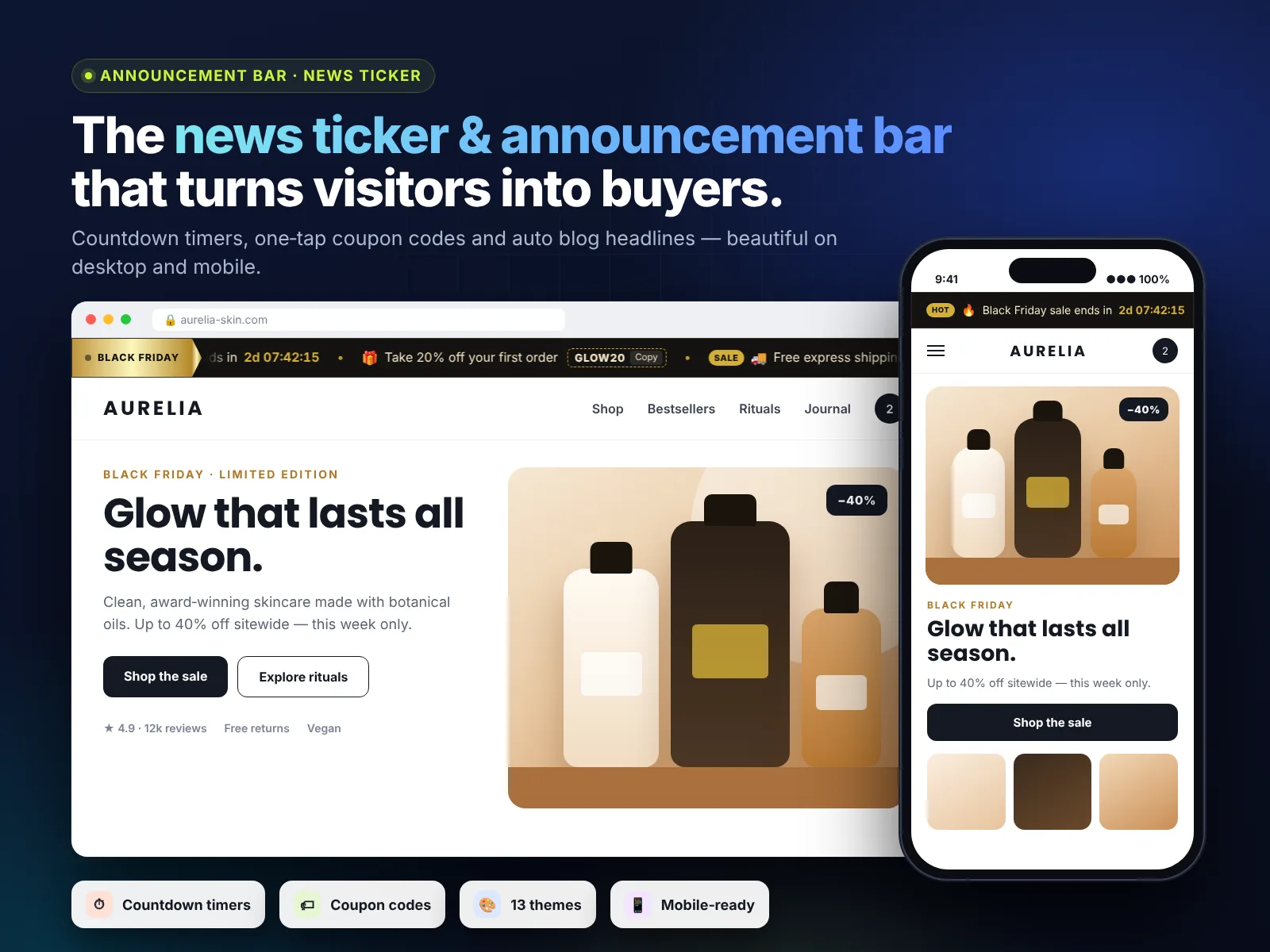
Every Wix site has one spot that every visitor sees in the first second: the very top of the page. The best Wix announcement bar app turns that thin strip into your most hard-working sales space, telling visitors about a sale, free shipping, new arrivals or opening hours on every page, on desktop and on mobile.
But not every announcement bar is equal. Some only show one line of static text. Others scroll, rotate several messages, count down to a deadline, show coupon codes and update themselves from your blog. In this guide we compare the top features you should look for, explain why we built News Ticker & Announcement Bar (TickerFlow) for Wix, and show you how to set one up step by step.
Add News Ticker & Announcement Bar to your Wix site →
Key takeaways
- A good announcement bar is seen by 100% of visitors and never blocks content like a popup does.
- The top features to look for: multiple messages, motion styles, countdown timers, coupon codes, scheduling, mobile control and no third-party branding.
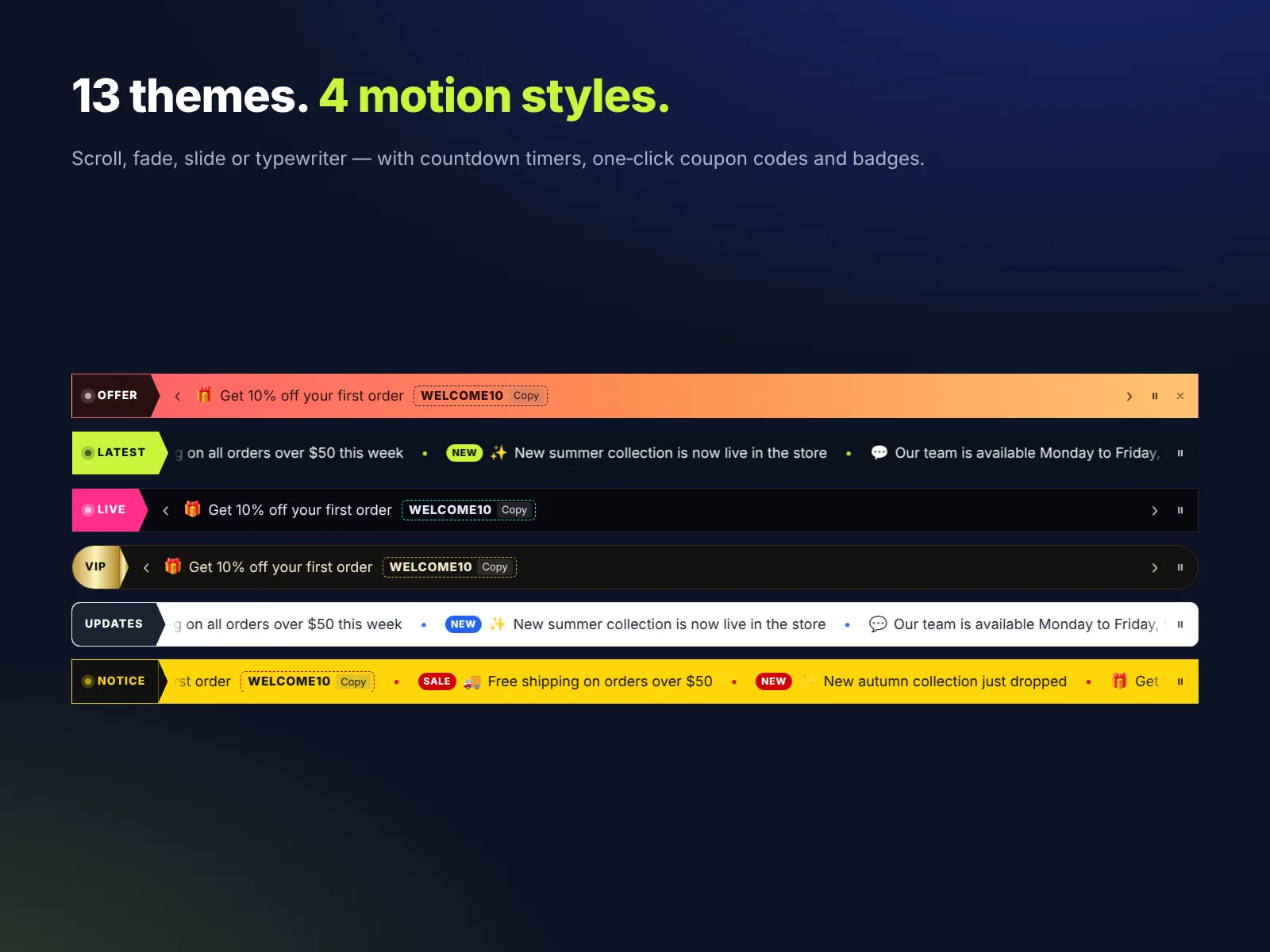
- News Ticker & Announcement Bar by MIVAQ Apps covers all of them, with 13 themes and 4 motion styles.
- The Free plan covers up to 5 messages. Pro costs $2.99 a month (or $2.49 a month billed yearly) and adds countdowns, coupons, blog feed and more.
- You can add it to any Wix site in about five minutes, without code.
In this guide
- Why every Wix site needs an announcement bar
- Top 10 features of the best announcement bar apps
- Built-in text strip vs a dedicated app
- The best announcement bar app for Wix: News Ticker & Announcement Bar
- Free vs Pro pricing
- How to add an announcement bar to Wix in 5 minutes
- Top 12 announcement bar examples by business type
- Best practices that get more clicks
- Install and leave a review
- Frequently asked questions
Why every Wix site needs an announcement bar
An announcement bar is a slim strip at the top of a website that shows a short, important message. A news ticker is the moving version: several messages scroll or rotate, one after another. Both solve the same problem: your most important message is otherwise hidden somewhere on a page visitors may never open.
- Maximum visibility. The top of the page is read first, on every page of your site.
- No annoyance. Unlike popups, a bar never covers your content, so it does not hurt the visitor experience or SEO.
- More clicks. A clear message with a link, such as “Free shipping over $50 – shop now”, moves people deeper into your site.
- Urgency. A countdown to the end of a sale gives visitors a reason to act today.
- Freshness. Rotating news, events or new blog posts show that your business is active.
Online stores, restaurants, schools, clinics, agencies, event organisers and local services all benefit. If you ever have something to announce, the bar is the best place for it. For more ways to turn visitors into customers, read our Wix store conversion tips.
Top 10 features of the best announcement bar apps
When you compare announcement bar apps for Wix, check this list. The best apps tick every box.
- Multiple messages. One message gets ignored after a while. Rotating 3 to 5 messages keeps the bar interesting.
- Motion styles. A smooth scroll for news, a fade or slide for offers, a typewriter effect for headlines. Motion draws the eye without being loud.
- Countdown timers. A live “Sale ends in 02:14:36” is the strongest urgency tool you can add to a page.
- Coupon codes visitors can copy. One tap to copy a discount code removes friction at checkout.
- Links on every message. Each message should be able to send visitors to the right page.
- Scheduling. Start and end dates mean your Black Friday message disappears on time, even if you forget.
- Design control. Themes, your own colors and fonts, speed and height, so the bar matches your brand.
- Mobile and desktop control. Show the bar where it helps, hide it where it does not.
- Accessibility. Pause on hover, keyboard support and screen reader friendly text.
- No third-party branding. Your site should show your brand, not “Powered by” links from the app maker.
Built-in text strip vs a dedicated app
Wix lets you place a text box or a strip in your header, and for a single permanent line that can be enough. As soon as you want movement, more than one message, a countdown or a schedule, a dedicated app saves a lot of time.
| Text strip in the header | News Ticker & Announcement Bar | |
|---|---|---|
| Several rotating messages | No | Yes |
| Scroll, fade, slide, typewriter | No | Yes |
| Countdown timer | No | Yes (Pro) |
| Copyable coupon code | No | Yes (Pro) |
| Automatic blog headlines | No | Yes (Pro) |
| Start and end dates | No | Yes (Pro) |
| Show only on mobile or desktop | Manual work | Yes (Pro) |
| Pause on hover, keyboard support | No | Yes |
| Setup time | Design by hand | About 5 minutes |
The best announcement bar app for Wix: News Ticker & Announcement Bar
We built News Ticker & Announcement Bar because store owners kept asking us for one flexible bar that does everything above, looks premium and costs less than a coffee each month. It is published on the Wix App Market by MIVAQ Apps.
- 4 motion styles: Scroll, Fade, Slide and Typewriter.
- 13 designer themes such as Midnight, Paper and Breaking news, plus your own colors and fonts on Pro.
- Countdown items that tick down live to the end of an offer.
- Coupon items with a copy button, so shoppers paste the code at checkout.
- Blog feed: connect your Wix Blog and your newest posts appear in the ticker automatically.
- Scheduling with start and end dates for each message.
- Close button and device control so you decide where the bar appears.
- No branding from us on your live site, ever.
For a full walk-through of every setting, read our Wix News Ticker & Announcement Bar: the complete guide.
Free vs Pro pricing
| Free | Pro | |
|---|---|---|
| Price | $0 | $2.99/month, or $2.49/month billed yearly |
| Messages | Up to 5 | Up to 50 |
| Motion styles | Scroll | Scroll, Fade, Slide, Typewriter |
| Themes | 3 | All 13 plus custom colors and fonts |
| Countdown timers | — | ✓ |
| Coupon codes | — | ✓ |
| Blog feed | — | ✓ |
| Scheduling | — | ✓ |
| Close button, mobile/desktop control | — | ✓ |
Billing is handled by Wix, and you can upgrade, downgrade or cancel any time from your Wix dashboard.
How to add an announcement bar to Wix in 5 minutes
- Open the News Ticker & Announcement Bar listing and click Add to Site.
- In the Wix Editor, the bar is added to your page. Drag it to the top of your header or just below it.
- Click Settings on the bar and open the Content tab. Write your messages and add a link to each one.
- Open the Design tab. Pick a theme and a motion style, then adjust speed and height.
- On Pro, add a countdown or coupon item and set start and end dates.
- Preview on desktop and mobile, then click Publish.
Tip: if your header is set to show on all pages, place the bar inside the header so it appears everywhere automatically.
Top 12 announcement bar examples by business type
- Online store: “Free shipping on orders over $50 – shop now.”
- Flash sale: “20% off everything – ends in 05:42:10.”
- Coupon: “Use code WELCOME10 for 10% off your first order” with a copy button.
- Restaurant: “Now open for lunch on Sundays – book a table.”
- Clinic: “New patients welcome – book online in 2 minutes.”
- School or course: “Enrollment for the spring term closes Friday.”
- Events: “Early-bird tickets end in 3 days.”
- News or blog site: latest headlines scrolling automatically from your blog.
- Agency: “Now booking projects for next month – get a free quote.”
- Holiday notice: “Closed Dec 25–26. Orders ship again on Dec 27.”
- Shipping update: “Order by Thursday for delivery before the weekend.”
- Trust message: “4.9★ from 1,200 happy customers.”
If you run sales often, pair the bar with bulk sale prices for Wix Stores so the offer and the prices go live together.
Best practices that get more clicks
- Keep messages short. 6 to 12 words is ideal, especially on phones.
- One action per message. “Shop the sale”, “Book now”, “Read more”.
- Use contrast. The bar should stand out from the header but still match your brand.
- Do not overdo speed. A calm scroll is easier to read and looks more premium.
- Rotate 3 to 5 messages. More than that and nobody sees the last ones.
- Schedule everything time-bound. Old offers make a site look neglected.
- Measure. Use links with clear targets and check the visits in Google Analytics.
Want a countdown that really creates urgency? Read our guide to the best countdown timer bar for Wix.
How to install News Ticker & Announcement Bar and leave a review
- Open the News Ticker & Announcement Bar listing on the Wix App Market.
- Click Add to Site, choose your Wix site and approve the permissions.
- Set it up from your Wix dashboard or the Editor (the steps above take a few minutes).
- Once it is working for you, go back to the app page, scroll to Reviews and click Write a Review. Choose your stars and share one or two sentences about how you use it.
Reviews help other Wix users find tools that work, and they help us, a small team, decide what to build next. If something is not working the way you expect, please tell us first and we will fix it fast.
More top Wix apps from MIVAQ Apps
MIVAQ Apps is the app studio of MIVAQ Creative Solutions. Every app is made for Wix, priced fairly and supported by real people. You can see all of them on our MIVAQ Apps developer page on the Wix App Market and on our Wix apps page.
- Bulk Product & Price Editor: bulk edit prices, sales, stock, ribbons and SEO for many products at once.
- Smart Booking & Payment: a booking calendar with online payments, deposits, Stripe and PayPal.
- Smart Price Table: 50 premium pricing table designs with built-in checkout.
- YMM Parts Finder: a Year / Make / Model parts finder and fit check for any kind of parts store.
Need help with your Wix site?
MIVAQ designs, builds and manages Wix websites and builds Wix apps. If you want help with your site design, sales campaigns or announcement bars, we are happy to help. See our Wix solutions, then contact us:
- WhatsApp: message us
- Email: hello@mivaq.com
- Form: send your project details
Install News Ticker & Announcement Bar →
Related Wix guides
- Top ways to use a countdown timer bar on Wix
- Wix news ticker and announcement bar guide
- Wix store conversion tips
- Best Wix apps
- The complete Wix guide
Frequently asked questions
What is the best announcement bar app for Wix?
Look for an app that supports several messages, motion styles, countdowns, coupon codes, scheduling and mobile control without adding its own branding. News Ticker & Announcement Bar by MIVAQ Apps includes all of these and has a free plan.
Can I add an announcement bar to Wix for free?
Yes. The Free plan of News Ticker & Announcement Bar shows up to 5 scrolling messages with 3 themes. Pro adds countdowns, coupons, blog feed, scheduling and all themes.
Will an announcement bar slow down my Wix site?
No. The bar is a light widget that loads with your page and does not call outside services.
Can I show the bar only on mobile?
Yes. On Pro you can show the bar on desktop, mobile or both.
Does it work on every page?
Place the bar in your site header and it will appear on every page that uses the header.
How do I leave a review?
After installing, open the app page on the Wix App Market, scroll to Reviews and click Write a Review.


