This article is part of our complete Wix guide and our list of best Wix apps.
The top of your website is the most valuable space you have. Every visitor sees it in the first second, on every page, on desktop and on mobile. Yet on most Wix sites that space only holds a logo and a menu. A news ticker and announcement bar for Wix turns it into a place that tells visitors what matters right now: a sale ending tonight, free shipping, a new collection, a coupon code or your latest blog post.
We built News Ticker & Announcement Bar (TickerFlow) for exactly this. It is a Wix App Market app made by MIVAQ that adds a smooth, eye-catching scrolling bar to your site in under two minutes. This guide explains everything it does, how much it costs, how to set it up step by step and how to use it to get more sales and clicks.
Add News Ticker & Announcement Bar to your Wix site for free →
Key takeaways
- TickerFlow adds a scrolling news ticker or announcement bar to any Wix site, with no code.
- Pro adds live countdown timers that create urgency and coupon codes visitors copy in one tap.
- Choose from 4 motion styles (Scroll, Fade, Slide, Typewriter) and 13 designer themes, or your own colors and fonts.
- Connect your Wix Blog and your newest posts appear in the ticker automatically.
- The Free plan covers up to 5 announcements. Pro costs $2.99 a month, or $2.49 a month billed yearly.
- It never shows our branding on your site, and it is built for mobile, keyboard and screen reader users.
In this guide
- What is a news ticker and announcement bar?
- Why your Wix site needs one
- Features at a glance
- Countdown timers and coupon codes
- Motion styles, themes and design
- Automatic blog feed and scheduling
- Free vs Pro pricing
- How to add a news ticker to Wix, step by step
- 10 ideas that turn the bar into sales
- Best practices
- TickerFlow vs a plain text strip
- Frequently asked questions
What is a news ticker and announcement bar?
An announcement bar is a slim strip, usually at the very top of a website, that shows a short message. A news ticker is the moving version: messages scroll across the strip one after another, like the headlines at the bottom of a TV news channel. Both have the same job: to put one or more important messages in front of every visitor without taking over the page the way a popup does.
Wix does not include a flexible ticker of its own. You can add a text box to your header, but it does not move, rotate messages, count down to a deadline or update itself. TickerFlow fills that gap with a dedicated widget you control from a simple settings panel.
Why your Wix site needs an announcement bar
- It is seen by everyone. The top of the page is the first thing visitors read, on every page.
- It does not annoy. Unlike popups, a bar never blocks content, so it does not hurt the experience or your SEO.
- It drives action. A clear offer with a link (“Free shipping over $50 — shop now”) moves visitors deeper into your site.
- It creates urgency. A live countdown to the end of a sale gives people a reason to buy today, not “later”.
- It keeps your site fresh. Rotating news, opening hours, new arrivals or blog headlines show that the business is active.
Online stores, restaurants, news and blog sites, events, schools, clinics, agencies and service businesses can all use it. If you have something to announce, the bar is the best place to say it.
Features at a glance
| Feature | What it does |
|---|---|
| Announcement items | Write short messages with optional links, emojis and NEW, SALE or HOT badges. |
| 4 motion styles | Scroll (marquee), Fade, Slide and Typewriter. |
| 13 designer themes | Ready-made looks from Midnight and Paper to Breaking News, Ocean, Sunset, Neon and Luxury Gold, plus your own colors. |
| Countdown timers | A live timer that counts down to a date and hides itself when time runs out. |
| Coupon codes | Show a code visitors can copy in one tap. |
| Blog feed | Pulls in your latest Wix Blog posts automatically. |
| Scheduling | Set start and end dates so promotions appear and disappear on their own. |
| Visitor controls | Pause on hover, a pause button and an optional close button. |
| Accessibility | Keyboard and screen reader support, plus right-to-left languages. |
| Mobile-ready | Adapts to small screens; you can show the bar only on desktop or only on mobile. |
| No branding | Your site never shows our logo or a “powered by” link, on any plan. |
Countdown timers and coupon codes
These two Pro features are what make TickerFlow a sales tool rather than just a decoration.
Countdown timers
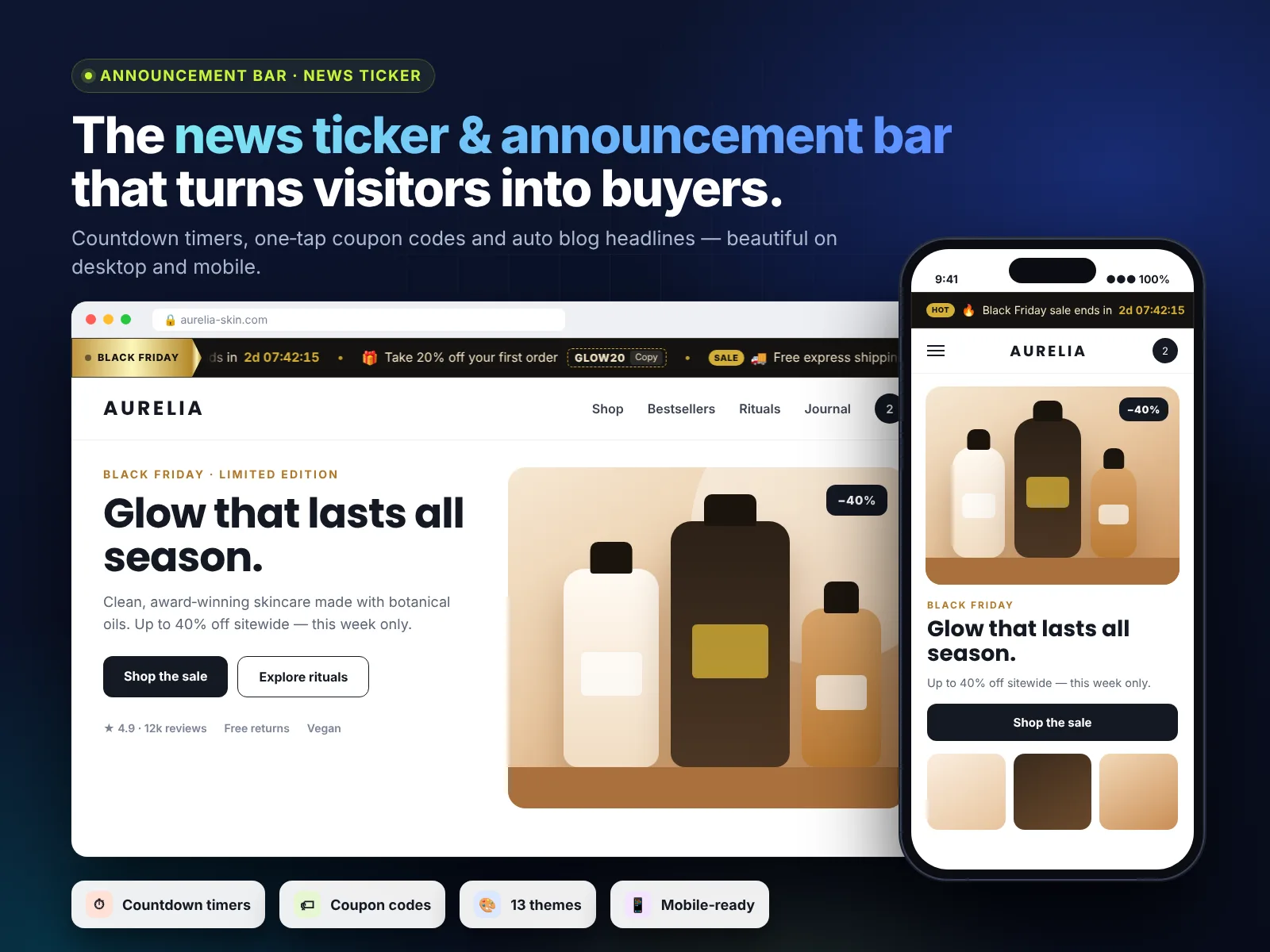
Add a countdown item, write a short message such as “Black Friday sale ends in” and pick the end date and time. Visitors see a live timer in days, hours, minutes and seconds. When the deadline passes, the countdown item hides itself automatically, so you never show an expired offer by mistake.
Real urgency works: a visible deadline gives people a reason to decide now. Use it for flash sales, shipping cut-offs (“Order in the next 3 hours for delivery before Christmas”), event registrations and early-bird prices.
Coupon codes
Add a coupon item with a message and a code, for example “Take 20% off your first order” and WELCOME20. The code appears in a neat box with a copy button. One tap copies it, ready to paste at checkout. Codes that are easy to copy get used more, and fewer customers abandon checkout looking for the code.
Create the matching discount in your Wix dashboard first (Marketing → Coupons), then add the same code to the ticker.
Motion styles, themes and design
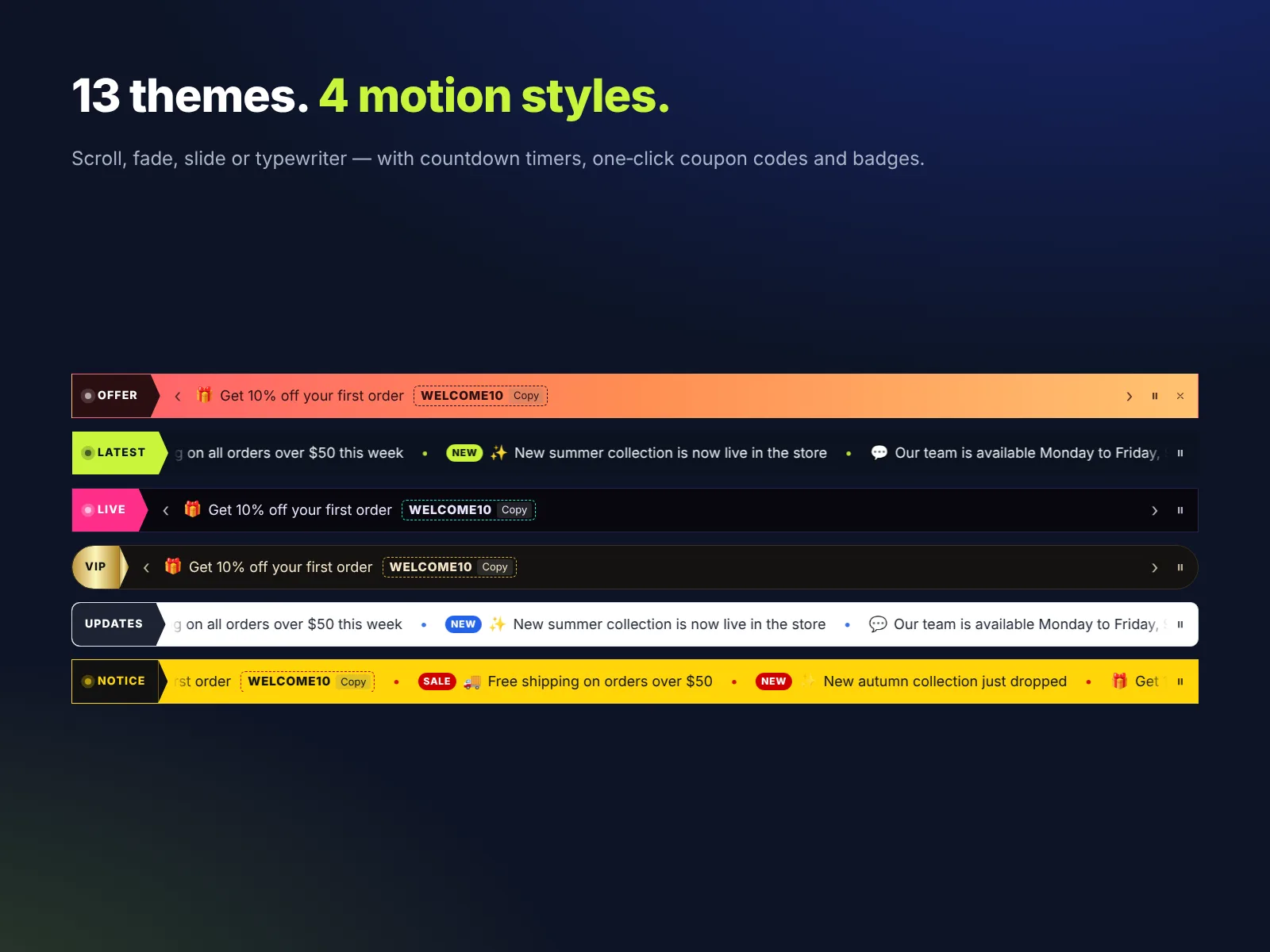
Your announcement bar should look like part of your brand, not like an add-on. TickerFlow gives you four motion styles:
- Scroll: the classic news ticker, with messages gliding from right to left. Great for several short messages.
- Fade: one message at a time with a soft fade. Calm and elegant for premium brands.
- Slide: one message at a time with a slide transition and optional arrows.
- Typewriter: each message types itself out letter by letter. Eye-catching for launches.
Pick one of 13 designer themes or set custom colors for the background, text, label and accents. You can also change the font, font size, bar height and corner radius, add a label such as LATEST, DEALS or BREAKING with an optional pulse, and choose the separator between messages. The Free plan includes three themes: Midnight, Paper and Breaking News.
Automatic blog feed and scheduling
If you run a Wix Blog, switch the content source to Blog feed and choose how many posts to show. Your newest posts appear in the ticker with links, and new articles are added automatically as you publish. It is an easy way to get more readers for every post without extra work.
With scheduling, every announcement can have a start and end date. Prepare next week’s promotion today, and it will appear and disappear on its own. Combined with countdown timers, you can run a full sale calendar from one place.
Free vs Pro pricing
| Free | Pro | |
|---|---|---|
| Price | $0 | $2.99/month, or $2.49/month billed yearly |
| Announcements | Up to 5 | Up to 50 |
| Motion styles | Scroll | Scroll, Fade, Slide, Typewriter |
| Themes | 3 themes | 13 themes + custom colors and fonts |
| Countdown timers | — | ✓ |
| Copy-to-clipboard coupon codes | — | ✓ |
| Automatic blog feed | — | ✓ |
| Scheduling (start and end dates) | — | ✓ |
| Show only on desktop or mobile | — | ✓ |
| Visitor close button | — | ✓ |
| Badges, emojis and links | ✓ | ✓ |
| Pause on hover, RTL, accessibility | ✓ | ✓ |
| No branding on your site | ✓ | ✓ |
Billing is handled securely by Wix, and you can upgrade or cancel from your Wix account at any time. For less than the price of a coffee each month, one extra sale from a countdown or coupon pays for the whole year.
How to add a news ticker to Wix, step by step
- Install the app. Open the News Ticker & Announcement Bar listing and click Add to Site. Choose your site and approve.
- Find the ticker. The bar is added to your site automatically. To add another one, open the Editor, click Add Elements and then App Widgets.
- Position it. Drag the bar into your header or to the top of the page and stretch it to full width.
- Write your messages. Select the ticker, click Settings and open the Content tab. Add text, links, badges and emojis. On Pro, add countdown and coupon items or switch to the blog feed.
- Style it. On the Design tab, choose a motion style and theme, then adjust colors, font, size and height.
- Fine-tune behaviour. On the Settings tab, set speed, pause options, visibility on desktop or mobile and the close button.
- Publish. Click Publish in the Editor. Your ticker is live.
The app’s dashboard page (Apps → TickerFlow in your Wix dashboard) also has a quick start guide, a Free vs Pro comparison and a direct link to support.
10 ideas that turn the bar into sales
- 🔥 Flash sale countdown: “Weekend sale ends in 1d 04:12:30.”
- 🎁 Welcome coupon: “New here? Take 10% off with WELCOME10.”
- 🚚 Free shipping threshold: “Free shipping on orders over $50.”
- ✨ New arrivals: “NEW: the autumn collection is here — shop now.”
- 📅 Holiday cut-off: “Order by Dec 18 for Christmas delivery.”
- 📰 Latest articles: an automatic blog feed for news and content sites.
- 🍽️ Restaurant updates: “Today’s special: wood-fired margherita. Book a table.”
- 🎟️ Event reminders: “Early-bird tickets close in 3 days.”
- ⭐ Social proof: “Rated 4.9 by our customers — read the reviews.” (Only use real numbers.)
- 🕘 Service info: opening hours, holiday closures or delivery delays.
Best practices for an announcement bar that converts
- Keep messages short. Aim for under 60 characters so they read at a glance on mobile.
- One action per message. Each item should lead to one clear page, such as a sale collection or booking page.
- Use 3 to 5 messages. Enough to rotate, not so many that visitors miss the important one.
- Match your brand. Pick a theme or colors that fit your site, with strong contrast for readability.
- Use urgency honestly. Only count down to real deadlines. Trust is worth more than one sale.
- Review weekly. Remove expired offers (or let scheduling do it) and keep the bar current. See our Wix maintenance checklist.
- Check speed. TickerFlow is lightweight, but keep an eye on your overall Wix site speed.
TickerFlow vs a plain text strip
| Text box in header | TickerFlow | |
|---|---|---|
| Rotating or scrolling messages | No | Yes, 4 styles |
| Live countdown that hides when expired | No | Yes (Pro) |
| One-tap coupon codes | No | Yes (Pro) |
| Automatic blog headlines | No | Yes (Pro) |
| Scheduling | Manual edits | Start and end dates (Pro) |
| Pause, keyboard and screen reader support | Limited | Built in |
| Different look on desktop and mobile | Manual | Built in |
Need help setting it up?
MIVAQ builds Wix websites, stores and apps. If you want us to set up your announcement bar, plan a sale calendar or improve your whole site, we are happy to help. See our Wix solutions, then contact us:
- WhatsApp: message us
- Email: hello@mivaq.com
- Form: send your project details
Install News Ticker & Announcement Bar free →
Related Wix guides
- Bulk edit Wix Store products and prices
- Best Wix apps
- Wix blog SEO
- Wix SEO checklist
- The complete Wix guide
Frequently asked questions
How do I add a scrolling news ticker to my Wix site?
Install News Ticker & Announcement Bar from the Wix App Market. The bar is added automatically; select it in the Editor, click Settings, add your messages and publish.
Is the app free?
Yes. The Free plan includes up to 5 announcements, the scrolling style and 3 themes, with no branding. Pro unlocks everything for $2.99 a month or $2.49 a month billed yearly.
Can I add a countdown timer to my Wix announcement bar?
Yes, on Pro. Add a countdown item, choose the end date and time, and the timer counts down live. It hides automatically when the time is up.
Does it work on mobile?
Yes. The bar adapts to small screens, and on Pro you can choose to show it only on desktop or only on mobile.
Can visitors close the bar?
On Pro you can turn on a close button. All plans include pause on hover and a pause button.
Will it slow down my site?
TickerFlow is a lightweight widget that loads with your page, so its effect on speed is small. As with any app, check your page speed after adding it.
Does it support right-to-left languages?
Yes. Turn on RTL in the settings for Arabic, Hebrew, Urdu and other right-to-left languages.