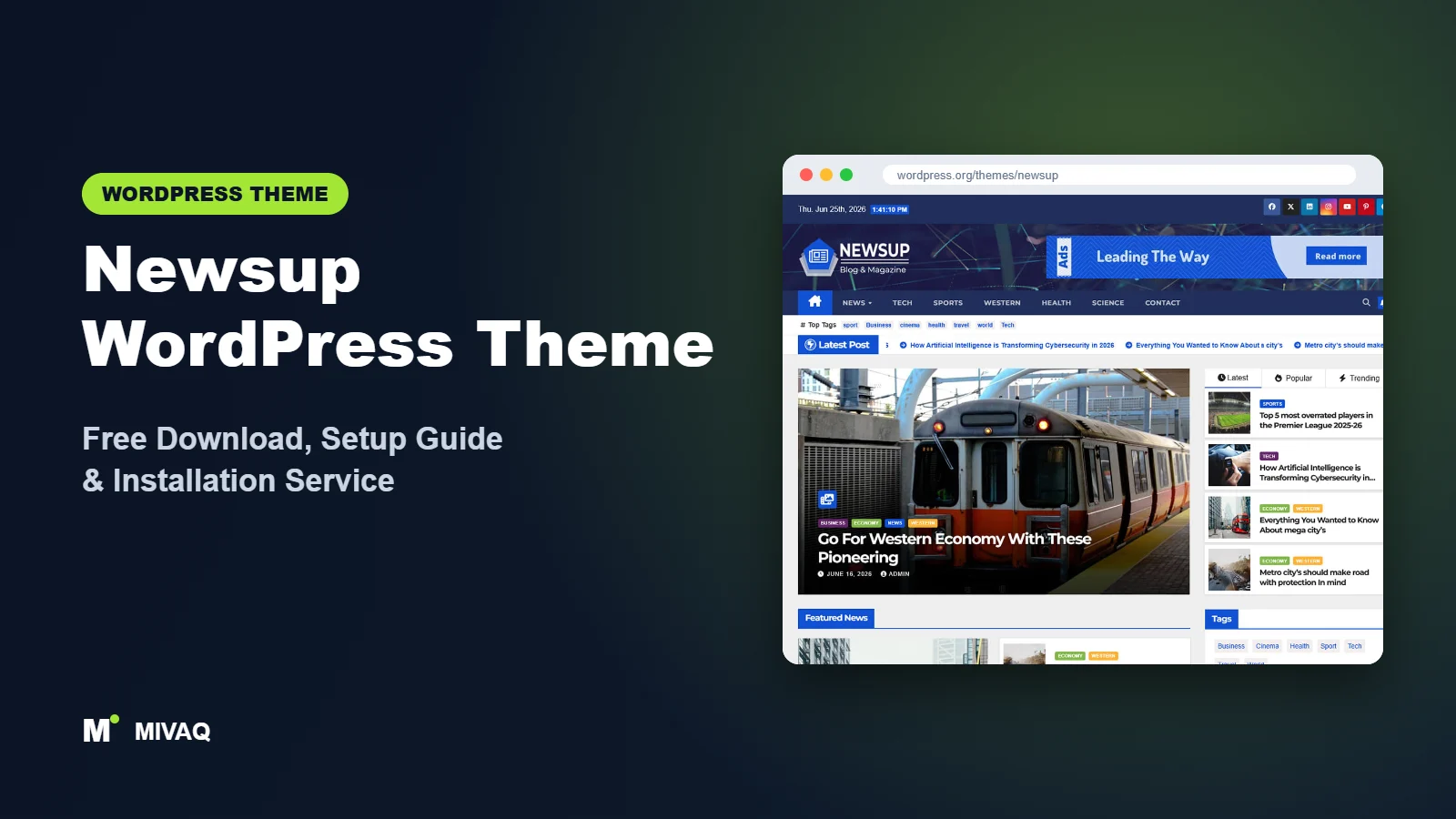
A modern news portal has a certain look: a dark top bar with the date, a headline ticker, a big featured block of stories and neat rows of thumbnails underneath. Building that from scratch with a page builder takes days. Newsup gives you that portal layout from a free theme. This guide covers the Newsup WordPress theme free download, how the theme is organised, and the exact steps we use to turn it into a working news site.
This article is part of our complete guide: How to Build a WordPress Website for Your Business (2026 Guide).
Newsup is 100% free and legal to download from the official WordPress.org directory. It is developed by Themeansar, a team that specialises in news and magazine themes, and it is updated very regularly. The latest release at the time of writing came out on 6 October 2026.
What is the Newsup WordPress theme?
Newsup is a classic, Customizer-based news magazine theme. Its key idea is that the site is “fully widgetized”: instead of a fixed homepage template, you build the front page by placing news widgets (post grids, lists, sliders and category blocks) into widget areas. That gives you a lot of flexibility without a page builder. It suits newspapers, magazine sites, gaming and tech portals, review sites and personal blogs that publish frequently.
| Detail | Newsup |
|---|---|
| Developer | Themeansar |
| Latest version | 5.6.3 |
| Active installs | 20,000+ |
| Rating | 4.8/5 (188 reviews) |
| Requires WordPress | 6.7 or higher |
| Requires PHP | 7.4 or higher |
| Last updated | 6 October 2026 |
| Theme type | Classic theme (Customizer and widgets) |
| Price | Free (Newsup Pro optional) |
Note the requirement of WordPress 6.7 or newer. If your site is running an older WordPress version, update WordPress core (after a backup) before installing Newsup.
Key features of Newsup
- Widget-based homepage: build the front page from news widgets placed in dedicated homepage areas.
- Featured slider and highlight posts: a large slider of top stories next to smaller highlighted posts, the classic portal layout.
- Breaking news ticker: scrolling headlines near the header.
- Top bar with date and social icons: a familiar newspaper detail readers expect.
- Custom header and logo: add a header background image and a wide logo.
- Light and dark style options: a darker “portal” look that works well for tech and gaming news.
- WPML, translation and RTL ready: suitable for multilingual or right-to-left news sites.
- Gutenberg compatible: article content and pages work with the block editor.
Why a widget-driven homepage is useful
With Newsup you can reorder entire homepage sections by dragging widgets, and you can point each widget at a different category. A sports site could show a Football grid, then a Cricket list, then a Video row, all without touching code. For editors this is easier to maintain than a hand-built page.
Starter content via the demo importer
Themeansar provides a demo importer plugin, offered from the theme’s welcome screen, that recreates the live preview layout with sample posts and widgets. It is the fastest way to understand how the widget areas fit together.
An example homepage plan for a tech news site
To make the widget idea concrete, here is a layout we often suggest for a small technology portal. At the top, the slider shows five stories from a “Featured” category, with the highlighted posts beside it pulled from “Reviews”. Below that, a grid widget shows the latest “Smartphones” stories, followed by a list widget for “How-to” guides and a second grid for “Gaming”. The sidebar carries a search box, a popular-posts widget, a newsletter sign-up and one ad unit. Every block is fed automatically by categories, so editors only need to publish and categorise posts correctly; the homepage updates itself without anyone touching the layout again.
Newsup free vs Pro: what do you get?
The free version covers the essentials of a news portal: the slider, featured posts, ticker, widget-based homepage, header options, sidebar layouts and social links.
Newsup Pro adds more ways to shape and brand the site. Typical Pro upgrades include extra homepage widget styles and post layouts, more colour and typography options, additional header styles, more advertising positions and dedicated support. Themeansar’s feature list and licence prices change from time to time, so check the developer’s site for current Pro pricing and exact features.
For a new portal, the free version is usually enough to launch. Upgrade once you know which layouts your readers engage with.
Who should use Newsup?
- Tech, gaming and entertainment portals that want a modern, slightly darker look.
- Online newspapers that publish many short stories each day.
- Review websites that organise content in categories such as phones, laptops or games.
- Editors who prefer widgets over page builders.
- Multilingual publishers using WPML.
Who should look elsewhere? If you publish one article a week, Newsup’s busy portal layout will look empty. A business brochure site, a portfolio or a course site will also be better served by a multipurpose or block theme such as Variations. And if your hosting is stuck on an old WordPress version, the 6.7 requirement is a blocker until you update.
Newsup WordPress theme free download (official and safe)
Get Newsup from these official links only:
- Official theme page: wordpress.org/themes/newsup
- Direct ZIP file: downloads.wordpress.org/theme/newsup.zip
MIVAQ does not distribute theme files; the free download always comes from WordPress.org, where the code has been reviewed.
Search results for “Newsup Pro free download” often lead to nulled copies. These can contain malicious code, spam injections and backdoors, and they never get the security fixes that Themeansar ships. News sites attract a lot of bot traffic, so this risk is real. If a nulled theme has already caused problems, see our WordPress malware removal guide.
How to install Newsup in WordPress (step by step)
Method 1: From the WordPress dashboard
- Log in and go to Appearance › Themes.
- Click Add New Theme and search for “Newsup”.
- Click Install on Newsup by Themeansar.
- Click Activate.
Method 2: Upload the ZIP
- Download newsup.zip from the official link.
- Open Appearance › Themes › Add New Theme › Upload Theme.
- Choose the file, click Install Now and then Activate.
Tip: Themeansar releases updates often. Any code edits should go in a child theme so the next update does not erase them.
How to set up Newsup after installation
Newsup’s setup happens in two places: the Customizer for global design, and Appearance › Widgets (or the widget panel in the Customizer) for the homepage. Our recommended order:
- Plan categories and publish sample posts. Widgets pull posts by category, so create your sections and add a few posts with featured images to each.
- Optional demo import. Use the demo importer from the welcome notice on a fresh site to copy the preview layout.
- Logo, header and top bar. Upload a horizontal logo, set the header background, and enable the date and social icons in the top bar.
- Slider and featured posts. In the Customizer’s featured section, choose the category that feeds the main slider and the highlighted posts beside it.
- Breaking news ticker. Point the ticker at your latest posts or a “Breaking” category.
- Homepage widgets. Add news widgets to the front-page content and sidebar areas: a grid for your main category, list blocks for secondary ones, and a popular-posts widget in the sidebar.
- Colours and typography. Set the primary colour to your brand colour and check readability on both light and dark sections.
- Menus and footer. Build a category menu and add About, Contact, Privacy Policy and Advertise links in the footer.
Newsup speed and SEO checklist
- Cache aggressively. A widget-heavy homepage runs many queries. Page caching makes the biggest difference; see our LiteSpeed speed guide.
- Keep widget counts sensible. Each widget is another database query and more images. Remove sections nobody clicks.
- Use NewsArticle schema through your SEO plugin; our Rank Math vs Yoast guide compares the options.
- Write strong headlines that work as title tags. Our title tag SEO guide has formulas that keep headlines under 60 characters.
- Harden the site with our WordPress security checklist, especially login protection.
Common mistakes when setting up Newsup
- Activating on an outdated WordPress. The theme needs 6.7 or newer; update core first.
- Empty widgets. A category widget pointing at a category with no posts leaves a blank hole on the homepage.
- Different thumbnail sizes. Grids look messy unless featured images share one ratio. Regenerate thumbnails after changing image settings.
- Losing widgets after switching themes. Widgets are tied to theme areas. If you test another theme and come back, check your homepage widgets.
- Overusing the ticker. A ticker full of month-old stories signals an inactive site. Feed it only fresh posts.
Newsup vs similar free WordPress themes
- Newsup vs ColorMag: ColorMag has the bigger user base, colour-coded categories and block-based homepage building via Magazine Blocks. Newsup feels more like a modern portal and is built around widgets. Pick ColorMag for a traditional newspaper, Newsup for a sleek tech or gaming site.
- Newsup vs Newsmatic: Newsmatic leans on the Customizer and Elementor through its News Kit addon. Newsup is simpler if you are comfortable with widgets and want to avoid a page builder.
- Newsup vs News Magazine X: News Magazine X gives you a header and footer builder and a dark mode switcher. Newsup has a larger install base and a well-documented setup.
Newsup pros and cons
What we like
- Professional news-portal look straight after demo import.
- Flexible, widget-driven homepage without a page builder.
- Very frequent updates and online documentation from Themeansar.
- WPML, RTL and translation support.
What to consider
- Requires a recent WordPress (6.7+) and PHP 7.4+.
- Widget-based building feels dated if you are used to blocks.
- Advanced layouts and extra styling are in Pro.
- Needs regular content to look alive.
Our verdict: Newsup is a reliable free choice for an active news or tech portal. It looks modern, it is updated constantly and the widget system makes the homepage easy to rearrange. If you publish daily and want a portal feel without paying for a premium theme, Newsup deserves a place on your shortlist.
Website design with Newsup: our design service
A blog or news site lives or dies by readability, structure and speed. With our website design service, MIVAQ builds your publication on Newsup: a homepage that surfaces the right stories, clear category structure, author pages, newsletter sign-up areas and ad placements that do not ruin the reading experience.
What our Newsup website design package includes:
- Magazine or blog homepage with featured, latest and category sections
- Category, tag and author structure planned for readers and search engines
- Readable typography, dark-mode friendly colours and fast-loading layouts
- Newsletter sign-up, social sharing and tasteful ad placements
- Article SEO templates, schema basics and Search Console setup
You can see examples in our recent work and case studies, and read more about our WordPress development and SEO services. Every project starts with a free consultation and a fixed price, so you know exactly what you get before we begin.
Want a website designed with Newsup? Contact MIVAQ: WhatsApp +880 1723-189847, email hello@mivaq.com or use our contact form. We usually reply the same day.
Newsup installation and setup service
Short on time, or not sure how the widget areas fit together? MIVAQ Creative Solutions installs and customises Newsup for news teams and bloggers. Our service includes:
- Installing Newsup from WordPress.org, with a child theme
- Demo import and removal of placeholder content
- Branding: logo, colours, typography, top bar and ticker
- Homepage widget layout organised by your categories
- Essential pages, menus, ad slots and WooCommerce if needed
- Speed and SEO basics: caching, image optimisation and Rank Math
We always give a fixed quote first. See our WordPress services or get in touch:
- WhatsApp: message us about Newsup
- Email: hello@mivaq.com
- Form: send your project details
Related WordPress theme guides
- ColorMag WordPress theme: free download and setup guide
- Newsmatic WordPress theme: free download and setup guide
- News Magazine X WordPress theme: free download and setup guide
- Customizr WordPress theme: free download and setup guide
- 50 best free WordPress themes
Frequently asked questions
Is Newsup free?
Yes. Newsup is free to download from WordPress.org and use on unlimited websites. Newsup Pro is an optional paid version from Themeansar.
Is Newsup good for SEO?
Newsup is described by its developer as SEO friendly and uses standard WordPress markup. Combine it with an SEO plugin, caching and good headlines to compete in news search results.
Does Newsup work with Elementor?
You can use Elementor on individual pages, but Newsup’s homepage is designed around its own widgets, which is usually the lighter option.
Can I use Newsup for WooCommerce?
You can add WooCommerce for a small shop, but Newsup is a news theme first. For a store-led business, choose a dedicated shop theme.
Can MIVAQ install Newsup for me?
Yes. We install Newsup, import the demo, set up your categories and homepage widgets and handle speed and SEO basics for a fixed price.


