This article is part of our complete Wix guide and our list of best Wix apps.
Your product pages are the pages that make money, yet in most Wix stores they are the weakest pages for SEO. Titles are just the product name, meta descriptions are empty, and Google writes its own snippet from random text on the page. The result: fewer clicks from search, even when your products rank.
This guide shares the best Wix product SEO tips for 2026, with simple formulas for SEO titles and meta descriptions, real examples, and a fast way to write them for hundreds of products at once with Bulk Product & Price Editor by MIVAQ Apps.
Add Bulk Product & Price Editor to your Wix site →
Key takeaways
- The SEO title and meta description decide how your product looks in Google, and a better snippet means more clicks.
- A strong product title formula: Product name + key detail + brand or store name, under about 60 characters.
- A strong meta description: benefit + key detail + price or offer + reason to buy, under about 160 characters.
- Bulk Product & Price Editor writes titles and descriptions for every selected product from templates like {name} | {brand}, with a Google preview.
- You can fill only products that have no custom SEO yet, so hand-written work is kept. Bulk SEO is part of Pro ($4.99/month, or $3.99/month billed yearly).
In this guide
- Why product SEO matters for Wix stores
- The best SEO title formula for products
- How to write meta descriptions that get clicks
- Use templates to write product SEO in bulk
- Step by step: bulk SEO in Wix
- Top 10 Wix product SEO tips
- Common product SEO mistakes
- Install and leave a review
- Frequently asked questions
Why product SEO matters for Wix stores
When someone searches for “black leather wallet for men”, Google shows a list of results. Each result has a blue title and a short grey description. That snippet is your shop window in search. Two stores can rank in similar positions, but the one with a clear, specific, attractive snippet gets the click.
- More clicks from the same rankings. A better snippet lifts your click-through rate without needing higher positions.
- Better relevance. Clear titles help Google understand what each product is.
- Less duplication. Unique titles stop similar products from competing with each other.
- Better shopping results. Clean product data also helps in Google Shopping and AI search answers.
Wix gives every product page an SEO panel, so the tools are there. The problem is time: with 200 products, writing 400 lines of text by hand takes days. Templates solve that. For the full picture of store SEO, read our Wix eCommerce SEO guide and Wix SEO checklist.
The best SEO title formula for products
Use this simple formula and keep it under about 60 characters so it does not get cut off:
Product name + key detail | Brand or store name
| Product | Weak title | Better title |
|---|---|---|
| Leather wallet | Wallet 12 | Slim Leather Wallet for Men – RFID | Oakline |
| Candle | Candle – Vanilla | Vanilla Soy Candle, 40-Hour Burn | Glow & Co |
| Brake pads | BRK-100 | Ceramic Front Brake Pads for Honda Civic | PartsPro |
| Yoga mat | Mat | Non-Slip Yoga Mat 6mm, Eco TPE | ZenFlow |
- Put the main keyword first. Shoppers scan the first words.
- Add the detail people search for: size, material, model, color, quantity or compatibility.
- End with your brand if there is room. It builds recognition.
- Make each title unique. Two products should never share the same SEO title.
How to write meta descriptions that get clicks
Google does not use meta descriptions to rank pages, but it often shows them as the snippet. A good one answers “why should I click this result?” Keep it under about 160 characters.
Formula: Benefit + key detail + price or offer + reason to buy.
- “Shop the Slim Leather Wallet by Oakline for $39. Holds 8 cards, blocks RFID. Free shipping and 30-day returns.”
- “Vanilla soy candle with a 40-hour burn, hand-poured in small batches. $18 – free gift wrap on every order.”
- “Ceramic front brake pads for Honda Civic 2016–2026. Low dust, quiet braking. In stock, ships today.”
Use active words (shop, get, discover), mention what makes you different (free shipping, warranty, handmade, fast dispatch) and include the price when it is competitive.
Use templates to write product SEO in bulk
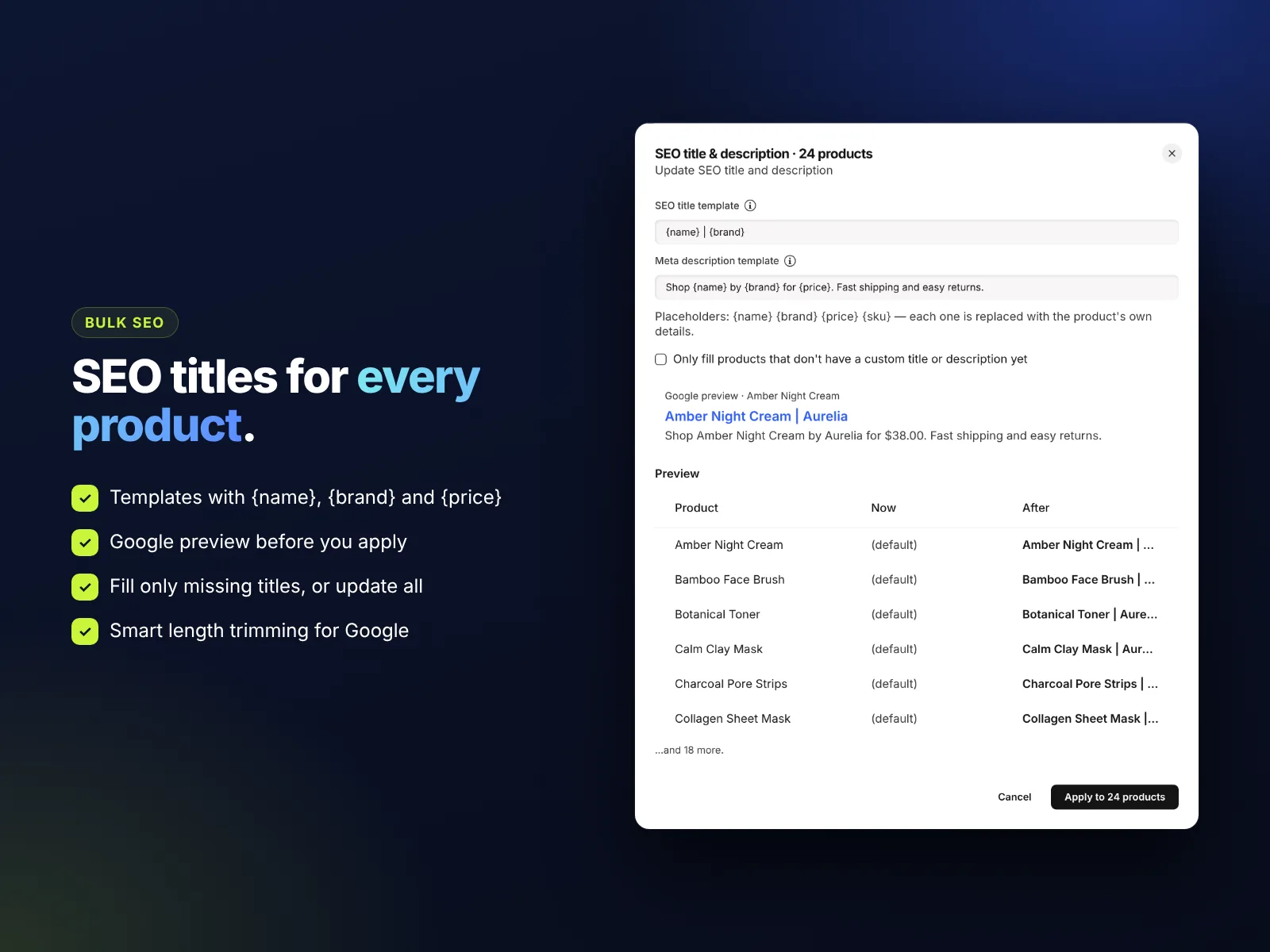
A template is a sentence with placeholders that are replaced by each product’s own data. Bulk Product & Price Editor supports these placeholders:
| Placeholder | Replaced with |
|---|---|
| {name} | The product name |
| {brand} | The product brand |
| {price} | The current price |
| {sku} | The SKU |
Examples:
- Title:
{name} | {brand} - Title:
{name} – Free Shipping | Your Store - Description:
Shop {name} by {brand} for {price}. Fast shipping and easy 30-day returns. - Description:
Buy {name} online for {price}. In stock and ready to ship from our store.
The app trims titles to about 60 characters and descriptions to about 160, cutting neatly at a word, so nothing gets chopped mid-word in Google. A Google-style preview shows how the first selected product will look before you apply.
Step by step: bulk SEO in Wix
- Install Bulk Product & Price Editor and open it from Apps in your Wix dashboard.
- Filter the products you want, for example one brand or one category, so the template fits them. Different product types often deserve different templates.
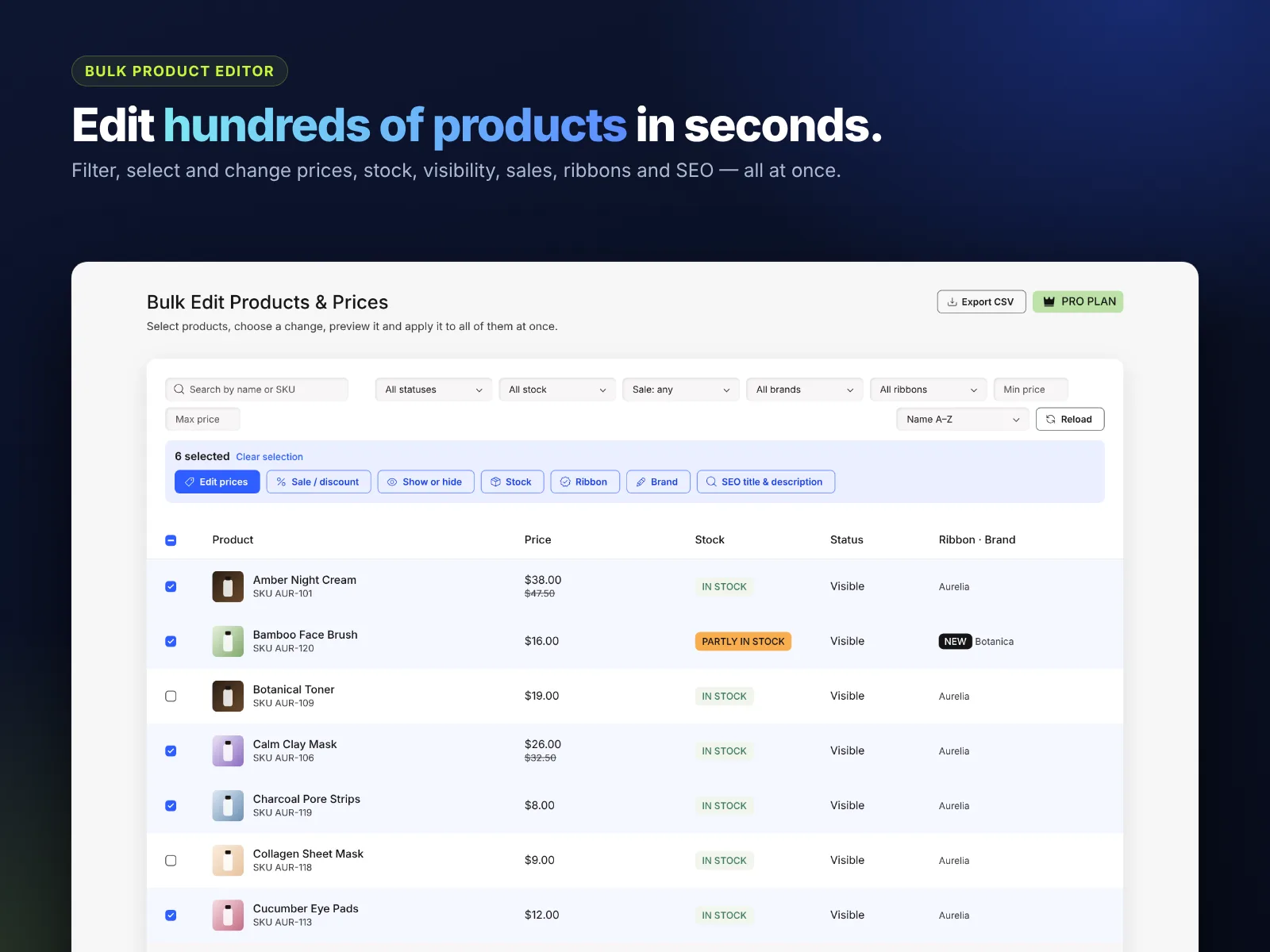
- Select the products, or tick the top box to select all filtered products.
- Click SEO title & description.
- Enter your title and description templates.
- Tick Only fill products that don’t have a custom title or description yet if you have already written SEO for some products by hand.
- Check the Google preview, then click Apply.
- Repeat for the next group of products with a template that suits them.
Afterwards, open two or three products in your Wix dashboard to see the new SEO settings, and request indexing in Google Search Console for your most important pages. If pages are not showing in Google at all, see our Google indexing fix.
Top 10 Wix product SEO tips
- Use clear product names. “Slim Leather Wallet” beats “Wallet 12” everywhere, not only in SEO.
- Write unique descriptions on the page. Do not copy the manufacturer’s text word for word.
- Add alt text to product images. Describe the product in a few words.
- Use clean URLs. Wix creates the URL from the product name, so set the name well before you publish.
- Add a brand to every product. Brand helps filters, structured data and searches like “Oakline wallet”. You can set brands in bulk too.
- Keep products in stock or hide them. Many out-of-stock pages hurt the experience.
- Link related products and categories. Internal links help Google crawl your store.
- Collect reviews. Reviews add fresh content and can show stars in some results.
- Speed up pages. Compress images and avoid heavy embeds. See our Wix maintenance checklist.
- Check Search Console monthly. Find products with many impressions but few clicks and improve their snippets first.
Common product SEO mistakes
- Keyword stuffing: “Wallet wallets men wallet leather wallet” looks like spam to people and Google.
- Same title for every variant or product. Every product deserves its own title.
- Titles that are too long. Google cuts them, and the important part may disappear.
- Empty meta descriptions. Google will pick random text, often your shipping policy.
- Forgetting old products. The oldest products often have the weakest SEO. Templates fix them in minutes.
Running a sale too? Put products on sale in bulk with the same app: how to run a sale on Wix Stores.
How to install Bulk Product & Price Editor and leave a review
- Open the Bulk Product & Price Editor listing on the Wix App Market.
- Click Add to Site, choose your Wix site and approve the permissions.
- Set it up from your Wix dashboard or the Editor (the steps above take a few minutes).
- Once it is working for you, go back to the app page, scroll to Reviews and click Write a Review. Choose your stars and share one or two sentences about how you use it.
Reviews help other Wix users find tools that work, and they help us, a small team, decide what to build next. If something is not working the way you expect, please tell us first and we will fix it fast.
More top Wix apps from MIVAQ Apps
MIVAQ Apps is the app studio of MIVAQ Creative Solutions. Every app is made for Wix, priced fairly and supported by real people. You can see all of them on our MIVAQ Apps developer page on the Wix App Market and on our Wix apps page.
- News Ticker & Announcement Bar: a scrolling news ticker and announcement bar with countdowns and coupon codes.
- Smart Booking & Payment: a booking calendar with online payments, deposits, Stripe and PayPal.
- Smart Price Table: 50 premium pricing table designs with built-in checkout.
- YMM Parts Finder: a Year / Make / Model parts finder and fit check for any kind of parts store.
Need help with your Wix site?
MIVAQ designs, builds and manages Wix websites and builds Wix apps. If you want help with product SEO, store setup or content for your product pages, we are happy to help. See our Wix solutions, then contact us:
- WhatsApp: message us
- Email: hello@mivaq.com
- Form: send your project details
Install Bulk Product & Price Editor →
Related Wix guides
- Bulk edit Wix Store products and prices
- How to run a sale on Wix Stores
- Wix eCommerce SEO
- Wix SEO checklist
- Wix Stores product setup
Frequently asked questions
How do I change the SEO title of a Wix product?
Open the product in your Wix dashboard and edit its SEO settings, or use Bulk Product & Price Editor to write SEO titles for many products at once from a template.
How long should a product SEO title be?
About 50 to 60 characters. Longer titles are often cut off in Google.
Do meta descriptions help ranking?
Not directly, but a good meta description is often shown as the snippet and can increase clicks.
Will bulk SEO overwrite my custom titles?
Only if you want it to. Tick “Only fill products that don’t have a custom title or description yet” to keep hand-written SEO.
Which placeholders can I use?
{name}, {brand}, {price} and {sku}.
Is bulk SEO free?
Bulk SEO titles and descriptions are part of the Pro plan, $4.99 a month or $3.99 a month billed yearly.


