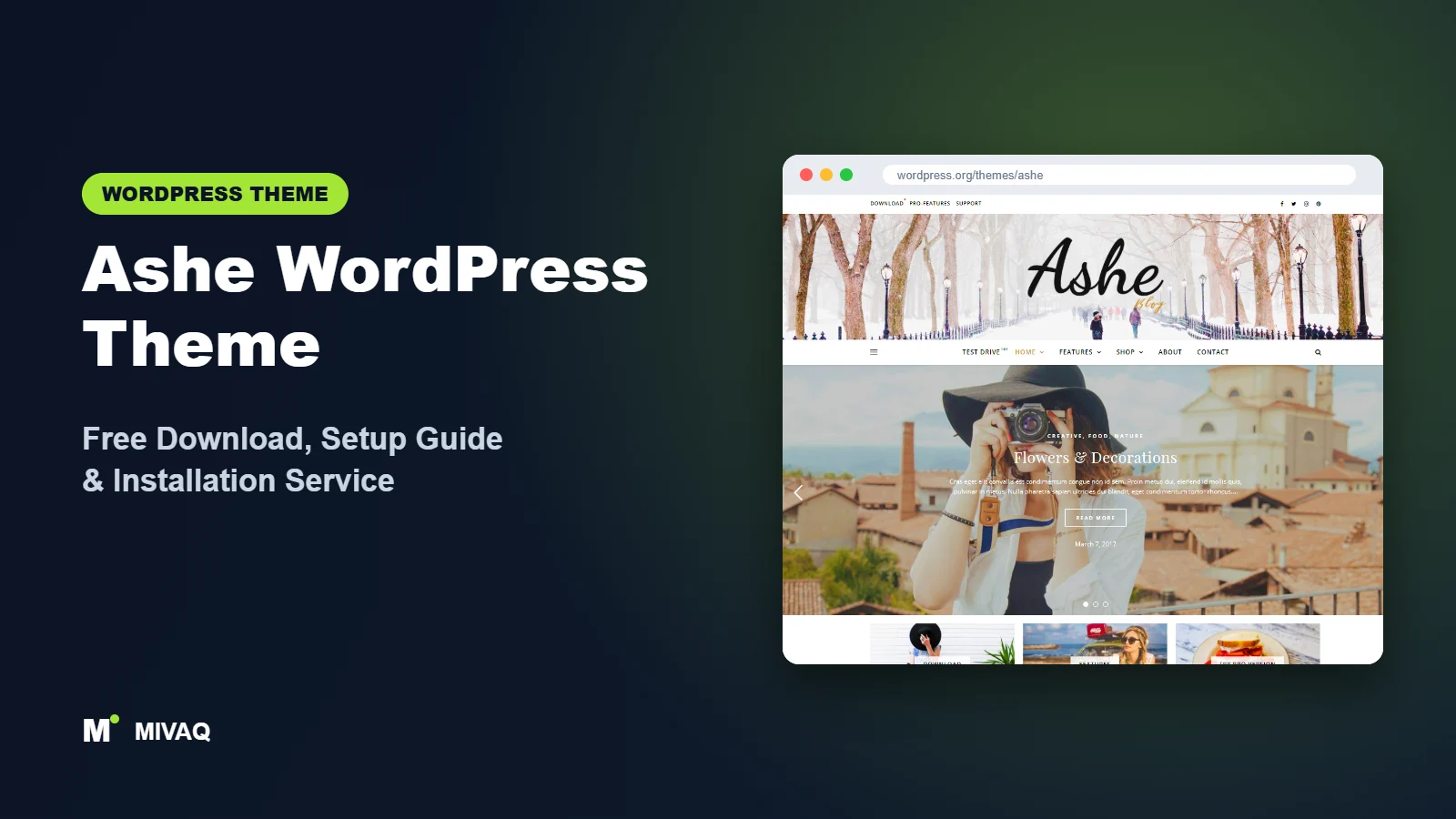
Some blogs need a newspaper. Most personal blogs need the opposite: white space, a beautiful slider of your best posts, readable typography and nothing that distracts from your photos. That is the gap Ashe fills. If you are searching for the Ashe WordPress theme free download, this guide shows where to get it safely, what the free version really includes and how to set it up so your food, travel or lifestyle blog looks polished from the first post.
This article is part of our complete guide: How to Build a WordPress Website for Your Business (2026 Guide).
Ashe is 100% free and legal on the official WordPress.org theme directory. It is developed by WP Royal, the team behind the popular Royal Elementor Addons plugin, and it holds a 4.9/5 rating from more than 300 reviews, which is unusually high for a blog theme. A Pro version exists, but the free theme is complete enough to run a serious blog.
What is the Ashe WordPress theme?
Ashe is a classic, Customizer-based blog theme for personal and multi-author blogs. Its design is soft and editorial: a centred logo, a full-width featured slider, a row of promo boxes under the header and a clean post feed with a sidebar. It suits lifestyle, food, travel, beauty, fashion, wedding and photography blogs, and it includes WooCommerce styling if you want to sell presets, e-books or merchandise.
| Detail | Ashe |
|---|---|
| Developer | WP Royal |
| Latest version | 2.274 |
| Active installs | 30,000+ |
| Rating | 4.9/5 (304 reviews) |
| Requires WordPress | 4.7 or higher |
| Requires PHP | 5.2.4 or higher (use PHP 8.x on your host) |
| Last updated | 25 September 2026 |
| Theme type | Classic theme (Customizer) |
| Price | Free (Ashe Pro optional) |
Data is taken from WordPress.org at the time of writing. The low minimum PHP version only means the theme is backwards compatible; for speed and security your hosting should run a current PHP 8 release.
Key features of Ashe
- Full-screen featured slider: show your best posts in a large slider right under the header.
- Featured links (promo boxes): three image boxes under the slider that link to key pages such as “Start here”, “Recipes” or “Shop”.
- Text or image logo: use a stylish text logo with custom fonts, or upload your own logo image.
- Header image: add a wide background image behind the logo for a magazine-cover feel.
- Instagram widget support: display an Instagram feed in the footer, a natural fit for visual bloggers.
- Flexible blog layouts: left sidebar, right sidebar or full width, with one, two or three columns.
- WooCommerce styling: a matching shop design for selling digital or physical products.
- GDPR, translation and RTL ready: no tracking built in, plus support for right-to-left languages.
The slider and promo boxes
Ashe’s homepage formula is simple and effective: slider, three featured links, then the latest posts. The featured links are the secret weapon. Instead of hoping readers find your best content, you point them to your recipe index, travel guides or newsletter page right at the top.
A text logo that looks designed
Many bloggers do not have a logo at launch. Ashe’s text logo, paired with an elegant serif font, looks intentional, so you can start blogging today and commission a logo later.
Ashe free vs Pro: what do you get?
The free version gives you the complete Ashe look: slider, featured links, header image, sidebars, Instagram footer, social icons and WooCommerce support. For most new bloggers that is enough.
Ashe Pro, sold by WP Royal, unlocks more design control. Commonly listed Pro extras include more colour and typography settings, extra blog and header layouts, additional slider options, more widgets, the ability to remove the footer credit and premium support. Check WP Royal’s site for the current Pro feature list and pricing, as both change over time.
A practical approach is to blog on the free version for three to six months. If you then want, for example, a different post grid or more fonts, Pro is a reasonable upgrade. If not, you have lost nothing.
Who should use Ashe?
Ashe works best for:
- Food and recipe bloggers who want large photos and a clean post feed.
- Travel and lifestyle bloggers who rely on beautiful featured images.
- Fashion, beauty and wedding blogs where an elegant, feminine-leaning design fits the audience.
- Photographers who blog and want a simple showcase plus an Instagram feed.
- Beginners who want a nice result without learning a page builder.
Ashe is not ideal for news sites with dozens of daily posts (look at ColorMag instead), for company websites with service pages and landing pages, or for large WooCommerce stores. It is a blog theme first.
Ashe WordPress theme free download (official and safe)
Download Ashe only from WordPress.org:
- Official theme page: wordpress.org/themes/ashe
- Direct ZIP file: downloads.wordpress.org/theme/ashe.zip
MIVAQ does not distribute theme files. The official WordPress.org copy is reviewed, clean and receives automatic updates.
Avoid sites offering “Ashe Pro nulled” or “free premium” copies. These cracked files often contain injected code that adds spam links, redirects visitors or creates hidden admin users, and they never get security updates. If you suspect your blog is already infected, our WordPress malware removal guide explains what to do next.
How to install Ashe in WordPress (step by step)
Method 1: From the dashboard
- Log in to WordPress and open Appearance › Themes.
- Click Add New Theme and search for “Ashe”.
- Click Install on Ashe by WP Royal.
- Click Activate.
Method 2: Upload the ZIP
- Download ashe.zip from the official link above.
- Go to Appearance › Themes › Add New Theme › Upload Theme.
- Select the ZIP, click Install Now, then Activate.
Tip: Ashe is updated often. If you plan to edit its template files or functions.php, use a child theme so your changes survive updates. For small CSS tweaks, the Additional CSS panel in the Customizer is enough.
How to set up Ashe after installation
Ashe is set up almost entirely in Appearance › Customize. Work through it in this order:
- Write a few posts first. The slider and post feed need content with featured images. Publish at least five posts with landscape images of the same size before judging the design.
- Logo and tagline. Under Site Identity, choose a text logo or upload an image logo, and add a site icon.
- Header image. Add a wide, calm background image. Busy photos make the logo hard to read.
- Featured slider. Enable the slider and choose which posts it shows, for example a specific category such as “Featured”.
- Featured links. Set three promo boxes with an image, title and link to your most important pages.
- Colours and fonts. Set your accent colour to match your brand. Keep body text dark and large enough for comfortable reading.
- Blog layout. Choose the sidebar position and how many columns the post feed uses.
- Menus and social icons. Create a main menu (Home, Recipes, Travel, About, Contact) and add your social profiles.
- Footer. Add an Instagram feed plugin and place it in the footer widget area, plus a short About widget in the sidebar.
If you want custom landing pages, Ashe works well alongside Elementor and WP Royal’s free Royal Elementor Addons plugin.
Ashe speed and SEO checklist
Image-heavy blogs can get slow quickly. Keep Ashe light with these steps:
- Compress and resize images before upload, and serve WebP. Our LiteSpeed speed guide covers caching and image optimisation.
- Keep the slider short. Three to five slides are enough; each slide adds weight.
- Write descriptive alt text for every photo using our image alt text SEO guide. Food and travel images can bring real Google Images traffic.
- Pick one SEO plugin after reading Rank Math vs Yoast, and add Recipe schema if you publish recipes.
- Back up before updates with a proper WordPress backup strategy.
Common mistakes when setting up Ashe
- Mixed image shapes. Portrait and landscape featured images side by side make the feed look uneven. Pick one ratio.
- Heavy Instagram plugins. Some feed plugins load lots of scripts. Choose a lightweight one and cache the feed.
- Too many sidebar widgets. A long sidebar full of badges and archives distracts from your writing. Keep About, search, popular posts and a newsletter box.
- Linking featured boxes to nothing useful. The promo boxes are prime space. Link them to cornerstone content, not to “Uncategorized”.
- Editing theme files directly. Changes vanish when Ashe updates. Use a child theme.
Ashe vs similar free WordPress themes
- Ashe vs BlogHash: BlogHash is more modern and gives finer control over colours, typography and Elementor layouts. Ashe has the more classic, editorial look and a longer track record. Choose Ashe for a lifestyle blog with big photos, BlogHash for a contemporary content blog.
- Ashe vs News Magazine X: both come from WP Royal. News Magazine X is built for magazines with lots of categories, ad slots and a header builder. Ashe is quieter and better for personal storytelling.
- Ashe vs Hueman: Hueman packs more content into a dense, multi-sidebar layout. Ashe gives more breathing space and photo focus.
Ashe pros and cons
What we like
- Elegant, photo-friendly design that looks finished with little effort.
- Slider and featured link boxes included in the free version.
- Very high rating and frequent updates from WP Royal.
- Beginner friendly: almost everything lives in the Customizer.
What to consider
- The look is recognisable, as many blogs use Ashe; customise colours and fonts to stand out.
- Not designed for business sites or big shops.
- Some layout and typography options are Pro-only.
Our verdict: Ashe is one of the best free choices for personal, food and lifestyle blogs. It looks beautiful out of the box, stays simple to manage and lets your photos do the talking. If your site is mainly a blog, it is an easy recommendation.
Website design with Ashe: our design service
A blog or news site lives or dies by readability, structure and speed. With our website design service, MIVAQ builds your publication on Ashe: a homepage that surfaces the right stories, clear category structure, author pages, newsletter sign-up areas and ad placements that do not ruin the reading experience.
What our Ashe website design package includes:
- Magazine or blog homepage with featured, latest and category sections
- Category, tag and author structure planned for readers and search engines
- Readable typography, dark-mode friendly colours and fast-loading layouts
- Newsletter sign-up, social sharing and tasteful ad placements
- Article SEO templates, schema basics and Search Console setup
You can see examples in our recent work and case studies, and read more about our WordPress development and SEO services. Every project starts with a free consultation and a fixed price, so you know exactly what you get before we begin.
Want a website designed with Ashe? Contact MIVAQ: WhatsApp +880 1723-189847, email hello@mivaq.com or use our contact form. We usually reply the same day.
Ashe installation and setup service
Want your Ashe blog to look like a professional publication from day one? MIVAQ Creative Solutions installs and customises Ashe for bloggers and small brands. We handle:
- Installing Ashe from WordPress.org and creating a child theme
- Branding: logo, colours, fonts, header image and social icons
- Slider, featured links, About, Contact and newsletter pages
- Instagram feed, recipe or travel plugins and WooCommerce if you sell
- Speed and SEO basics: image optimisation, caching and Rank Math
Every project gets a fixed quote. Explore our WordPress services or reach us now:
- WhatsApp: message us about Ashe
- Email: hello@mivaq.com
- Form: send your project details
Related WordPress theme guides
- BlogHash WordPress theme: free download and setup guide
- News Magazine X WordPress theme: free download and setup guide
- Hueman WordPress theme: free download and setup guide
- Variations WordPress theme: free download and setup guide
- 50 best free WordPress themes
Frequently asked questions
Is Ashe free?
Yes. Ashe is free on WordPress.org under the GPL licence and can be used on as many sites as you like. Ashe Pro is an optional upgrade from WP Royal.
Is Ashe good for SEO?
Ashe is lightweight and coded with clean markup, so it gives you a solid technical base. Pair it with an SEO plugin, fast hosting and well-optimised images for the best results.
Does Ashe work with Elementor?
Yes. You can design individual pages with Elementor, and WP Royal’s free Royal Elementor Addons plugin adds extra widgets that match well.
Can I use Ashe for WooCommerce?
Yes, Ashe includes WooCommerce styling and works well for a small shop of e-books, presets or merchandise alongside your blog.
Can MIVAQ install Ashe for me?
Yes. We install and fully set up Ashe, including branding, slider, menus, Instagram feed and SEO basics, for a fixed price. Contact us on WhatsApp or by email.


