This article is part of our complete Wix guide and our list of best Wix apps.
If you run jeep tours, boat trips, walking tours, diving, cooking classes or any other activity, your website has one job: turn a visitor into a confirmed, paid booking before they open a competitor’s site. A contact form or “WhatsApp us to book” loses many of those people.
This guide explains what a tour booking system for Wix really needs, and how to set one up with Smart Booking & Payment by MIVAQ Apps: time slots with group limits, adult and child tickets, paid extras like hotel pickup, deposits, and a booking flow made for phones. It is based on booking systems we built for real tour operators.
Add Smart Booking & Payment to your Wix site →
Key takeaways
- Tours need time slots with capacity, ticket types, extras, pickup questions and deposits, not just a calendar.
- Smart Booking & Payment lets guests choose a tour, date, time and group size, see the live total and pay in three steps.
- Ticket types (adult, child), paid extras (pickup, lunch) and custom questions (hotel name) are included on Pro.
- Take a deposit online and the rest on the day, or full payment by Stripe, PayPal or your site checkout.
- Pro costs $3.99 a month, or $2.99 a month billed yearly. A free plan is available for 1 tour and 20 bookings a month.
In this guide
- What a tour booking system needs
- How to set up a tour on Wix
- Ticket types, extras and pickup questions
- Deposits and payments for tours
- A booking flow made for phones
- Manage bookings, groups and phone bookings
- Top 10 tips for more tour bookings
- Install and leave a review
- Frequently asked questions
What a tour booking system needs
| Need | Why it matters |
|---|---|
| Fixed start times | Tours leave at 9:00 and 14:00, not “any time”. |
| Capacity per departure | A jeep has 7 seats, a boat 12. Overbooking ruins the day. |
| Places left | “Only 2 places left” helps guests decide. |
| Price per person | Groups pay per guest, with child prices. |
| Paid extras | Hotel pickup, lunch, photos, equipment. |
| Guest questions | Hotel name, phone, dietary needs, fitness level. |
| Deposits | Secure the booking without asking for the full price. |
| Closed dates and seasons | Bad weather days, holidays, low season. |
| Minimum notice | Stop bookings for tomorrow 8:00 at midnight. |
| Phone and walk-in bookings | Everything in one calendar to avoid double-booking. |
Smart Booking & Payment handles every row of this table. The free best Wix booking app overview compares it with general booking features.
How to set up a tour on Wix
- Install Smart Booking & Payment and open it from your Wix dashboard.
- Go to Services and choose the Tour preset. Name it, for example “East Coast Jeep Safari – Half Day”.
- Choose Time slots, add start times (09:00 and 14:00) and set the capacity per departure (for example 7 guests).
- Set the price per person.
- Choose the weekly days the tour runs, add closed dates and set minimum notice (for example 12 hours) and how far ahead people can book (for example 180 days).
- Add a duration label such as “4 hours”. Put the meeting point and what is included in the text of your tour page, next to the widget.
- Add the booking widget to your tour page in the Editor and publish.
Repeat for each tour. On Pro you can create unlimited tours, each with its own times, prices and capacity.
Example: a half-day jeep tour
| Setting | Value |
|---|---|
| Service type | Time slots (Tour / activity preset) |
| Start times | 09:00 and 14:00 |
| Capacity | 7 guests per departure |
| Price | €65 per adult, €35 per child |
| Extras | Hotel pickup €10 per person |
| Days | Monday to Saturday, closed on public holidays |
| Minimum notice | 12 hours |
| Book ahead | Up to 180 days |
| Payment | 30% deposit online, rest on the day |
With this setup a family of two adults and two children sees a total of €200 plus pickup, pays a deposit on their phone in under a minute, and you see the booking in your dashboard straight away. The 14:00 departure keeps its own 7 seats, so morning and afternoon groups never mix up.
Ticket types, extras and pickup questions
Real tours rarely have one price. On Pro you can add:
- Ticket types: Adult €65, Child (4–12) €35, Infant €0. Each ticket type has its own price.
- Paid extras: Hotel pickup €10 per person, Picnic lunch €12, Photo package €25 per booking.
- Custom questions: “Hotel name and area”, “Any allergies?”, “Mobile number on WhatsApp”.
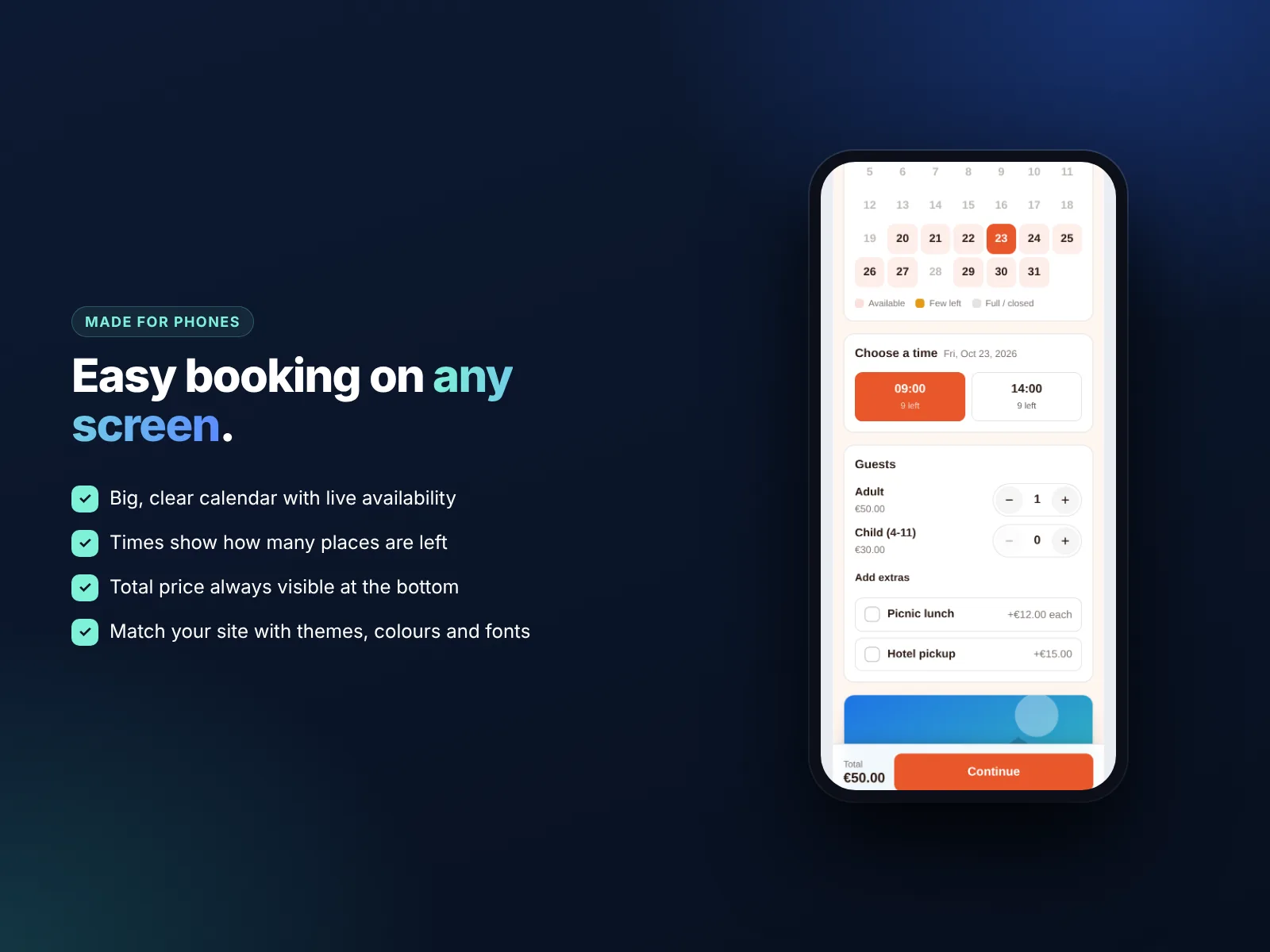
The total updates live as guests choose tickets and extras, so there are no surprises at payment. This is one of the biggest reasons guests complete a booking instead of leaving to “ask first”.
Deposits and payments for tours
Tour operators often prefer a deposit: guests commit, and you are not exposed to refunds for weather cancellations. A common setup is 20 to 30% online and the rest in cash or card on the day.
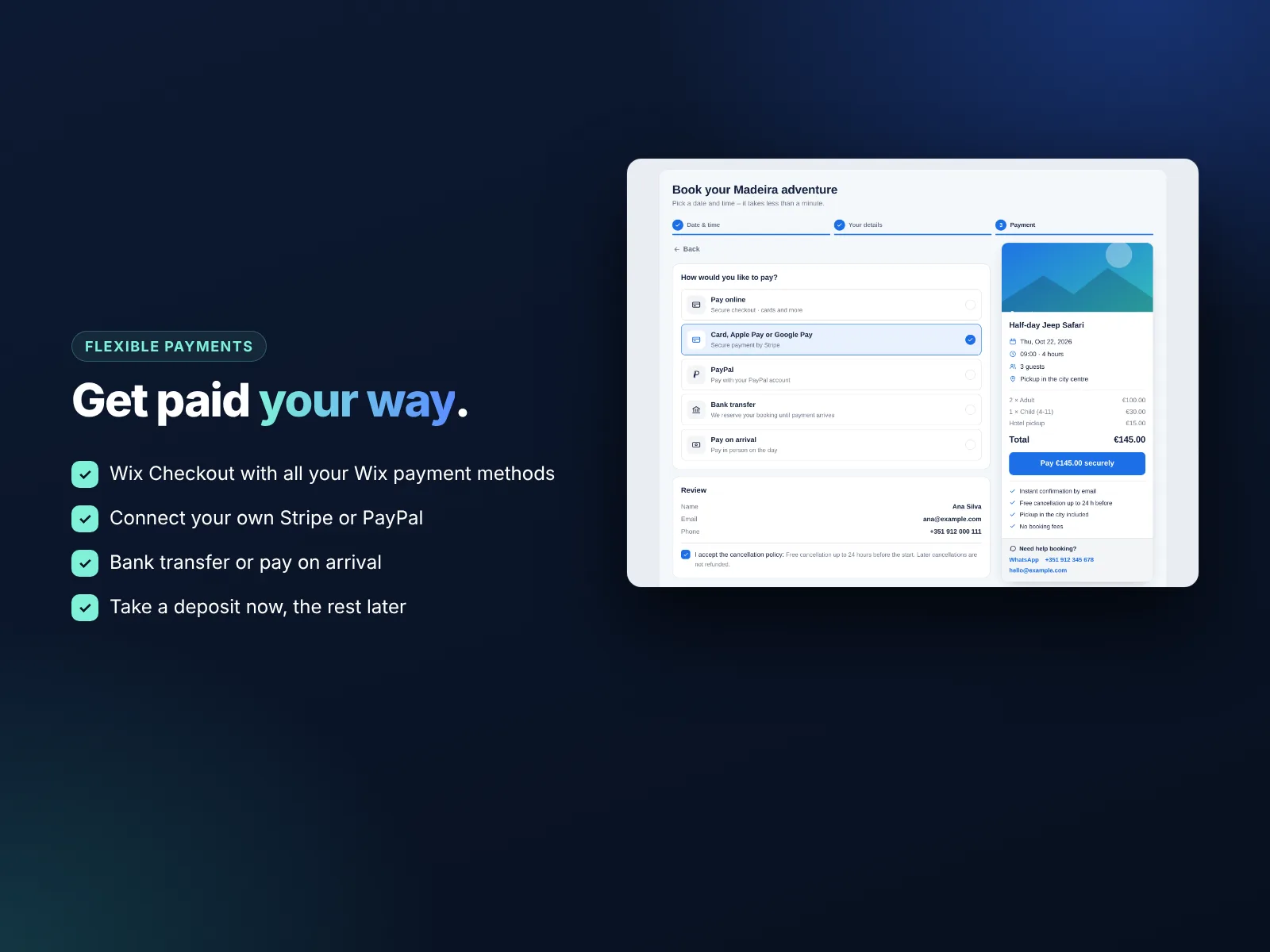
- Site checkout: guests pay through your Wix checkout with the methods you already accept.
- Your own Stripe: cards and wallets, paid straight to your Stripe account (Pro).
- Your own PayPal: popular with international travellers (Pro).
- Deposit: a percentage or fixed amount online, the rest later (Pro).
- Pay on arrival or bank transfer for groups and agents.
Online-payment bookings hold their seats for a short time while the guest pays, so two people cannot grab the last places at the same moment. Read more about booking payments and deposits on Wix and Wix payments setup.
A booking flow made for phones
Most tour bookings are made on phones, often on the day before or even the same morning. The booking widget is designed mobile-first:
- A big, easy calendar with unavailable days greyed out.
- Time buttons that show places left.
- A sticky bottom bar with the total and the next button always visible.
- Three short steps: date and time, details, payment.
- Your colors, fonts and theme, so it looks like part of your site.
Test it yourself on your phone before you publish. If you can book in under a minute, so can your guests. For more mobile tips, see our mobile-friendly Wix website guide.
Manage bookings, groups and phone bookings
The dashboard shows today’s and upcoming bookings, the number of guests per departure and the payment status of each booking (paid, deposit, unpaid). When a hotel or agent calls, add the booking by hand so the seats are taken in the calendar. Export bookings to CSV for your guides or drivers, and use Wix Automations to send reminders, because every guest is saved as a contact with the “Smart Booking” label.
Top 10 tips for more tour bookings
- Put the “Book now” button above the fold on every tour page.
- Show real photos of guides, vehicles and views, not stock images.
- List what is included and what to bring.
- State the cancellation policy clearly, especially for weather.
- Offer a small deposit instead of full payment to lower the barrier.
- Add hotel pickup as an extra. It is convenient for guests and extra revenue for you.
- Use urgency honestly: “Only 3 seats left on Saturday” and a countdown bar for seasonal offers.
- Translate your site for international guests. See our Wix multilingual guide.
- Collect reviews on Google and TripAdvisor after every tour.
- Show prices clearly with a pricing table for private tours and packages.
How to install Smart Booking & Payment and leave a review
- Open the Smart Booking & Payment listing on the Wix App Market.
- Click Add to Site, choose your Wix site and approve the permissions.
- Set it up from your Wix dashboard or the Editor (the steps above take a few minutes).
- Once it is working for you, go back to the app page, scroll to Reviews and click Write a Review. Choose your stars and share one or two sentences about how you use it.
Reviews help other Wix users find tools that work, and they help us, a small team, decide what to build next. If something is not working the way you expect, please tell us first and we will fix it fast.
More top Wix apps from MIVAQ Apps
MIVAQ Apps is the app studio of MIVAQ Creative Solutions. Every app is made for Wix, priced fairly and supported by real people. You can see all of them on our MIVAQ Apps developer page on the Wix App Market and on our Wix apps page.
- News Ticker & Announcement Bar: a scrolling news ticker and announcement bar with countdowns and coupon codes.
- Bulk Product & Price Editor: bulk edit prices, sales, stock, ribbons and SEO for many products at once.
- Smart Price Table: 50 premium pricing table designs with built-in checkout.
- YMM Parts Finder: a Year / Make / Model parts finder and fit check for any kind of parts store.
Need help with your Wix site?
MIVAQ designs, builds and manages Wix websites and builds Wix apps. If you want help with a tour website, a booking system or online payments, we are happy to help. See our Wix solutions, then contact us:
- WhatsApp: message us
- Email: hello@mivaq.com
- Form: send your project details
Install Smart Booking & Payment →
Related Wix guides
- Best Wix booking app for small businesses
- Wix Bookings guide
- Booking payments and deposits
- Wix for hotels and vacation rentals
- The complete Wix guide
Frequently asked questions
What is the best tour booking system for Wix?
A good tour booking system needs time slots, capacity, ticket types, extras, guest questions and deposits. Smart Booking & Payment by MIVAQ Apps includes all of these and works inside your Wix site.
Can I set different prices for adults and children?
Yes. On Pro you can add ticket types such as adult, child and infant, each with its own price.
Can I charge for hotel pickup?
Yes. Add pickup as a paid extra per person or per booking.
Can I take a deposit for tours?
Yes. On Pro you can charge a deposit online and collect the rest on the day.
How do I stop overbooking?
Set capacity per departure and add phone bookings in the dashboard. Online bookings also hold seats while the guest pays.
Does it work for multi-day tours or stays?
Yes. Use a date-range service for multi-night stays, or a full-day service for day trips.


