This article is part of our complete Wix guide and our list of best Wix apps.
Your pricing section is where a visitor decides to buy or leave. A cramped text list of plans makes that decision hard. A clear, beautiful pricing table with a highlighted plan, a monthly and yearly switch and a big “Buy now” button makes it easy.
This guide covers the top features of the best Wix pricing table app, shows why we built Smart Price Table by MIVAQ Apps with 50 premium designs and built-in checkout, and walks you through the setup step by step.
Add Smart Price Table to your Wix site →
Key takeaways
- A good pricing table compares plans at a glance, highlights the best choice and lets visitors buy without leaving the page.
- Top features: monthly/yearly switch with “Save %”, badges, crossed-out prices, feature tooltips, comparison table, FAQ and mobile layout.
- Smart Price Table includes 50 designs (10 layouts × 5 color palettes) in light and dark.
- Every plan button can open your Wix checkout with the right plan and price, open any link, or be hidden.
- It costs $2.99 a month, or $2.49 a month billed yearly, with a 14-day free trial.
In this guide
- Why your Wix site needs a real pricing table
- Top 10 features of the best pricing table apps
- Smart Price Table: the pricing table app we built for Wix
- 50 premium designs
- Sell plans with your Wix checkout
- Live editor and smart features
- Pricing
- How to add a pricing table to Wix
- Top 10 uses for pricing tables
- Install and leave a review
- Frequently asked questions
Why your Wix site needs a real pricing table
- Faster decisions. Side-by-side plans let visitors compare in seconds.
- More upgrades. Highlighting a “Most popular” plan nudges people toward the middle option.
- More yearly plans. A visible “Save 20%” badge makes the yearly option attractive.
- Fewer questions. Feature lists, tooltips and an FAQ answer doubts before people contact you.
- Trust. A polished table looks professional, which matters when you ask for money.
Wix has Pricing Plans for memberships, which are perfect when you sell access to members-only content. Many businesses, though, simply need a beautiful table to sell services, packages, products or subscriptions, and a button that goes straight to checkout. That is the gap a pricing table app fills.
Top 10 features of the best pricing table apps
- Professional designs that match modern websites, in light and dark.
- Monthly / yearly switch with an automatic “Save %” badge.
- Highlighted plan with a badge like “Most popular” or “Best value”.
- Crossed-out prices for launch offers and discounts.
- Feature lists with tooltips to explain details without clutter.
- Comparison table for buyers who want every detail.
- FAQ, guarantee and trust points below the plans.
- Offer countdown for time-limited prices.
- Buy buttons that work: checkout for the plan, or a link to any page.
- Stats: views, clicks, orders and revenue for each table.
Smart Price Table: the pricing table app we built for Wix
Smart Price Table is published on the Wix App Market by MIVAQ Apps. It combines everything above in one app: you design the table in a live editor in your Wix dashboard, place it on any page with the widget, and visitors can buy straight away.
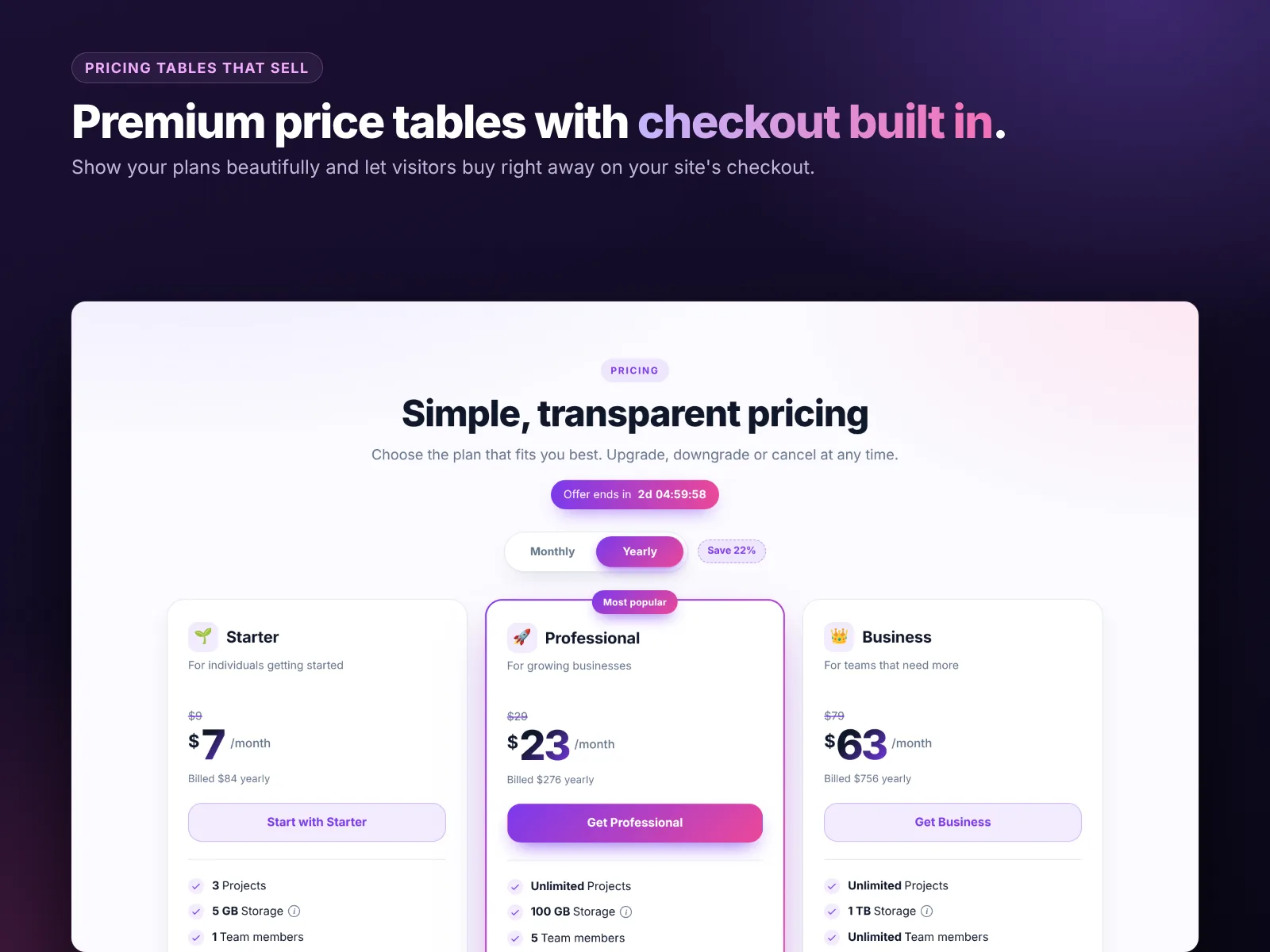
You can create as many tables as you like and use a different one on each page, for example one for services, one for memberships and one for software plans. Your plans and prices stay the same when you switch designs, so you can try a new look in seconds.
50 premium designs
The 50 designs come from 10 layout styles, each in 5 color palettes:
| Layout style | Looks like | Best for |
|---|---|---|
| Aurora | Soft gradient cards with gentle color washes | Startups, apps, creative brands |
| Classic | Clean white cards with a clear top plan | Any business |
| Bold Header | Strong color header on each plan | Agencies, fitness, events |
| Glass | Frosted glass on a colorful background | Premium and tech brands |
| Neon | Glowing accents on a dark background | Gaming, tech, nightlife |
| Minimal | Thin lines and lots of white space | Consultants, law, finance |
| Spotlight | The featured plan lifted and lit up | Pushing one main plan |
| Pastel | Soft, friendly colors | Wellness, beauty, kids |
| Rows | Compact horizontal rows | Long lists of packages |
| Comparison | A full feature-by-feature grid | Detailed software or service plans |
Each style comes in 5 color palettes, including dark versions, so there is always one close to your brand before you touch a single setting. Switching designs keeps all your plans, prices and features, which makes it easy to test which look converts best on your site.
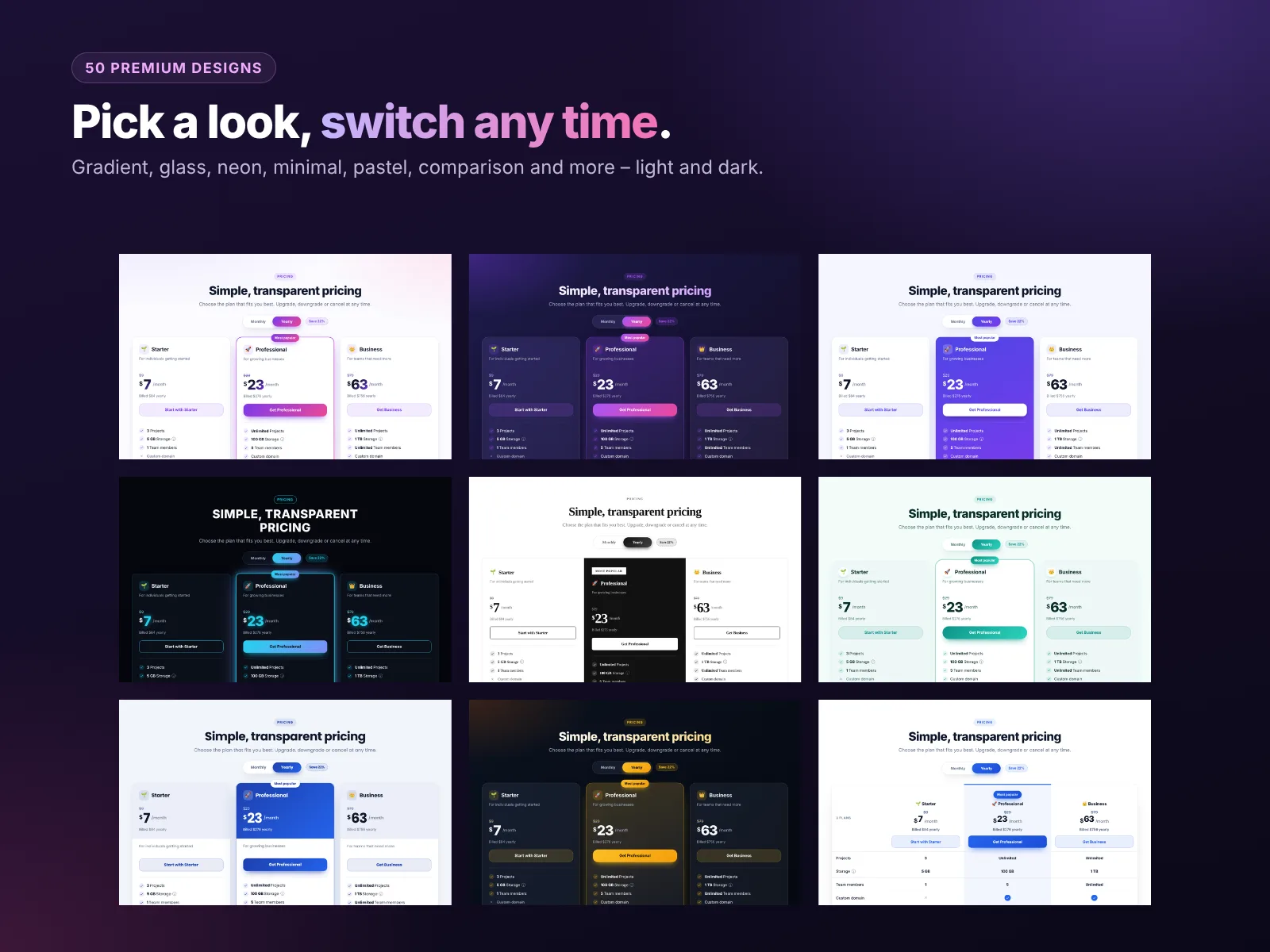
Pick a design, then fine-tune colors, fonts and corner style so the table matches your brand. For more design advice, read our Wix website design tips.
Sell plans with your Wix checkout
This is what makes Smart Price Table different from a design-only table. Each plan button can:
- Start checkout for that plan and price (monthly or yearly), using your Wix checkout and the payment methods you already accept.
- Open any link, such as your contact page, a booking page or a membership plan.
- Be hidden for plans that are “contact us” only.
The price is calculated on the server, so visitors cannot change it in the browser, and the currency always matches your site. Orders appear in your Wix orders list, and the app counts the sale in its stats. To set up checkout payments, see our Wix payments setup guide.
Live editor and smart features
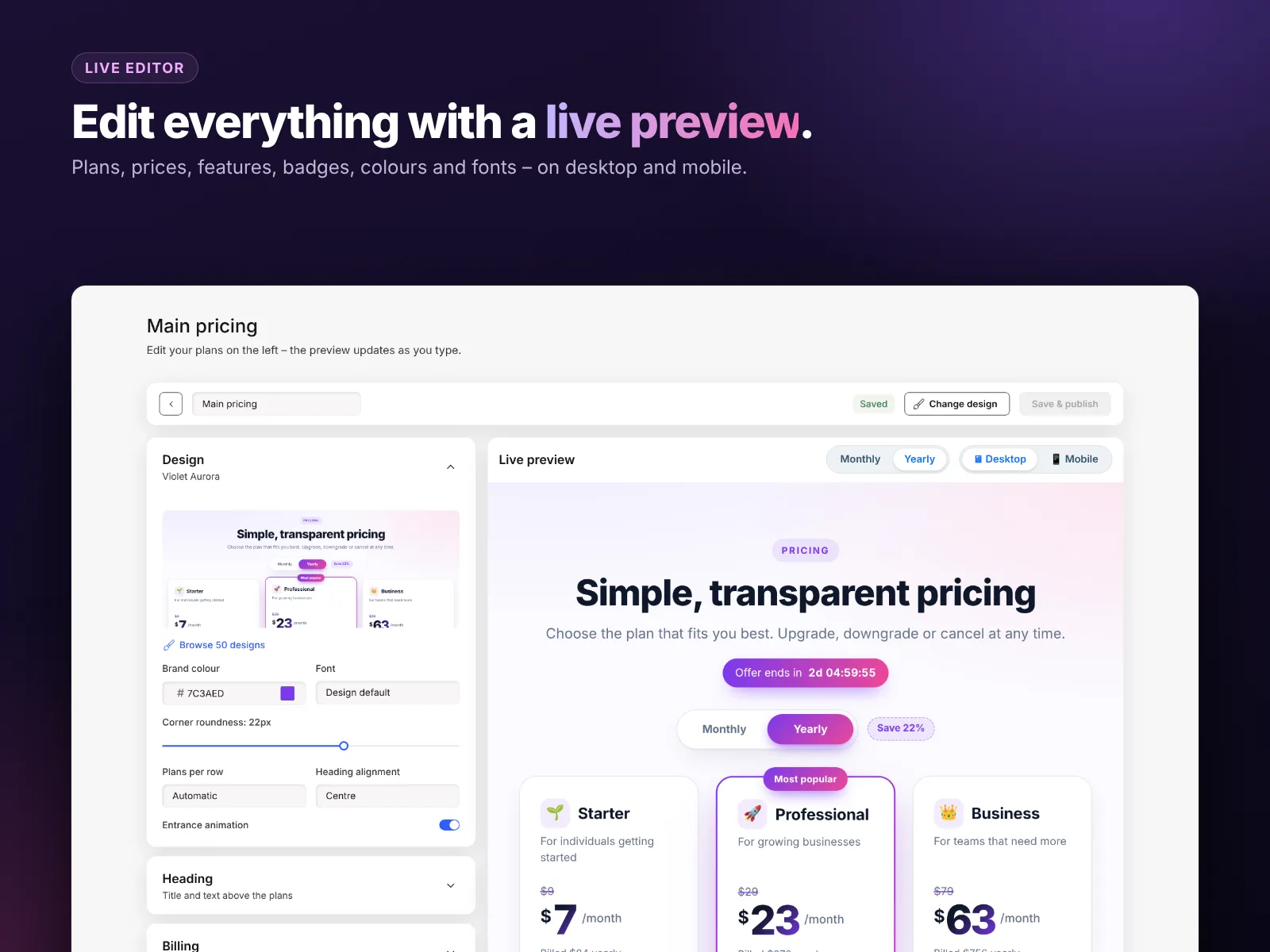
Everything is edited in a live editor with desktop and mobile preview: plan names, prices, icons, badges, crossed-out prices, feature lists with tooltips, colors, fonts and corners. Smart features include:
- A monthly / yearly switch with an automatic “Save %” badge.
- A highlighted plan.
- An offer countdown.
- A money-back guarantee line and trust points.
- A full comparison table and an FAQ.
- On phones, the featured plan is shown first.
- Views, clicks, orders and revenue for each table.
Pricing
| Plan | Price | Includes |
|---|---|---|
| Premium | $2.99/month, or $2.49/month billed yearly | 50 designs, unlimited tables and plans, buy buttons with checkout, countdown, comparison table, FAQ, stats |
Every new install starts with a 14-day free trial, so you can build your tables and test checkout before paying.
How to add a pricing table to Wix
- Install Smart Price Table from the Wix App Market and start the free trial.
- In your Wix dashboard, open the app and click New table. Choose one of the 50 designs.
- Edit your plans: names, monthly and yearly prices, features and badges.
- Set each button: checkout for the plan, a link, or hidden.
- Turn on the extras you want: yearly switch, comparison table, FAQ, guarantee, countdown.
- In the Editor, add the Smart Price Table widget to your page and choose the table.
- Use Test Wix Checkout connection in the Help tab, then publish.
Want to write a pricing page that really converts? Read our top pricing page tips for Wix.
Top 10 uses for pricing tables
- Agency and freelancer service packages.
- Coaching and consulting programs.
- Website, SEO or marketing retainers.
- Software and SaaS plans.
- Gym and fitness memberships.
- Course and class bundles.
- Photography packages.
- Event tickets and sponsor packages.
- Cleaning, repair or maintenance plans.
- Restaurant catering menus and party packages.
How to install Smart Price Table and leave a review
- Open the Smart Price Table listing on the Wix App Market.
- Click Add to Site, choose your Wix site and approve the permissions.
- Set it up from your Wix dashboard or the Editor (the steps above take a few minutes).
- Once it is working for you, go back to the app page, scroll to Reviews and click Write a Review. Choose your stars and share one or two sentences about how you use it.
Reviews help other Wix users find tools that work, and they help us, a small team, decide what to build next. If something is not working the way you expect, please tell us first and we will fix it fast.
More top Wix apps from MIVAQ Apps
MIVAQ Apps is the app studio of MIVAQ Creative Solutions. Every app is made for Wix, priced fairly and supported by real people. You can see all of them on our MIVAQ Apps developer page on the Wix App Market and on our Wix apps page.
- News Ticker & Announcement Bar: a scrolling news ticker and announcement bar with countdowns and coupon codes.
- Bulk Product & Price Editor: bulk edit prices, sales, stock, ribbons and SEO for many products at once.
- Smart Booking & Payment: a booking calendar with online payments, deposits, Stripe and PayPal.
- YMM Parts Finder: a Year / Make / Model parts finder and fit check for any kind of parts store.
Need help with your Wix site?
MIVAQ designs, builds and manages Wix websites and builds Wix apps. If you want help with your pricing page, website design or checkout setup, we are happy to help. See our Wix solutions, then contact us:
- WhatsApp: message us
- Email: hello@mivaq.com
- Form: send your project details
Related Wix guides
- Top pricing page tips for Wix
- Wix pricing plans and memberships
- Wix payments setup
- Best Wix apps
- The complete Wix guide
Frequently asked questions
What is the best pricing table app for Wix?
Look for professional designs, a monthly/yearly switch, highlighted plans, comparison tables and buttons that can sell. Smart Price Table by MIVAQ Apps has 50 designs and built-in checkout.
Can visitors buy a plan directly from the table?
Yes. A plan button can start your Wix checkout for that plan and price.
Can I use a different table on each page?
Yes. Create unlimited tables and choose one for each widget.
Does it work on mobile?
Yes. Tables are responsive, and the featured plan is shown first on phones.
Is there a free trial?
Yes. Every install starts with a 14-day free trial. After that it costs $2.99 a month or $2.49 a month billed yearly.
Is this the same as Wix Pricing Plans?
No. Wix Pricing Plans manages memberships. Smart Price Table is a design and checkout tool for showing and selling any plans or packages.


