
This article is part of our complete Wix guide and our list of best Wix apps.
A good directory is more than a helpful list. It can be a small, steady business. Local businesses pay to be found by customers, and a well-known directory in a city or niche becomes a place they want to be seen. The model is simple: attract visitors who are looking for businesses, then charge businesses for better visibility.
This guide explains how to make money with a directory website on Wix: which revenue models work, how to price listings, how to take payments, how to get businesses to join and how to grow the traffic that makes listings valuable. We use the Premium plan of Business Directory Listings by MIVAQ Apps, which lets you sell paid and featured listings through your own Wix Checkout.
Start your Wix directory with Business Directory Listings →
Key takeaways
- Most directories earn from featured listings, paid listings, sponsorships and advertising.
- Offer a free basic listing to fill the directory, then sell featured spots with clear benefits.
- With the Premium plan, you set listing packages and prices, payments go through your own Wix Checkout and featured spots expire automatically.
- Traffic is what businesses pay for, so invest in local SEO and helpful content.
- Moderate submissions and reviews to keep the directory trustworthy.
In this guide
- Directory revenue models
- How to design listing packages
- How much to charge
- Taking payments with Wix Checkout
- How to get businesses to list
- How to grow directory traffic
- Show businesses the value they get
- Moderation and trust
- A 90-day plan
- Directory niches that pay well
- Mistakes to avoid
- Frequently asked questions
Directory revenue models
- Featured listings: businesses pay to appear at the top of results or their category with a featured badge.
- Paid listings: a listing itself costs money, often used in premium niches where being included is valuable.
- Freemium: a free basic listing plus paid upgrades. This is the easiest way to start.
- Category sponsorship: one business sponsors a whole category, such as “Restaurants sponsored by…”.
- Display advertising: banners on your directory pages once traffic is large enough.
- Services: photography, copywriting or website help for listed businesses.
Most successful directories combine a free tier with featured upgrades, then add sponsorships as they grow.
How to design listing packages
Keep it simple: two or three options that are easy to compare.
- Free: a standard listing in the directory, with no end date. This fills your directory and builds trust.
- Featured: shown at the top with a featured badge for a set number of days, such as 30.
- Premium or Spotlight: featured placement for longer, plus extras you offer manually such as a mention in your newsletter or a social post.
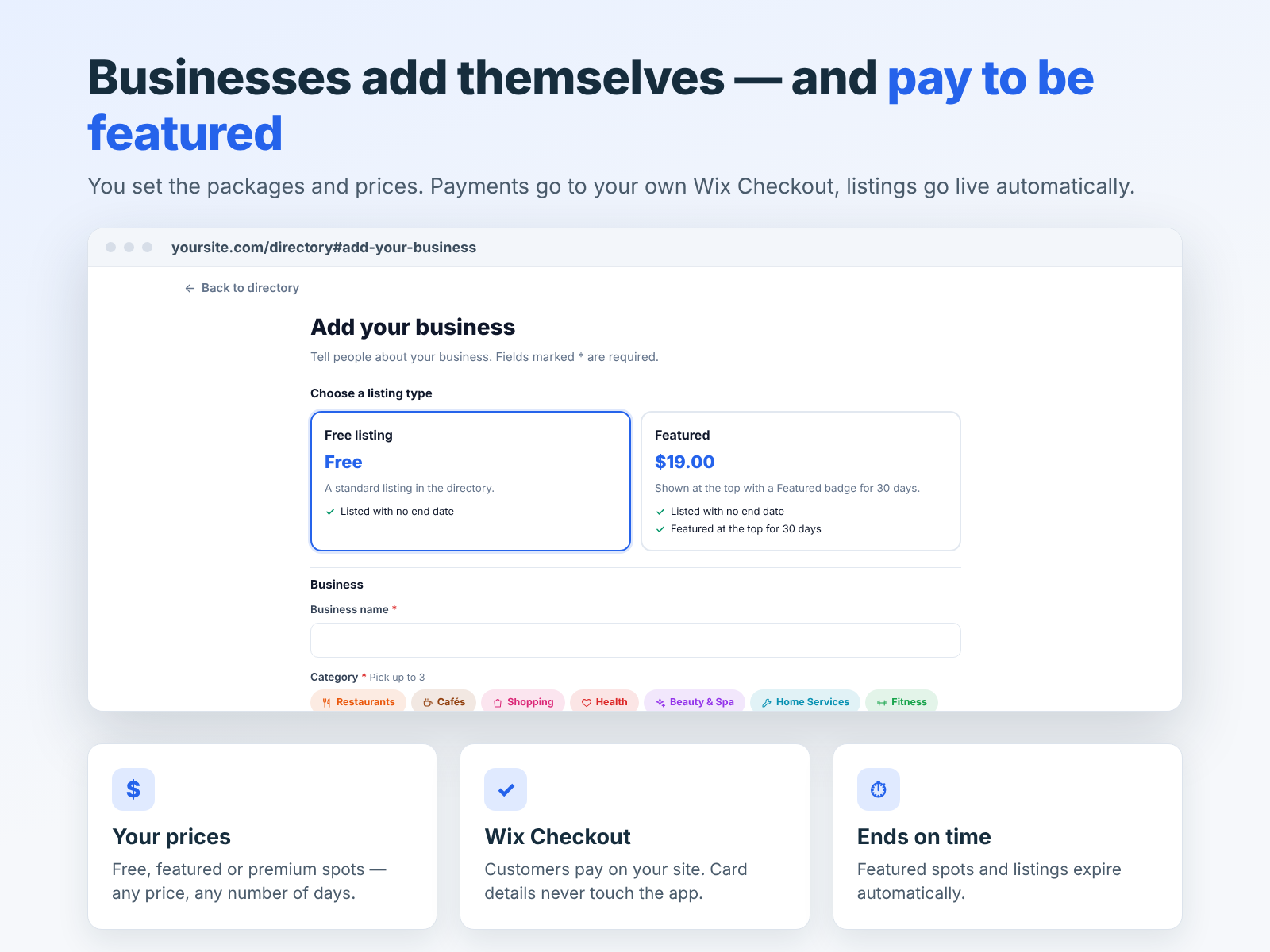
In Business Directory Listings Premium, you set the packages and prices yourself: free, featured or premium spots, any price and any number of days. Featured spots and listings expire automatically when their time is up, so you do not need to track dates manually.
How much to charge
There is no single right price. Start from the value a business gets:
- Customer value: a wedding photographer earns far more per customer than a coffee shop, so featured spots in high-value niches can cost more.
- Your traffic: charge little while traffic is small and raise prices as visits grow.
- Competition: check what local newspapers, magazines and other directories charge.
- Simple numbers: monthly prices that are easy to say yes to work best at the start.
Offer an introductory price to the first businesses, then raise it for new customers once you can show results.
Taking payments with Wix Checkout
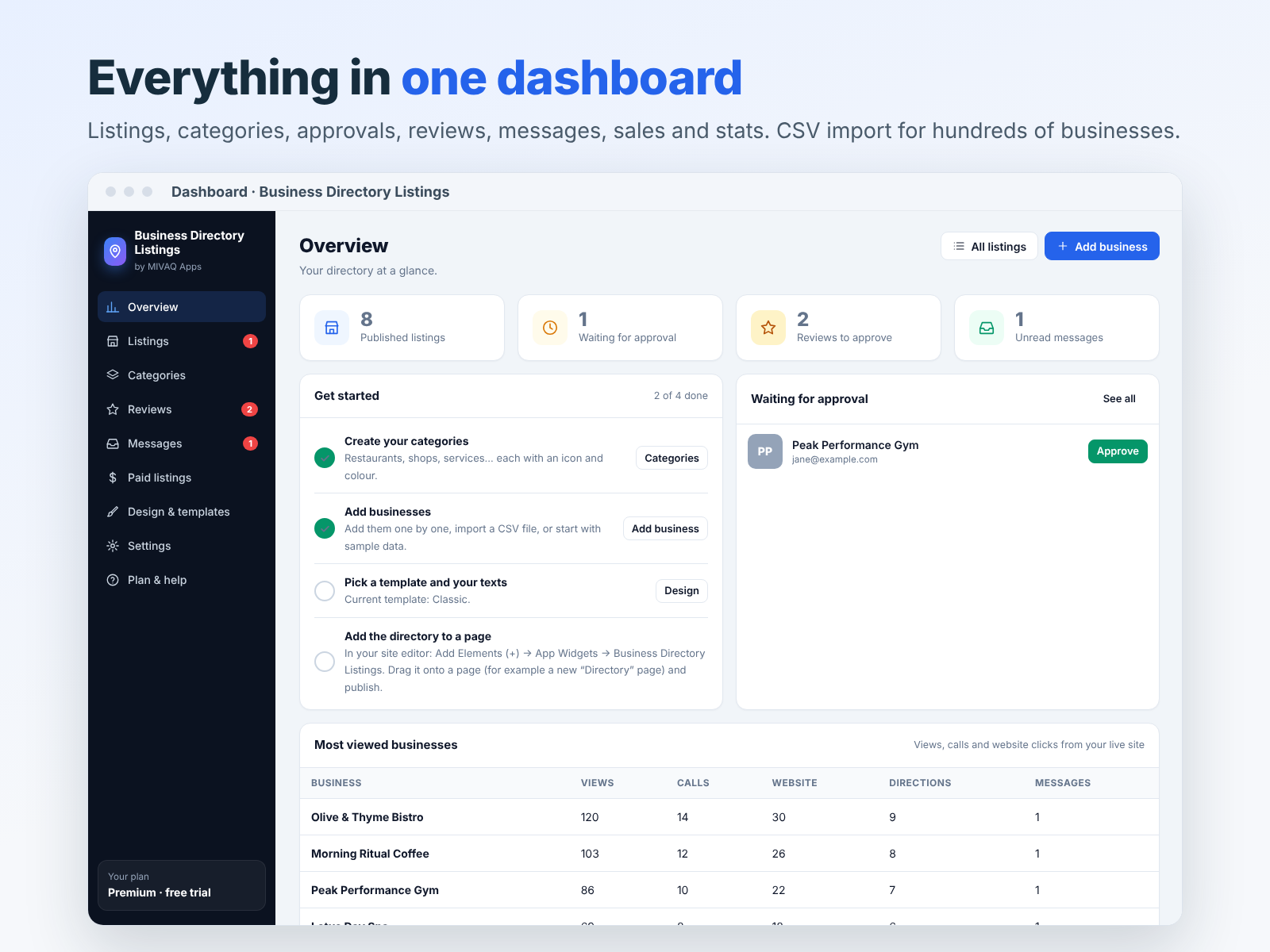
On the Premium plan, businesses choose a package when they submit, then pay through your own Wix Checkout. Card details never touch the app. Once payment is complete and you approve the listing, it goes live automatically. A sales report shows what you have earned.
Because payments run through your site, the money goes to your own Wix Payments or connected payment provider.
How to get businesses to list
- Seed the directory yourself. Add 30 to 50 businesses with free listings so the site is useful from day one. CSV import makes this fast.
- Tell them they are listed. Email or message each business with a link to their page. Many will share it.
- Make submission easy. The add-your-business form takes a few minutes and supports photo uploads.
- Offer a free trial of featured placement to your first businesses, then convert them to paid.
- Partner with local groups, chambers of commerce and event organizers.
- Show results: views and contacts from the directory’s visitor stats make the best sales argument.
How to grow directory traffic
Businesses pay for visibility, so traffic is your real product.
- Local SEO: target searches like “best brunch in [city]” and “[service] near [area]”. Each category and business page is a chance to rank.
- Helpful content: blog posts such as “12 dog-friendly cafes in town” that link to listings.
- Social sharing: share new listings and roundups in local groups.
- Newsletter: a monthly email with new and featured businesses.
- Backlinks: listed businesses often link to their directory page from their own sites.
Our small business SEO guide explains how to rank local pages.
Show businesses the value they get
Renewals are easier when businesses can see results. The dashboard shows how often each listing is viewed and contacted, and messages from visitors arrive in your dashboard. Send featured businesses a short monthly summary: views, clicks to call, website clicks and messages. Businesses that see numbers renew.
Moderation and trust
A directory full of spam or fake reviews loses visitors quickly, and then businesses stop paying. Keep standards high:
- Approve every submission before it goes live.
- Check that businesses are real and match your niche and area.
- Mark checked businesses as verified.
- Read reviews and remove abusive or fake ones.
- Label paid placements clearly as featured.
Directory niches that pay well
Some niches make money faster because each customer is worth a lot to the businesses listed:
- Weddings and events: venues, photographers, florists and caterers spend real money on marketing.
- Home services: plumbers, electricians, roofers and cleaners get high-value jobs from one enquiry.
- Health and wellness: physiotherapists, personal trainers, yoga studios and nutritionists want local clients.
- Education: tutors, language schools, music teachers and driving schools.
- Tourism: tours, activities and accommodation in popular destinations.
- Pets: groomers, vets, dog walkers and pet-friendly places.
Combine a valuable niche with a clear area, such as “wedding suppliers in Cornwall”, and you have a directory that businesses will pay to join.
Mistakes to avoid
- Charging too early. Build traffic and listings first, then sell featured spots.
- Too many categories. Empty categories make the site look abandoned. Start small and add more later.
- Copying business descriptions. Duplicate text helps nobody and hurts SEO. Write short, original summaries.
- Ignoring messages. Visitor messages and reviews are signs of an active directory. Respond and pass them on.
- Hiding that listings are paid. Clear featured labels keep visitors’ trust and keep you on the right side of advertising rules.
A 90-day plan
- Days 1 to 30: build the directory, add 50 free listings, publish four helpful blog posts.
- Days 31 to 60: contact every listed business, open submissions and offer the first featured spots at an introductory price.
- Days 61 to 90: share results with featured businesses, add a category sponsorship and keep publishing content.
Just getting started? Read how to create a business directory on Wix first.
Plans
Business Directory Listings has three plans, each with a 7-day free trial: Starter ($3.99 a month, up to 100 listings), Pro ($7.99 a month, up to 1,000 listings with submissions, reviews, messages, badges and stats) and Premium ($9.99 a month, unlimited listings, paid listings via Wix Checkout, all 9 templates and a sales report). To sell listings, choose Premium. Install it from the Wix App Market, or ask MIVAQ to build your directory website for you.
Frequently asked questions
Can I charge businesses to be listed on my Wix site?
Yes. With the Premium plan you create free, featured or premium packages at your own prices, paid through your Wix Checkout.
Do featured listings end automatically?
Yes. Featured spots and paid listings expire automatically when their time is up.
Where does the money go?
To your own site’s payment setup through Wix Checkout. Card details never touch the app.
Should I start with free listings?
Yes. Free listings fill the directory and attract visitors, which makes paid upgrades worth buying.
Can I approve listings before they go live?
Yes. Every submission waits for your approval.


