
This article is part of our complete Wix guide and our list of best Wix apps.
Directory websites are one of the most useful things you can build for a local community or a niche: a city guide of restaurants and shops, a members’ list for a business association, a directory of wedding suppliers, therapists, tradespeople or pet services. Visitors love them because they save time, and businesses love being listed because it brings customers.
This guide shows you how to create a business directory on Wix, from planning your categories to publishing searchable listings with maps, opening hours and reviews. We use Business Directory Listings, a Wix app by MIVAQ Apps, but the planning advice applies to any directory project.
Add Business Directory Listings to your Wix site →
Key takeaways
- A good directory needs clear categories, rich business pages and fast search.
- Business Directory Listings adds a searchable directory with 9 premium templates, search by keyword and city, categories, sorting and grid or list views.
- Each business gets its own page with cover photo, logo, gallery, description, contact details, opening hours with open or closed status, map directions and social links.
- Add businesses one by one, import them from CSV or start from sample content.
- Pro and Premium add owner submissions with approval, star reviews, messages, badges and visitor stats. Premium adds paid and featured listings through Wix Checkout.
In this guide
- Directory website ideas
- Plan your directory before you build
- Business Directory Listings for Wix
- 9 premium templates
- Business pages that bring customers
- Search, categories and filters
- Adding businesses: manual, CSV or sample data
- Owner submissions, reviews and messages
- How to build it, step by step
- Plans and pricing
- SEO tips for directory sites
- Example: launching a city guide in 30 days
- Keeping listings accurate
- Frequently asked questions
Directory website ideas
- City or town guide: restaurants, cafes, shops and services in one area.
- Business association or chamber of commerce: a members’ directory with contact details.
- Niche directories: wedding suppliers, vegan restaurants, dog-friendly places, coworking spaces, tutors or clinics.
- Professional networks: freelancers, consultants or trades in a region.
- Tourism sites: hotels, tours, attractions and activities.
- Community and church sites: local groups, charities and volunteer organizations.
The more specific the niche, the easier it is to rank on Google and to attract businesses that want to be listed.
Plan your directory before you build
- Choose your audience and area. “Family activities in Leeds” is clearer than “things to do”.
- Define categories. Five to fifteen clear categories, such as Restaurants, Cafes, Shopping, Health, Beauty and Spa, Home Services, Fitness and Automotive.
- Decide what each listing needs: photos, description, address, phone, website, opening hours, social links.
- Collect your first listings. Aim for at least 20 to 30 good businesses before launch, so the directory feels useful from day one.
- Decide on growth and income. Will businesses submit themselves? Will you charge for featured spots? Our guide to making money with a Wix directory covers this.
Business Directory Listings for Wix
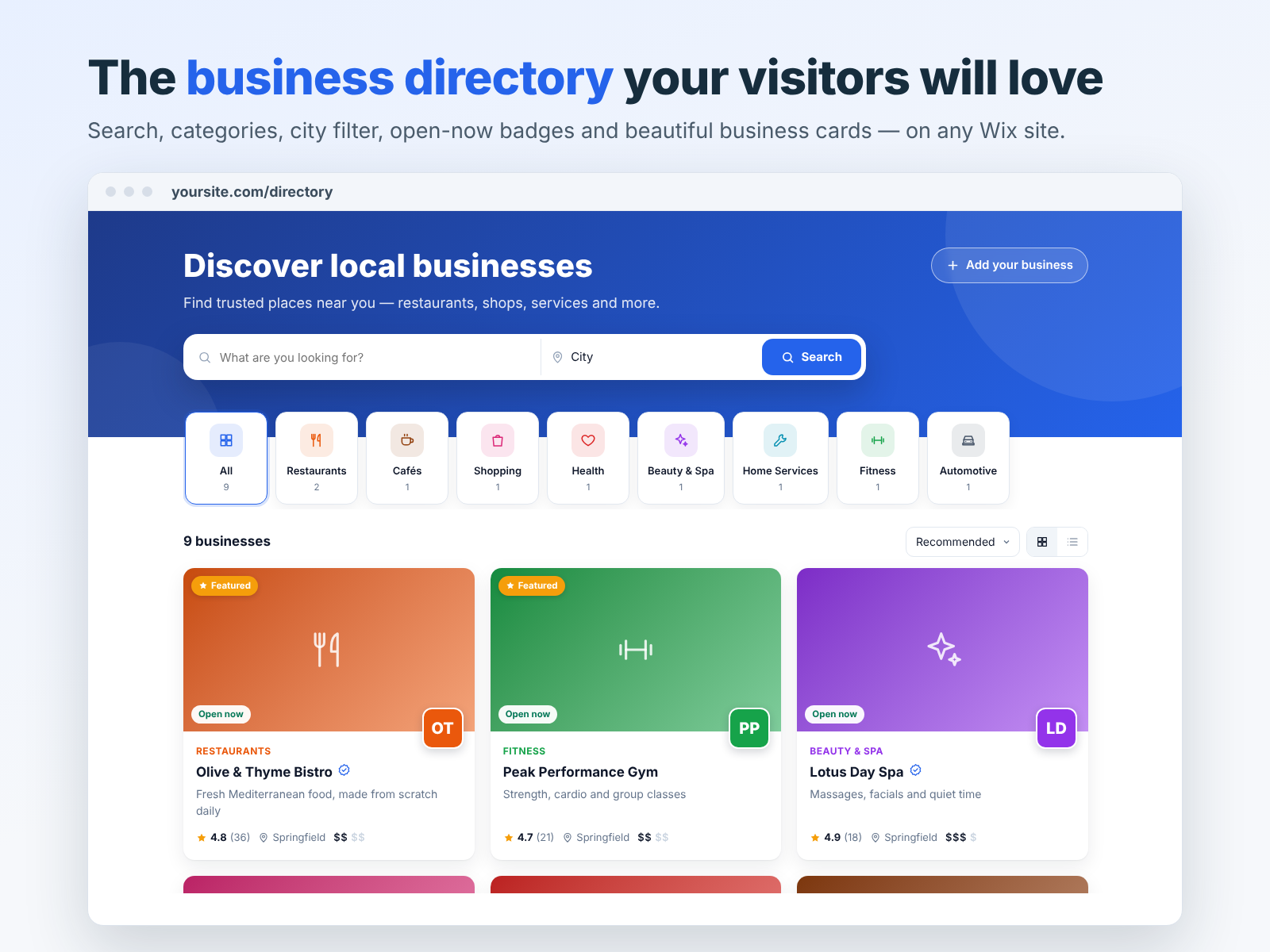
Business Directory Listings adds a clean, searchable directory of local businesses to your Wix site. Visitors search by keyword and city, browse by category, sort results and switch between grid and list views.
9 premium templates
Choose a look in one click, then change colours, fonts, corners, header photo and every text to match your brand. Templates include styles such as Overlay, Glass, Dark Luxe, Magazine, Bold and Elegant.
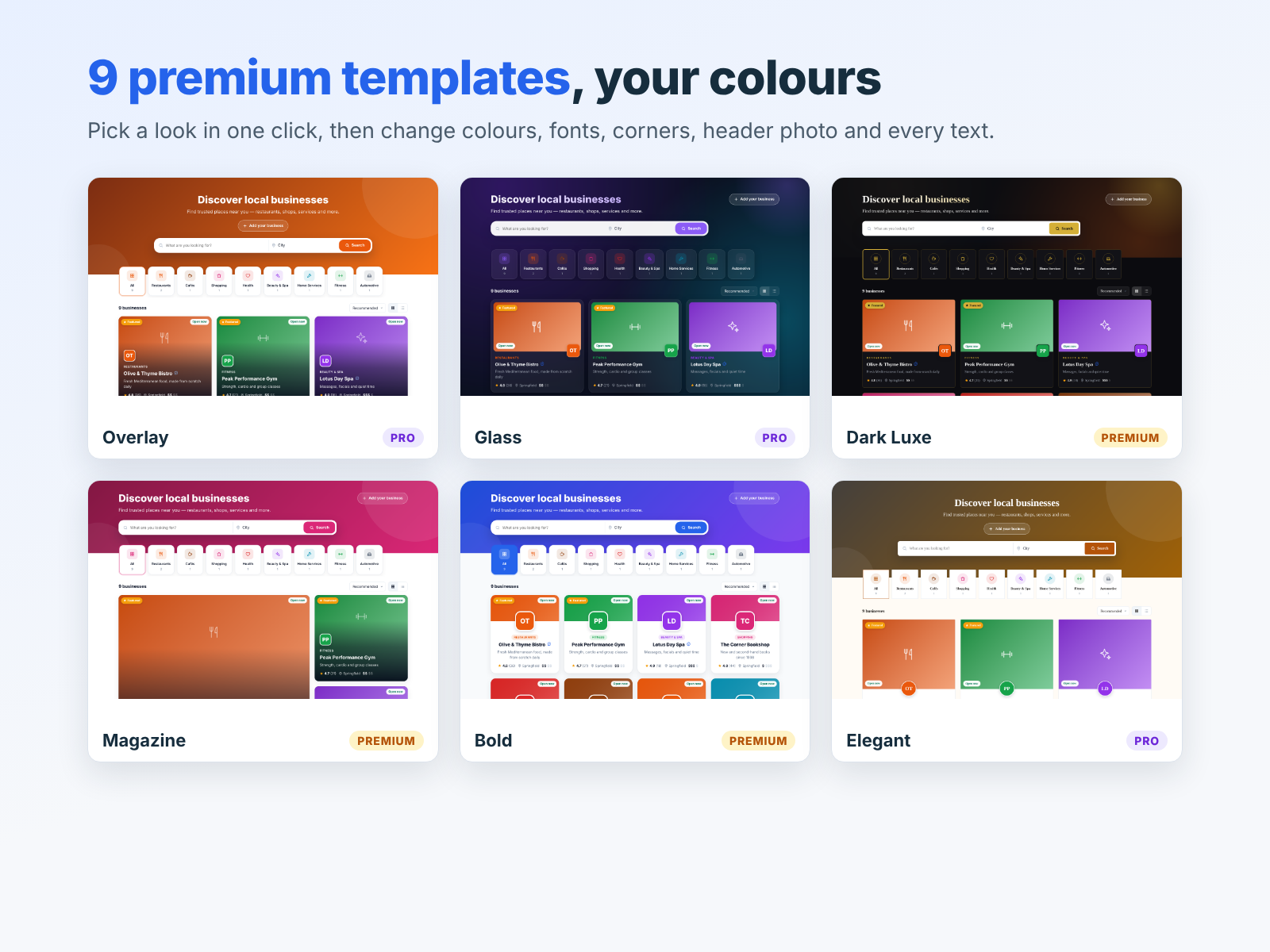
Starter includes 3 templates, Pro includes 6 and Premium includes all 9.
Business pages that bring customers
Every business gets its own page with:
- A cover photo, logo and gallery
- A description and tags
- Contact details, website and social links
- Opening hours with an “open now” or “closed” status
- A map with directions
- Star reviews and a message form (Pro and Premium)
- A sidebar of categories so visitors keep exploring
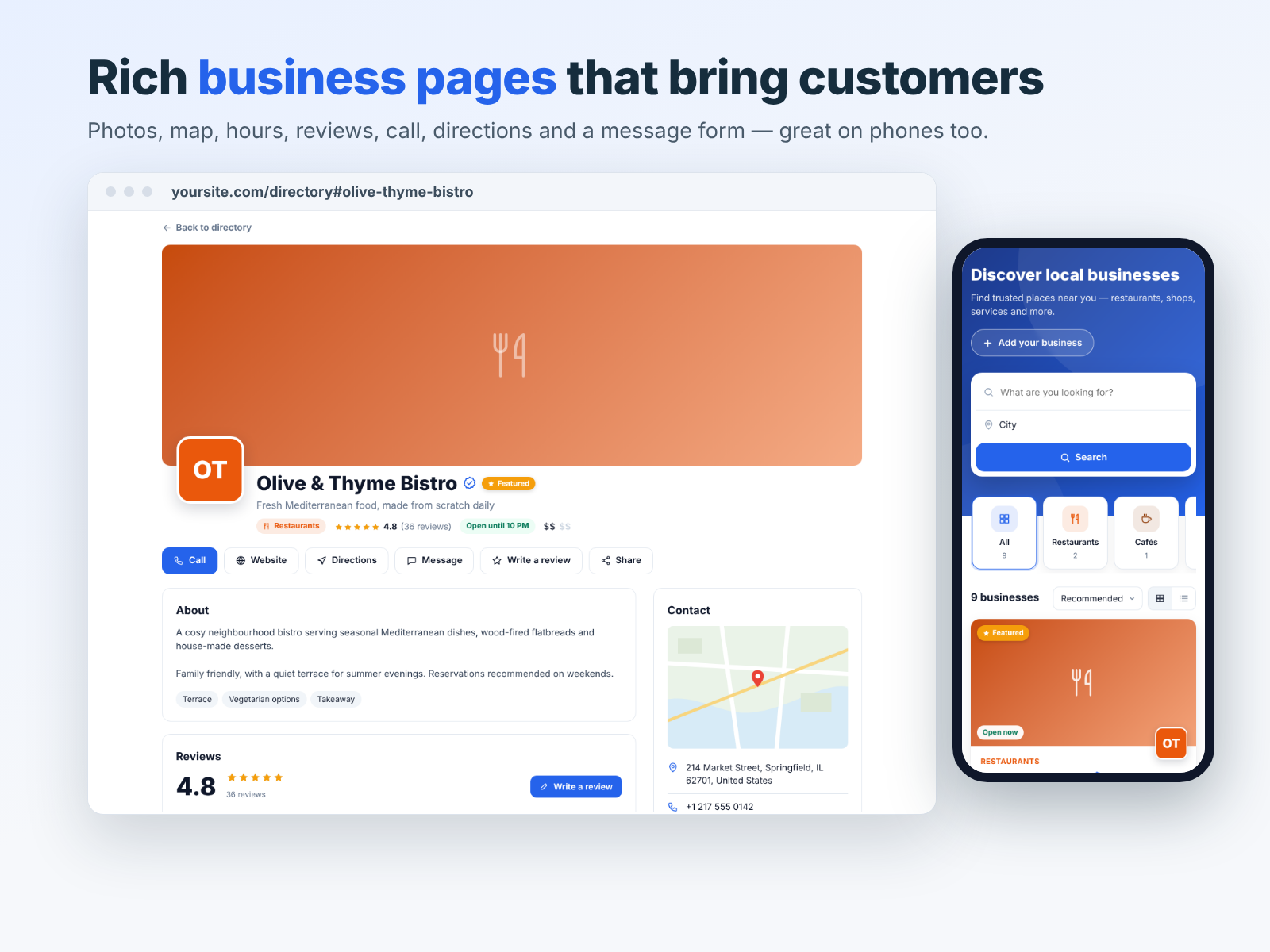
Pages work well on phones, where most local searches happen.
Search, categories and filters
Visitors find businesses by keyword and city, filter by category and sort the results. Open-now badges help people looking for something right away, and featured or verified badges highlight trusted listings.
Adding businesses: manual, CSV or sample data
- One by one: add each business in the dashboard with all its details.
- CSV import: import hundreds of businesses from a spreadsheet, and export them again when needed.
- Sample content: start with sample businesses to see the design, then replace them with real ones.
Owner submissions, reviews and messages
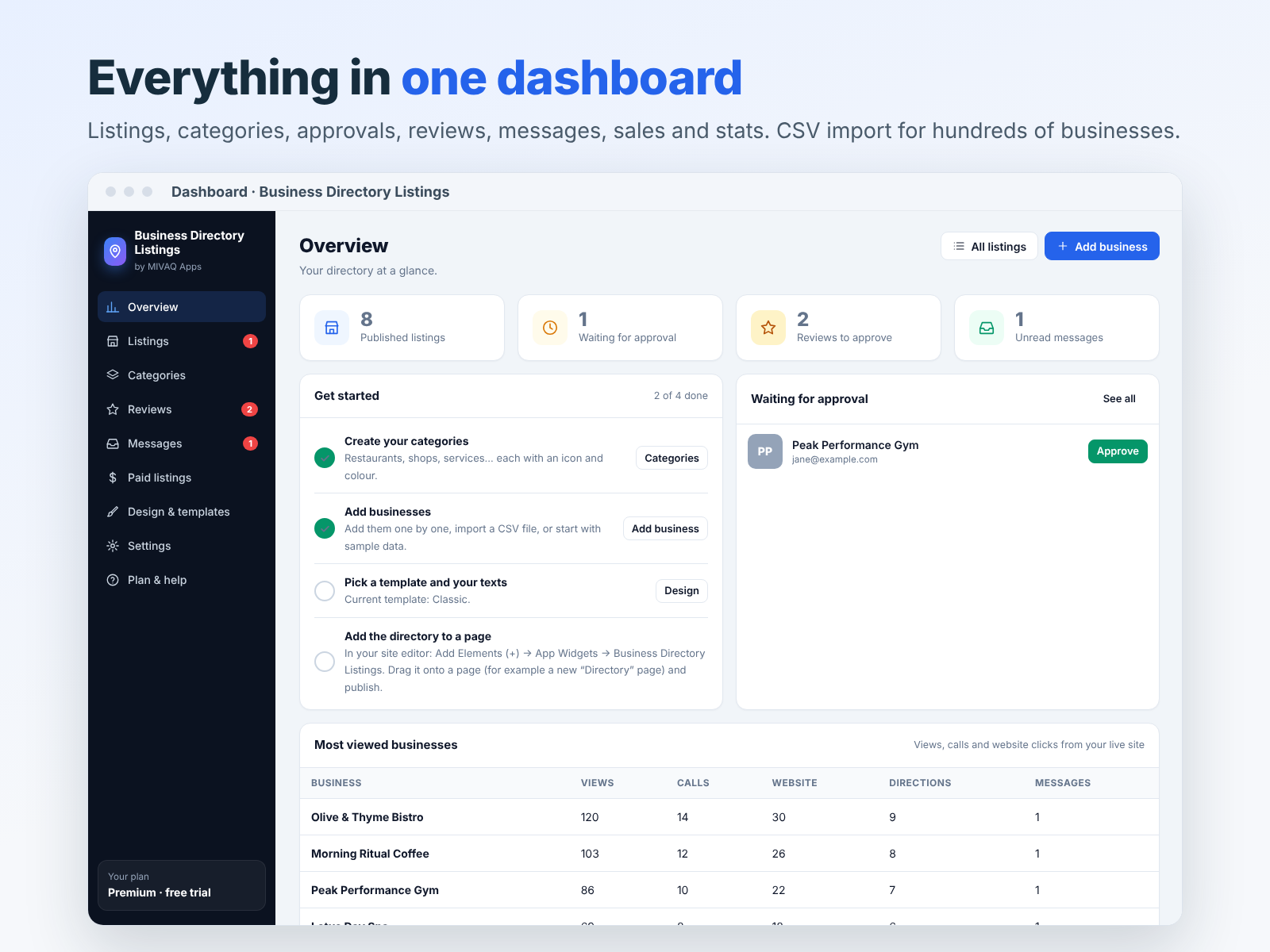
On Pro and Premium, business owners can submit their own listings through an “Add your business” form with photo uploads. Nothing goes live until you approve it. Visitors can leave star reviews and send messages that arrive in your dashboard. You can mark businesses as featured or verified, and see how often each listing is viewed and contacted.
How to build it, step by step
- Install the app from the Wix App Market and start the 7-day free trial.
- Create your categories in the dashboard.
- Add businesses manually, by CSV import or start with sample data.
- Pick a template and set your colours, fonts and texts.
- Add the directory to a page, for example a new page called Directory.
- Turn on submissions and reviews if you are on Pro or Premium.
- Publish and test search, filters and business pages on desktop and mobile.
Plans and pricing
- Starter: up to 100 business listings, search, categories and city filter, 3 premium templates, CSV import and export. $3.99 a month.
- Pro: up to 1,000 listings, add-your-business form and reviews, 6 templates, messages, badges and visitor stats. $7.99 a month.
- Premium: unlimited listings, paid listings via Wix Checkout, all 9 templates and everything in Pro plus a sales report. $9.99 a month.
All plans include a 7-day free trial, and yearly billing lowers the monthly price.
SEO tips for directory sites
- Target local phrases: “best cafes in Bristol”, “plumbers in Galway”.
- Write unique descriptions. Do not copy text from each business’s own website.
- Use good photos with descriptive file names.
- Write helpful blog posts that link to listings, such as “10 family-friendly restaurants in town”.
- Keep data fresh. Outdated hours and closed businesses hurt trust.
- Get links from local sites and from the businesses you list.
Our small business SEO guide covers these basics in more depth.
Example: launching a city guide in 30 days
Here is a realistic plan for a small team launching a local directory such as “Best of Riverside”:
- Week 1: choose 8 categories, design the directory with a template that matches your brand and add a homepage that explains what the guide is for.
- Week 2: collect 40 businesses. Visit their websites and Google profiles, write short unique descriptions and gather photos with permission. Import them by CSV.
- Week 3: contact every listed business to tell them they are featured and ask them to check their details. Many will share the link, which brings your first visitors and backlinks.
- Week 4: turn on the add-your-business form and reviews, publish two blog posts such as “Where to eat brunch in Riverside” linking to listings, and share the guide in local groups.
After launch, add a few businesses every week and keep improving descriptions. Directories grow by steady updates, not by one big push.
Keeping listings accurate
A directory is only as good as its data. Visitors who find a closed shop or wrong opening hours will not trust the next listing. A few habits keep quality high:
- Review listings every quarter and remove businesses that have closed.
- Use the approval step for owner submissions and check details before publishing.
- Read messages and reviews in your dashboard; visitors often report changes.
- Mark verified businesses once you have confirmed their details, so visitors know which listings are checked.
- Watch visitor stats to see which listings get views and contacts, and improve the ones that do not.
Install and start your directory
Install Business Directory Listings from the Wix App Market and try it free for 7 days. If you like it, please leave a short review. Need a complete directory website designed for you? See our Wix services or contact MIVAQ.
Frequently asked questions
Can I build a directory on any Wix site?
Yes. The app adds the directory to a page on your Wix site. Paid listings use your site’s Wix Checkout.
Can I import businesses from a spreadsheet?
Yes. CSV import and export are included on every plan.
Do business owners need an account to submit?
They use the add-your-business form on Pro and Premium. You approve each listing before it goes live.
Can visitors leave reviews?
Yes, on Pro and Premium. Visitors leave star reviews and send messages that arrive in your dashboard.
Does it show a map?
Yes. Each business page includes map directions alongside the address.
Is there a free trial?
Yes. All plans include a 7-day free trial.


