This article is part of our complete Wix guide and our list of best Wix apps.
Changing a URL on your Wix site takes seconds. Losing the rankings and visitors attached to the old URL takes just as long if you forget one step: the redirect. A 301 redirect tells browsers and Google that a page has moved for good and passes visitors, and most of the link value, to the new address.
This guide covers Wix 301 redirects from start to finish: what they are, when you need them, how to find the broken links on your site, how to fix them quickly and the mistakes that quietly hurt SEO. We also show how 404 Redirect by MIVAQ Apps finds broken links for you and fixes them in one click.
Find and fix broken links with 404 Redirect →
Key takeaways
- A 301 is a permanent redirect. Use it whenever a page moves or is replaced for good.
- Redirect to the most relevant live page, not always the homepage.
- Find broken links through Google Search Console, your own site and a 404 log that records real visits.
- Avoid redirect chains and loops, and update internal links instead of relying on redirects forever.
- 404 Redirect logs every broken link with visits and sources, fixes it with a 301 in one click and, on Pro, creates 301s automatically for very close matches.
In this guide
- What is a 301 redirect?
- 301 vs 302 redirects
- When you need a 301 on Wix
- Where should a redirect point?
- How to find broken links on your Wix site
- How to fix broken links in one click
- Automatic 301 redirects (Pro)
- Managing all your redirects
- Redirect mistakes that hurt SEO
- Real examples of good and bad redirects
- How to check that redirects work
- Frequently asked questions
What is a 301 redirect?
A 301 redirect is an instruction on the server that says “this address has permanently moved to that address”. When a visitor or a search engine requests the old URL, they are sent to the new one automatically. The visitor barely notices. Google updates its index over time and transfers ranking signals to the new page.
On Wix, permanent redirects live in the URL Redirect Manager in your SEO settings. Apps with the right permission can add redirects there too, which is how 404 Redirect creates its fixes.
301 vs 302 redirects
- 301 (permanent): the page has moved for good. Search engines move rankings to the new URL. Use it for renamed pages, merged content, deleted products with a replacement and migrations.
- 302 (temporary): the page is away for a short time and will come back. Search engines keep the old URL indexed. Use it rarely, for example during short maintenance.
In almost every real situation on a Wix site, the right choice is a 301.
When you need a 301 on Wix
- You changed a page URL, for example /services-1 to /web-design.
- You renamed a blog post slug.
- You deleted a product and sell a close replacement.
- You merged two thin pages into one stronger page.
- You moved from another platform and the URL structure changed.
- You changed your domain or removed a language folder.
- Old campaign or landing pages were removed but links to them still exist.
Where should a redirect point?
The best target is the page that answers the same need as the old one. A broken link to a blue linen shirt should go to the blue linen shirt, or to the linen shirts collection if the product is gone. It should not go to the homepage.
Google treats mass redirects to the homepage much like a 404, so the link value is mostly lost, and visitors are confused. Choose relevance first, and only use the homepage when nothing related exists.
This is exactly what smart matching does: 404 Redirect compares the words in the broken address with every page on your site and suggests the closest one, so choosing a good target takes seconds.
How to find broken links on your Wix site
Use more than one source, because each one catches different problems:
- Google Search Console: the Pages report lists URLs Google tried that returned “Not found (404)”. This shows broken links search engines know about.
- Your own content: check menus, buttons and blog posts for links to old pages, especially after a redesign.
- A live 404 log: the most practical source, because it shows broken links that real visitors are clicking right now, with how often and from where.
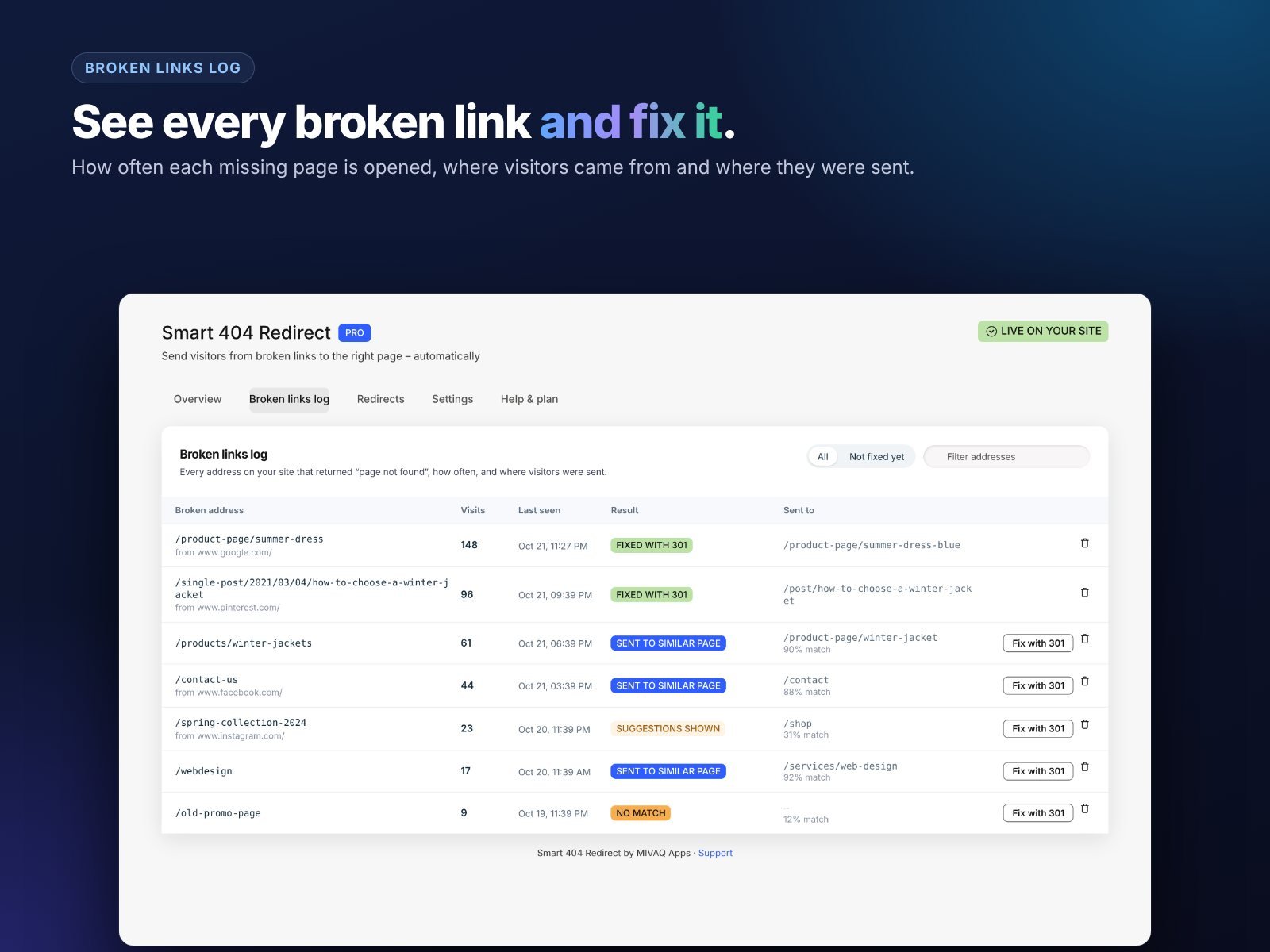
404 Redirect records every missing page that visitors open, along with the number of visits, the page or website they came from and where the app sent them. Sort by visits and you have a priority list.
How to fix broken links in one click
For each broken link in the log, the app suggests the most similar live page. Check the suggestion, change it if you prefer another page, and click to create a permanent 301 redirect. The redirect is added to your site’s redirect settings, and the log marks the link as fixed.
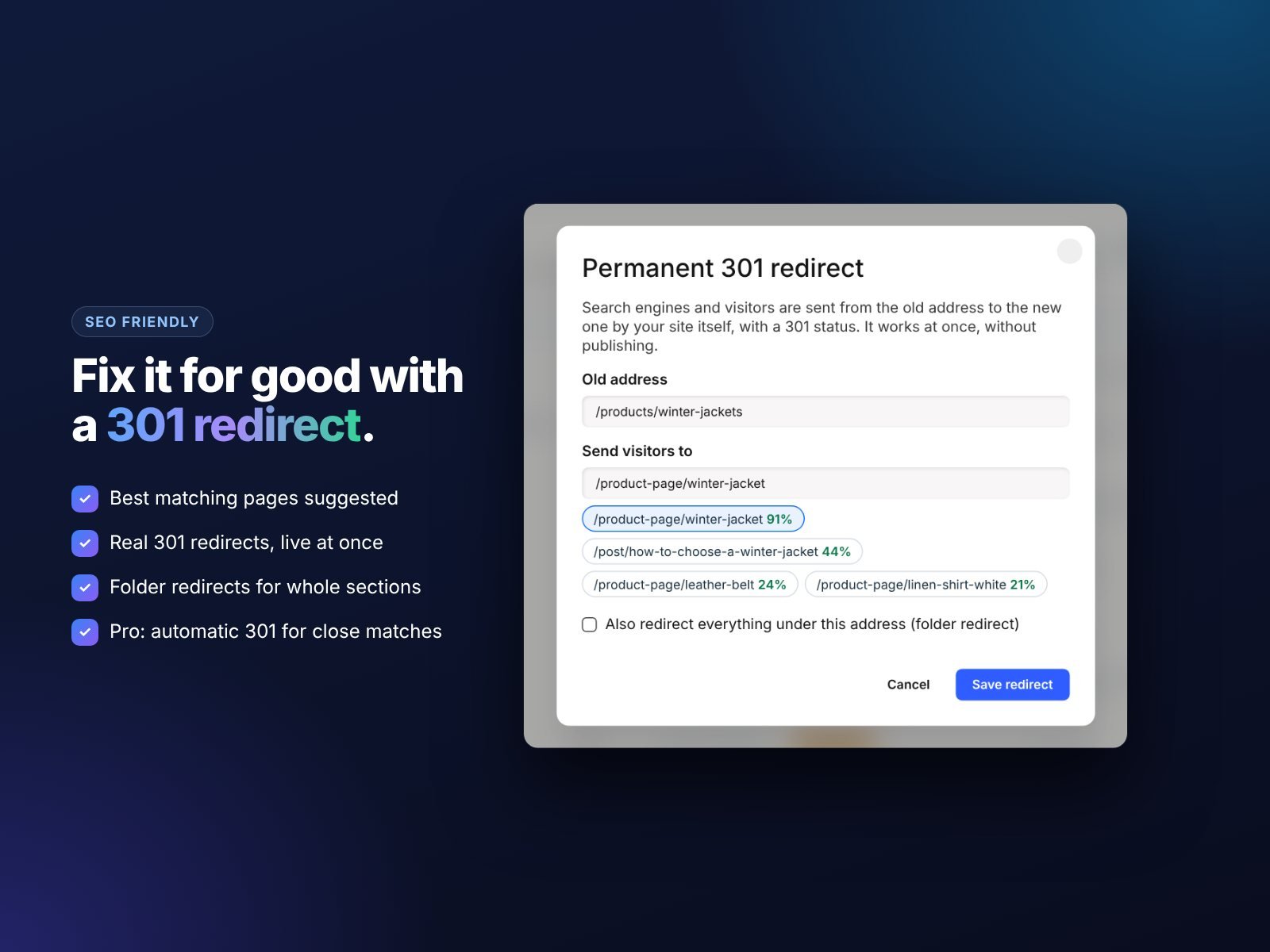
The app also protects you from mistakes: it warns you if a redirect for the same address already exists, or if the new redirect would replace another one.
Automatic 301 redirects (Pro)
On the Pro plan, very close matches are turned into permanent 301 redirects automatically. If someone opens /product-page/linen-sumer-dress and you have /product-page/linen-summer-dress, the app sends them there and saves a permanent redirect so search engines learn the right address too. Less confident matches are still redirected for visitors, but left for you to review.
This keeps your redirect list growing with real data, without you checking the log every day.
Managing all your redirects
Over time a site collects many redirects. The app shows all your 301 redirects in one place, including ones you added in Wix before, marks the ones created by the app and lets you remove any you no longer need.

Review the list a few times a year. Remove redirects that point to pages you have since deleted, and update any that now form chains.
Redirect mistakes that hurt SEO
- Redirect chains. A to B to C slows visitors and weakens signals. Point A straight to C.
- Loops. A to B and B back to A breaks the page completely.
- Everything to the homepage. Irrelevant redirects are treated almost like 404s.
- Redirecting live pages by accident. A redirect takes priority over a page at the same address, so double-check before saving.
- Never updating internal links. Redirects are a safety net. Update your own menus and links to the new URLs.
- Using 302 for permanent moves. Rankings may stay on the old URL.
- Removing redirects too early. Old links can live for years. Keep important redirects in place.
Real examples of good and bad redirects
Seeing a few cases makes the rules easier to apply:
- Renamed blog post. /post/linen-care-tips became /post/how-to-care-for-linen. Good: a 301 from the old slug to the new one. Bad: no redirect, so every Pinterest pin and backlink now hits a 404.
- Discontinued product. The Summer Linen Dress is gone, but a Linen Midi Dress is very similar. Good: 301 to the Linen Midi Dress or the linen dresses category. Bad: 301 to the homepage.
- Merged pages. Two short pages, /web-design-dublin and /website-design-dublin, are combined. Good: keep the stronger URL and 301 the other one to it. Bad: keep both and split your rankings.
- Typo links. A partner site links to /contcat. Good: smart redirect to /contact and a permanent 301 so the fix sticks.
- Old campaign page. /black-friday is removed after the sale. Good: 301 to the current offers page or the shop. Bad: a redirect chain from /black-friday to /sale to /shop.
How to check that redirects work
After adding redirects, test them:
- Open the old URL in a private browser window and confirm you land on the right page.
- Check that the address bar shows the new URL.
- Watch the broken links log: fixed links should stop collecting new 404 visits.
- In Google Search Console, use URL Inspection on the new page and request indexing for important pages.
- Over the following weeks, the old URLs should drop out of the “Not found (404)” report.
If rankings dip after a big change, give it a few weeks. Google needs time to recrawl old URLs and follow the redirects.
A simple monthly routine
- Open the broken links log and sort by visits.
- Fix the top entries with 301 redirects.
- Check Google Search Console for new 404s.
- Update internal links that point to redirected pages.
- Remove any redirect that now creates a chain.
Fifteen minutes a month keeps your site clean. For the bigger picture, read how to fix 404 errors on Wix automatically and our Wix and Squarespace SEO guide.
Try 404 Redirect
The free plan includes smart redirects, page suggestions, the latest 10 broken links and 3 permanent 301 redirects. Pro adds automatic 301s, unlimited redirects and the full log for $2.99 a month. Install 404 Redirect, and if you would like experts to handle a migration or SEO clean-up, see our Wix SEO service.
Frequently asked questions
Where are redirects in Wix?
In your site’s SEO settings, in the URL Redirect Manager. 404 Redirect also shows and manages them from its own dashboard.
Do 301 redirects pass link value?
Yes. Google treats a 301 as a strong signal to move ranking signals to the new URL.
How many redirects can I have?
The app’s free plan creates up to 3 permanent redirects. Pro has no limit from the app.
Can I redirect to another website?
Wix redirects can point to external URLs, but for SEO it is usually best to keep visitors on your own relevant pages.
Should I redirect deleted products?
Yes, if you have a close replacement or a matching category. Otherwise a helpful 404 page with suggestions is better than an irrelevant redirect.


