
This article is part of our complete Wix guide and our list of best Wix apps.
Every website collects broken links over time. You rename a blog post, delete an old product, change a page address or move from another platform to Wix. Old links keep living in Google results, social posts, emails and other websites. When someone clicks one, they land on a “page not found” error, and most of them leave right away.
This guide explains how to fix 404 errors on Wix and how to redirect lost visitors to the right page automatically. We use 404 Redirect, a Wix app by MIVAQ Apps that finds the most similar live page for every missing address, keeps a log of broken links and fixes them with permanent 301 redirects.
Add 404 Redirect to your Wix site →
Key takeaways
- 404 errors come from renamed pages, deleted products, typos, old Google results and site migrations.
- Each 404 costs you a visitor, and many broken links also waste the SEO value of links pointing to your site.
- 404 Redirect compares a broken address with every page on your site and sends visitors to the closest match automatically.
- When there is no close match, it shows friendly page suggestions or sends visitors to a page you choose.
- A broken links log shows every missing page, its visits and where they came from, and you can fix each one with a 301 redirect in one click.
- The free plan includes smart redirects, suggestions, the latest 10 broken links and 3 permanent redirects. Pro adds automatic 301s and removes the limits.
In this guide
- What is a 404 error?
- What causes 404 errors on Wix sites
- What broken links cost you
- Ways to handle 404s on Wix
- 404 Redirect for Wix
- How smart redirects find the right page
- The broken links log
- How to set it up, step by step
- Free vs Pro
- Tips to prevent new 404s
- Moving to Wix from another platform
- Frequently asked questions
What is a 404 error?
A 404 error is the response a website gives when someone asks for a page that does not exist. The visitor sees a “page not found” message instead of the content they expected. Search engines see the same signal and eventually drop the address from their results.
A few 404s are normal on any site. The problem is when visitors keep arriving at missing pages from places you cannot easily change: Google results, backlinks from other websites, old newsletters, printed QR codes or social posts.
What causes 404 errors on Wix sites
- Renamed pages and posts. Changing a page URL or blog post slug breaks every old link to it.
- Deleted products. Discontinued products leave links in Google Shopping, Pinterest and old ads.
- Site migrations. Moving from WordPress, Shopify or Squarespace to Wix changes URL structures, for example /product/blue-shirt becomes /product-page/blue-shirt.
- Typos. Visitors and other sites mistype addresses.
- Collection and category changes. Restructuring your store or blog categories can change many URLs at once.
- Old campaigns. Landing pages removed after a promotion while ads, emails or posts still link to them.
What broken links cost you
Broken links hurt in three ways:
- Lost visitors and sales. Someone who clicked a link to your summer dress and lands on an error rarely searches your site. They go back to Google and click a competitor.
- Lost SEO value. Links from other websites are one of the strongest ranking signals. When they point to a missing page, that value is wasted. A 301 redirect passes it to a live page instead.
- A worse impression. Repeated errors make a site feel neglected and less trustworthy.
Ways to handle 404s on Wix
You have three main options:
- A custom 404 page. Wix lets you design your 404 page. It is better than a blank error, but the visitor still has to find the right page themselves.
- Manual 301 redirects. Wix includes a URL Redirect Manager in its SEO settings. It is reliable, but you have to know every broken address and add each redirect by hand.
- Automatic smart redirects. An app watches for 404s, finds the closest live page and sends visitors there right away, while logging every broken link so you can make permanent fixes.
The best setup combines the last two: automatic redirects so no visitor is lost today, and permanent 301 redirects for the links that matter most.
404 Redirect for Wix
404 Redirect finds the live page that best matches a missing address and sends visitors there automatically. It also keeps a log of every broken link and lets you fix any of them with a permanent 301 redirect in one click.

- Smart redirects to the most similar page on your site.
- Friendly fallbacks: a card with the most similar pages, your homepage or any page you choose.
- A “page moved” notice in your colors and language, or an instant redirect.
- A broken links log with visits, sources and where each visitor was sent.
- One-click 301 fixes and one place to manage all your permanent redirects.
- Automatic 301s for very close matches on Pro.
How smart redirects find the right page
When a visitor opens an address that does not exist, the app compares the words in that address with every page on your site. So /products/winter-jackets lands on your Winter Jacket product, and an old blog link such as /post/how-to-clean-linen opens the renamed post about caring for linen.
You choose how strict the matching is. A relaxed setting redirects more visitors; a strict setting only redirects when the match is very clear. You can also exclude addresses that should never be redirected.
If there is no close match, nobody is left on a dead end. The app can show a friendly card with the most similar pages, send visitors to your homepage or to any page you choose.

The broken links log
Automatic redirects help visitors right away, but you also want to know what is broken. The broken links log shows every missing page, how many visits it gets, where those visitors came from and where they were sent.
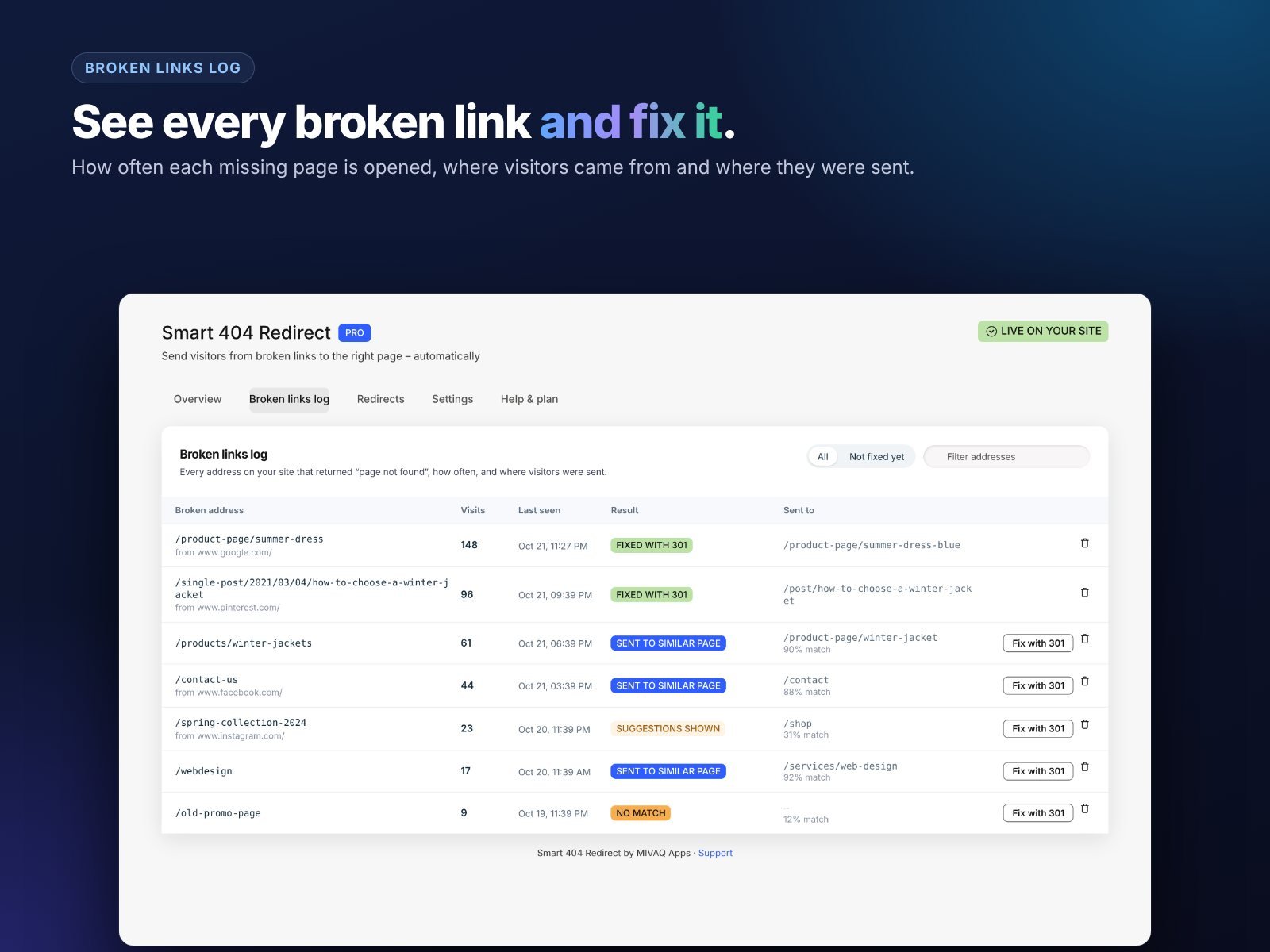
Sort by visits and fix the busiest broken links first. The source column is useful too: if many visits come from one website or newsletter, you can ask for the link to be updated as well.
How to set it up, step by step
- Install the app from the Wix App Market. Smart redirects work on a Premium site with a connected domain, because Wix adds app scripts only to those sites.
- Open the dashboard. The app reads your sitemap to learn which pages exist.
- Choose the matching level: relaxed, balanced or strict.
- Choose the style: an instant redirect or a short “page moved” notice with a countdown.
- Choose what happens with no match: page suggestions, your homepage or a custom page.
- Translate the texts and set your accent color.
- Test it by opening a made-up address on your live site, such as /products/old-item.
- Check the log after a few days and add 301 redirects for the most visited broken links.

Free vs Pro
- Free plan: smart redirects to similar pages, page suggestions for lost visitors, the broken links log (latest 10) and 3 permanent 301 redirects.
- Pro plan: automatic 301 redirects for broken links, unlimited permanent redirects and the full broken links log. Pro costs $2.99 a month.
Tips to prevent new 404s
- Add a redirect every time you change a URL. Make it part of your routine when renaming pages or posts.
- Do not delete popular products. Mark them out of stock or redirect them to the closest alternative.
- Plan migrations carefully. Export your old URLs and map them before switching platforms. Our Wix redesign guide covers this.
- Check Google Search Console. Its indexing report lists “Not found (404)” pages Google has seen.
- Keep internal links up to date. Update menus, buttons and blog links when pages move.
Want to go deeper on permanent fixes? Read our guide to Wix 301 redirects and broken links. Is your site missing from Google altogether? See our Google indexing fix service.
Moving to Wix from another platform
Migrations create more 404s than anything else. A store moving from WooCommerce or Shopify to Wix can change hundreds of URLs in one day: /product/ becomes /product-page/, /blog/ becomes /post/ and category pages change shape. Google keeps the old addresses in its index for weeks, and backlinks keep pointing to them for years.
A good migration plan looks like this:
- Export every old URL from your old sitemap or analytics before switching.
- Map the important ones by hand: best-selling products, top blog posts and pages with backlinks. Add 301 redirects for them on launch day.
- Let smart redirects catch the rest. 404 Redirect sends visitors on any unmapped address to the closest new page, so long-tail links still work.
- Watch the broken links log for the first weeks and turn the busiest entries into permanent 301s. On Pro, very close matches become 301s automatically.
- Submit your new sitemap in Google Search Console and monitor the indexing report.
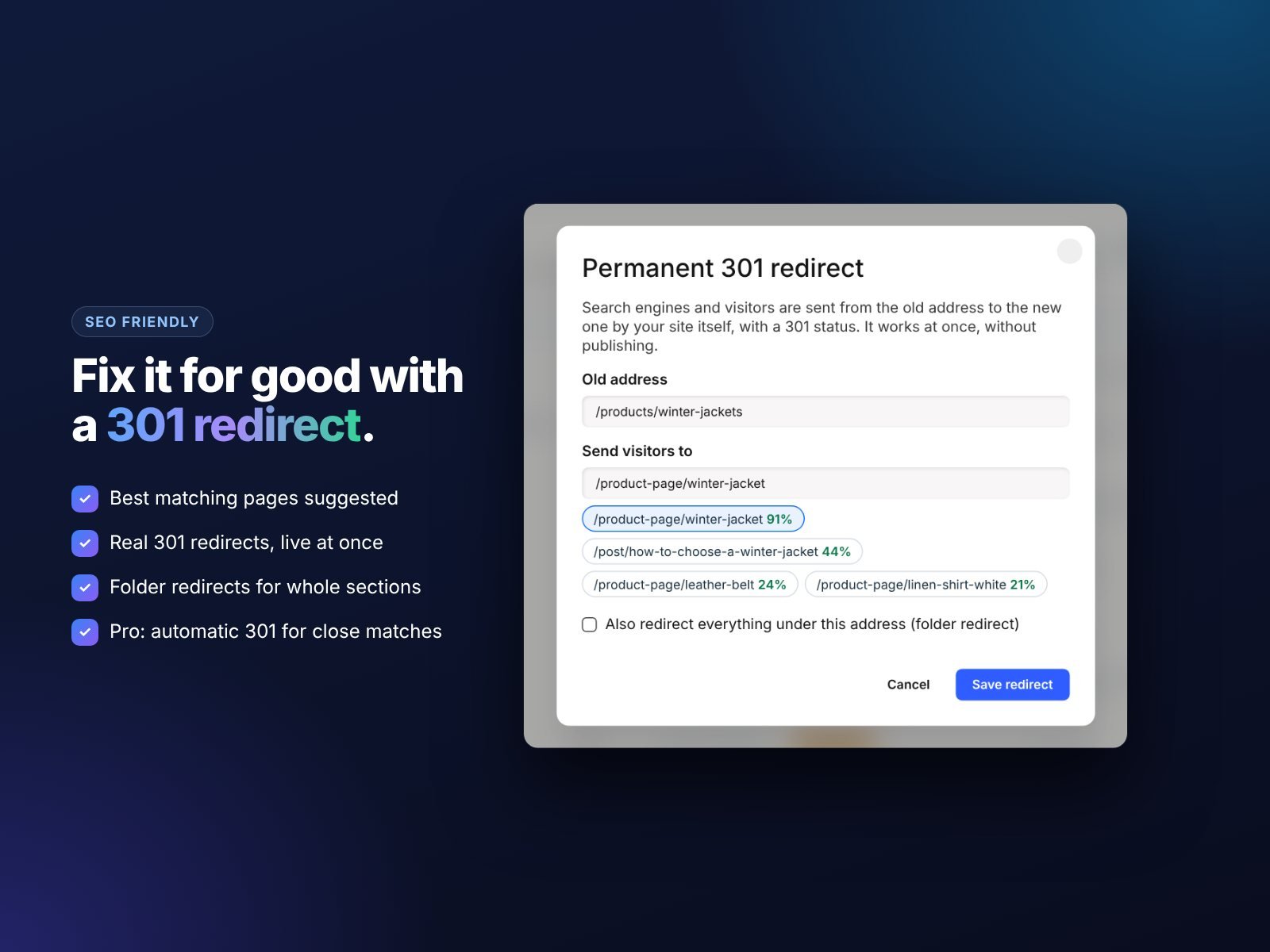
This combination protects both your visitors and the rankings you built on the old platform.
Install and leave a review
Install 404 Redirect from the Wix App Market and stop losing visitors to broken links. If it helps, please leave a short review so other site owners can find it. Need help with a site migration or SEO? Contact MIVAQ.
Frequently asked questions
Does Wix redirect 404 pages automatically?
No. Wix shows a 404 page, and you can add redirects manually in the URL Redirect Manager. 404 Redirect adds automatic matching to the closest live page.
Is a redirect better than a custom 404 page?
For most visitors, yes. A redirect takes them to the content they wanted. A custom 404 page is still useful as a fallback.
Will this hurt my SEO?
No. Sending visitors to relevant pages and using 301 redirects for permanent moves is the recommended way to handle changed URLs.
Why do smart redirects need a Premium site?
Wix adds app scripts only to Premium sites with a connected domain. Permanent 301 redirects work on every site.
Can I exclude some addresses?
Yes. You can exclude any address you do not want redirected.


