This article is part of our complete Wix guide and our list of best Wix apps.
Selling parts online has one big problem: “Will this fit my car?” If shoppers are not sure, they leave, or they buy the wrong part and send it back. Big parts stores solve this with a Year / Make / Model search: choose your vehicle, see only the parts that fit.
Until now that was hard to build on Wix. YMM Parts Finder by MIVAQ Apps adds a full parts finder and a product page fit check to any Wix store, for cars and trucks and for any other kind of parts: motorcycles, phones, laptops, printers, appliances, bikes, machines and boats. This guide covers the top features to look for and how to set it up.
Add YMM Parts Finder to your Wix site →
Key takeaways
- A Year / Make / Model finder shows shoppers only compatible parts, which means more sales and fewer returns.
- YMM Parts Finder works for any parts store with 1 to 6 steps you name yourself, with 10 ready-made presets.
- A fit check on every product page tells shoppers “Fits your 2024 Honda Civic” before they add to cart.
- Import fitment from a CSV file with ranges like 2018-2026 and lists like Civic, Accord, or add fits by hand.
- Plans: Standard $4.99/month ($3.99 billed yearly) and Pro $9.99/month ($7.99 billed yearly), with a 14-day free trial.
In this guide
- Why parts stores need a Year / Make / Model search
- Top 10 features of the best parts finder apps
- YMM Parts Finder for Wix
- Not just cars: any kind of parts
- Product page fit check
- Add your fitment data
- Plans and pricing
- How to add a parts finder to Wix
- Install and leave a review
- Frequently asked questions
Why parts stores need a Year / Make / Model search
- Shoppers think in vehicles, not part numbers. They know “2019 Toyota RAV4 2.5L”, not “BRK-1042”.
- Less doubt, more orders. When the store confirms the fit, shoppers buy with confidence.
- Fewer returns. Wrong-fit returns cost shipping, handling and bad reviews.
- Fewer support questions. No more “will this fit my car?” emails all day.
- Shoppers come back. When the store remembers their vehicle, the next visit starts with the right parts.
Wix Stores has search and categories, but no built-in way to match parts to vehicles or devices. For the bigger picture of running a parts business on Wix, read our Wix auto parts store guide.
Top 10 features of the best parts finder apps
- Step-by-step dropdowns that only show valid options (only models of the chosen make).
- Flexible steps: Year / Make / Model / Engine for cars, Brand / Series / Model for devices.
- Results inside your store design with prices, images and stock.
- Fit check on product pages.
- Universal parts that fit everything, such as floor mats or tools.
- Saved vehicles so returning shoppers do not choose again.
- Bulk import from CSV with year ranges and lists.
- Designs that match your brand on desktop and mobile.
- Search insights to see what shoppers look for and what they cannot find.
- Works with your catalog without moving products to another system.
YMM Parts Finder for Wix
YMM Parts Finder is published on the Wix App Market by MIVAQ Apps. It adds a finder widget you can place on your homepage, shop page or any page, and a fit check plugin on your Wix Stores product pages.

- Shoppers choose their vehicle or device step by step and click Find parts. Matching products appear right below, each marked “Fits your vehicle”.
- Results can show on the same page or on a results page you choose.
- The shopper’s choices are saved as “My vehicles” in their browser, so the next visit starts with their vehicle ready.
- 12 designs (classic, search bar, glass, outline, bold, steps, hero, compact, neon, industrial and more) with your color, font and corners.
- Works with both the older and the newer Wix Stores catalog.
Not just cars: any kind of parts
The name says YMM, but the finder works for any store where products fit specific models. You name the steps (from 1 to 6), or start from a preset:
| Preset | Steps |
|---|---|
| Cars & trucks | Year → Make → Model → Engine |
| Motorcycles & ATV | Year → Make → Model |
| Phones & tablets | Brand → Series → Model |
| Laptops & computers | Brand → Series → Model |
| Printers & ink | Brand → Series → Model |
| Home appliances | Appliance → Brand → Model |
| Bicycles & e-bikes | Brand → Model → Year |
| Machines & tools | Brand → Machine type → Model |
| Boats & marine | Engine brand → Horsepower → Year |
| Custom | Your own steps |
Read more about device and appliance stores in our guide to compatible parts finders for phones, laptops and printers.
Product page fit check
Many shoppers land directly on a product page from Google. The fit check shows them at once whether the part fits their saved vehicle: “Fits your 2026 Honda Civic 1.5L Turbo”, “Does not fit”, or a short form to choose their vehicle. You can add a note per fit, like “Front axle”, and shoppers can open the full list of compatible models.
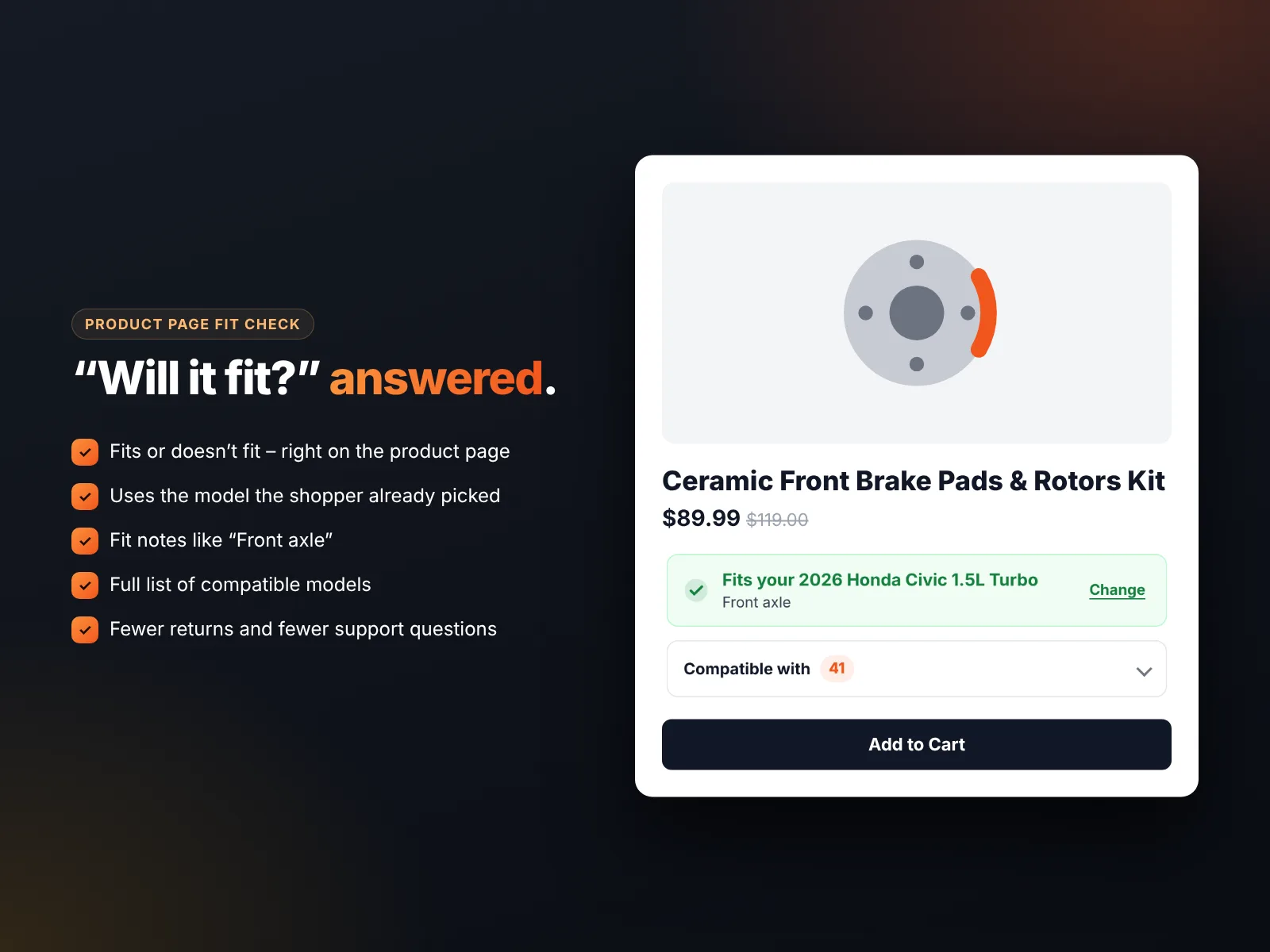
The fit check is added to Wix Stores product pages automatically when you install the app, and it stays hidden on products that have no fitment data.
Add your fitment data
Fitment data says which product fits which vehicles. You can add it in two ways:
- CSV import: one row per fit with the product (SKU, name, ID or URL slug) and one column per step. Ranges such as
2018-2026and lists such asCivic, Accordsave thousands of rows. Leave later steps empty to mean “all models”, and use*for universal parts. - By hand: open a product, add fits with smart suggestions, or copy fits from a similar product.
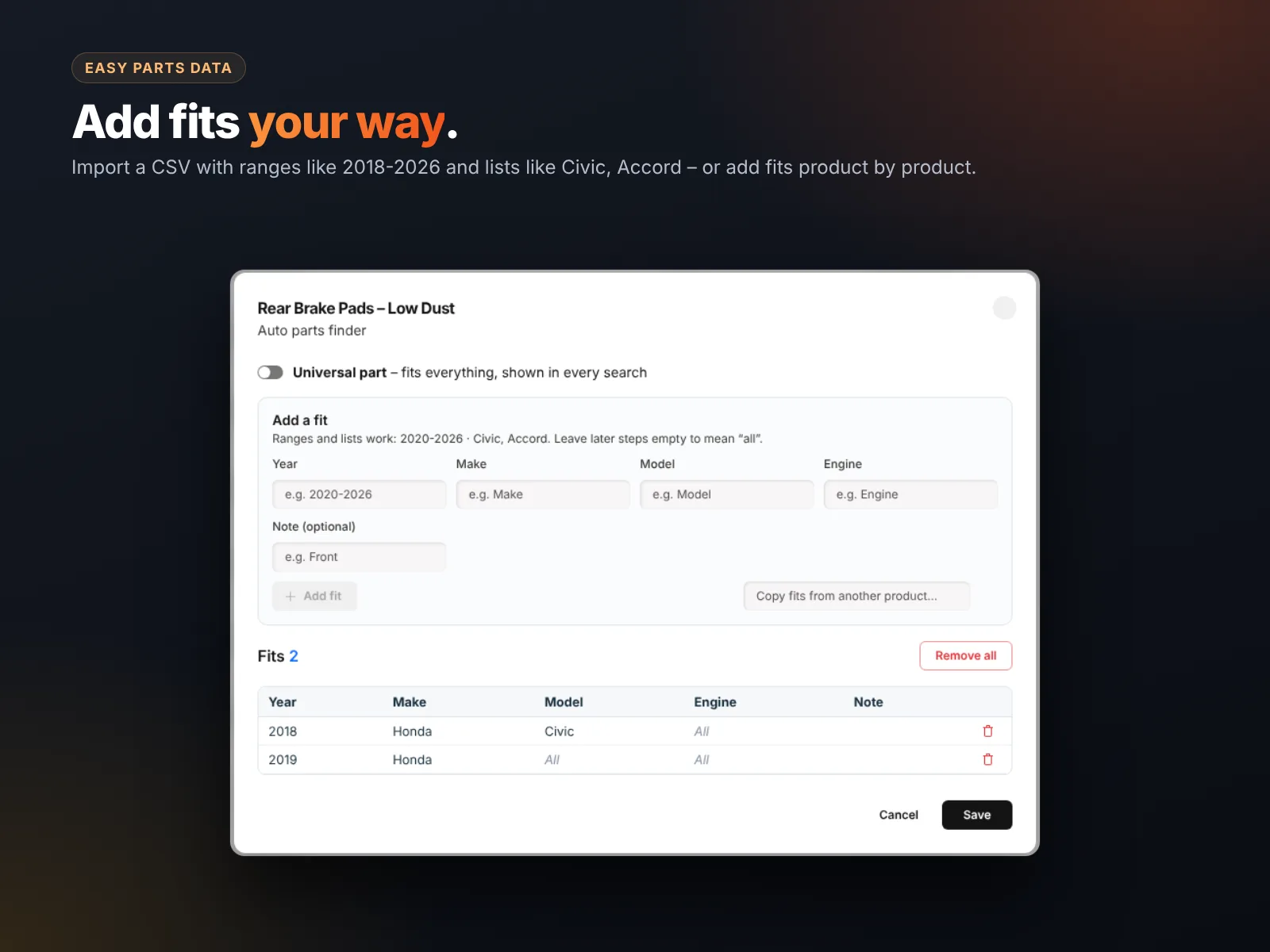
A download-ready template matches your own steps, so you only fill it in. You can update data at any time, and the finder options rebuild automatically.
Plans and pricing
| Standard | Pro | |
|---|---|---|
| Monthly | $4.99/month | $9.99/month |
| Billed yearly | $3.99/month | $7.99/month |
| Parts finders | Up to 3 | Unlimited |
| Products and fits | Unlimited | Unlimited |
| 12 designs, fit check, CSV import | ✓ | ✓ |
| Search insights | — | ✓ |
| CSV export and backup | — | ✓ |
| Priority support | — | ✓ |
Every install starts with a 14-day free trial. There is no free plan: after the trial, choose Standard or Pro to keep the finder visible on your live site. Everything you set up during the trial is kept.
How to add a parts finder to Wix
- Install YMM Parts Finder from the Wix App Market.
- Open the app in your dashboard and choose a preset (for example Cars & trucks) or create your own steps.
- Import your fitment CSV or add fits product by product.
- In Design & settings, pick one of 12 designs and preview it on desktop, mobile and the product page.
- In the Editor, add the YMM Parts Finder widget to your homepage or shop page.
- Check that the fit check appears on your product pages, then publish.
Selling across many vehicles? Read our Wix Stores product setup guide for clean product names and SKUs that make imports easy.
How to install YMM Parts Finder and leave a review
- Open the YMM Parts Finder listing on the Wix App Market.
- Click Add to Site, choose your Wix site and approve the permissions.
- Set it up from your Wix dashboard or the Editor (the steps above take a few minutes).
- Once it is working for you, go back to the app page, scroll to Reviews and click Write a Review. Choose your stars and share one or two sentences about how you use it.
Reviews help other Wix users find tools that work, and they help us, a small team, decide what to build next. If something is not working the way you expect, please tell us first and we will fix it fast.
More top Wix apps from MIVAQ Apps
MIVAQ Apps is the app studio of MIVAQ Creative Solutions. Every app is made for Wix, priced fairly and supported by real people. You can see all of them on our MIVAQ Apps developer page on the Wix App Market and on our Wix apps page.
- News Ticker & Announcement Bar: a scrolling news ticker and announcement bar with countdowns and coupon codes.
- Bulk Product & Price Editor: bulk edit prices, sales, stock, ribbons and SEO for many products at once.
- Smart Booking & Payment: a booking calendar with online payments, deposits, Stripe and PayPal.
- Smart Price Table: 50 premium pricing table designs with built-in checkout.
Need help with your Wix site?
MIVAQ designs, builds and manages Wix websites and builds Wix apps. If you want help with setting up a parts store, preparing fitment data or importing products, we are happy to help. See our Wix solutions, then contact us:
- WhatsApp: message us
- Email: hello@mivaq.com
- Form: send your project details
Related Wix guides
- Compatible parts finder for phone, laptop and printer stores
- Wix auto parts store guide
- Wix eCommerce guide
- Wix eCommerce SEO
- Best Wix apps
Frequently asked questions
Can I add a Year Make Model search to Wix?
Yes. YMM Parts Finder by MIVAQ Apps adds a step-by-step finder and a product page fit check to Wix Stores.
Does it only work for cars?
No. You can use 1 to 6 steps with your own names, with presets for motorcycles, phones, laptops, printers, appliances, bikes, machines, boats and custom.
How do I add fitment data?
Import a CSV with ranges and lists, or add fits product by product in the dashboard.
Can a part fit all vehicles?
Yes. Mark it as a universal part and it shows in every search.
Is there a free plan?
There is a 14-day free trial. After that, Standard costs $4.99 a month and Pro $9.99 a month, less when billed yearly.
Does it remember the shopper’s vehicle?
Yes. Shoppers can save their vehicles in their own browser and reuse them on the next visit.


