This article is part of our complete Wix guide and our list of best Wix apps.
Who changed this price? Who deleted that coupon? When was this order edited, and what did it say before? If more than one person works on your Wix site, these questions come up every week. Without a record, the answers depend on memory, guesswork and awkward conversations.
This guide explains how a Wix activity log works and how to set one up so you can see who changed what on your site, when, and exactly what changed. We use Activity & Audit Log, a Wix app by MIVAQ Apps that records changes across your store, orders, coupons, blog, members and more, with the old and new values side by side.
Add Activity & Audit Log to your Wix site →
Key takeaways
- An audit log records every change on your site: who made it, when, and what the old and new values were.
- Activity & Audit Log covers products and inventory, categories and collections, orders, coupons and discounts, blog posts, members, contacts, bookings, pricing plans and business info.
- Each team member can add their name, so the log reads “Sara edited product Summer Dress” instead of an ID.
- Filter by area, person, action and date, search everything and export to CSV.
- You choose what to record and how long to keep it, from 30 days to 1 year. Records stay in your own site.
- Plans are based on team size, from 3 members to unlimited, with a 5-day free trial.
In this guide
- Why your Wix site needs an activity log
- What an audit log should record
- Activity & Audit Log for Wix
- Old and new values, side by side
- The team overview
- Filters, search and CSV export
- Choose what to record and for how long
- How to set it up, step by step
- Plans and pricing
- Everyday ways to use the log
- Activity log vs backups
- Privacy and team trust
- Who benefits most
- Frequently asked questions
Why your Wix site needs an activity log
A one-person website rarely needs an audit trail. As soon as staff, freelancers, a client or an agency have access, things change:
- Mistakes are hard to trace. A product price drops from 45 to 4.50 and nobody remembers touching it.
- Undoing errors is slow. Without the old value you have to guess what a description or price used to be.
- Disputes take time. A customer says their order was changed. A client says the agency deleted a page. You need facts.
- Accountability is unclear. When everyone uses the dashboard, nobody feels responsible for changes.
- Security questions go unanswered. If something unexpected happens, you want to know whether a person, another app or an automatic update made the change.
An activity log turns all of these into a quick search.
What an audit log should record
A useful log answers four questions for every change:
- Who made it: a named team member, a site member, a visitor, another app or an automatic system update.
- When it happened, to the minute.
- What was changed: which product, order, coupon, post or member.
- How it changed: the exact old and new values.
Logs that only say “product updated” are not enough. You need the details to fix problems quickly.
Activity & Audit Log for Wix
Activity & Audit Log records changes across your Wix site and shows who made each one, when, and exactly what changed. It covers:
- Products and inventory
- Store categories and collections
- Orders: payments, fulfillment, cancellations and edits
- Coupons and automatic discounts
- Blog posts
- Members and contacts
- Booking services and bookings
- Pricing plans
- Your business info
Old and new values, side by side
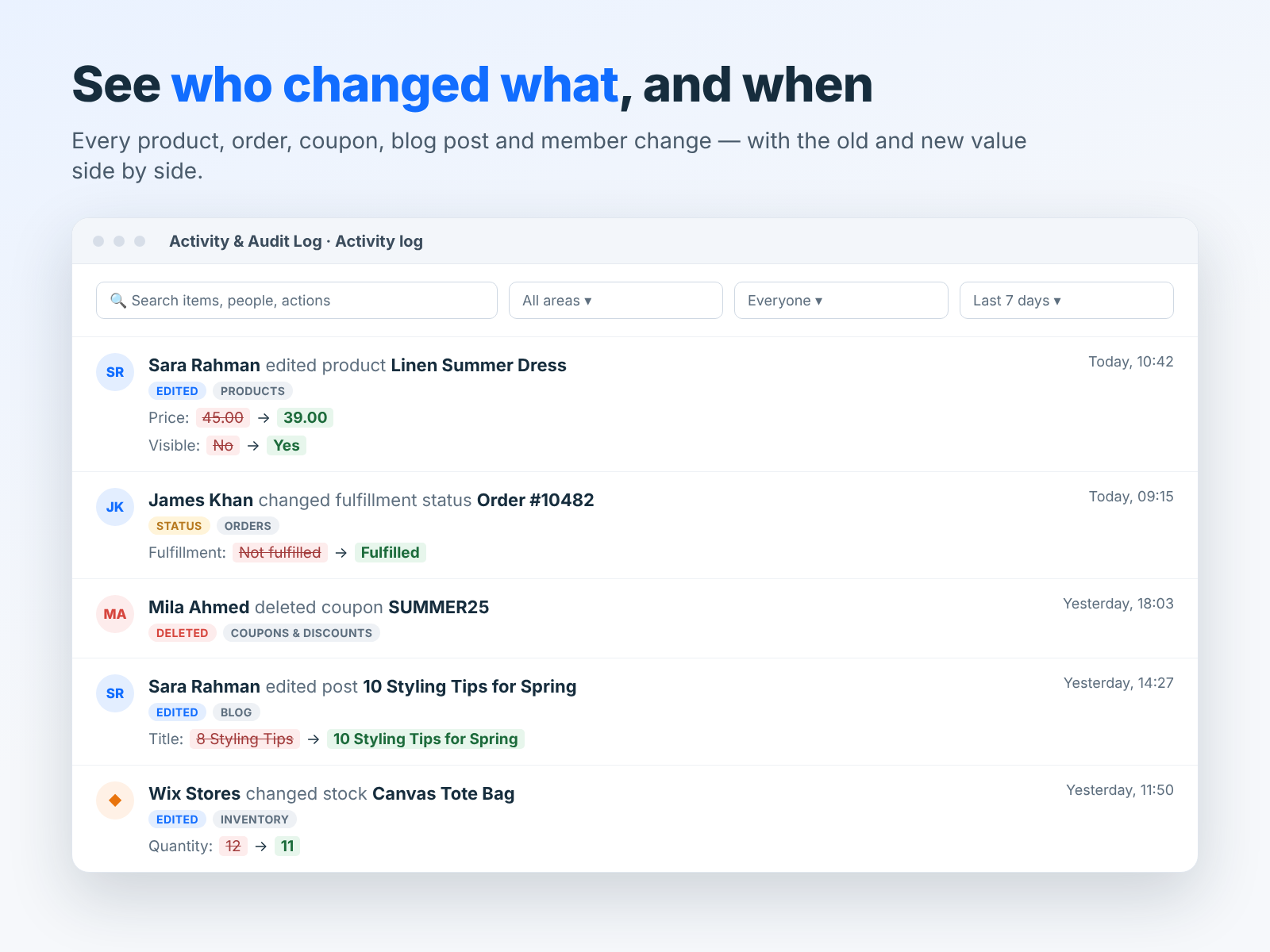
The most useful part of any audit log is the detail. Activity & Audit Log shows the old and new value for every edit, for example Price: 45.00 to 39.00, Visible: No to Yes or Fulfillment: Not fulfilled to Fulfilled. Blog title changes, stock quantities and deleted coupons are recorded the same way.
That means you can undo a mistake in seconds, because you know exactly what the value was before.
Each team member can add their name, so entries read like “Sara Rahman edited product Linen Summer Dress” rather than a technical ID. Changes made by site members, visitors, other apps and automatic system updates are labelled too, and you can hide them when you only want to see your team’s work.
The team overview
Besides the detailed log, an overview page shows the big picture: changes today and in the last 7 days, items deleted, how many people were active, a 14-day activity chart, the most active team members and the busiest areas of your site.
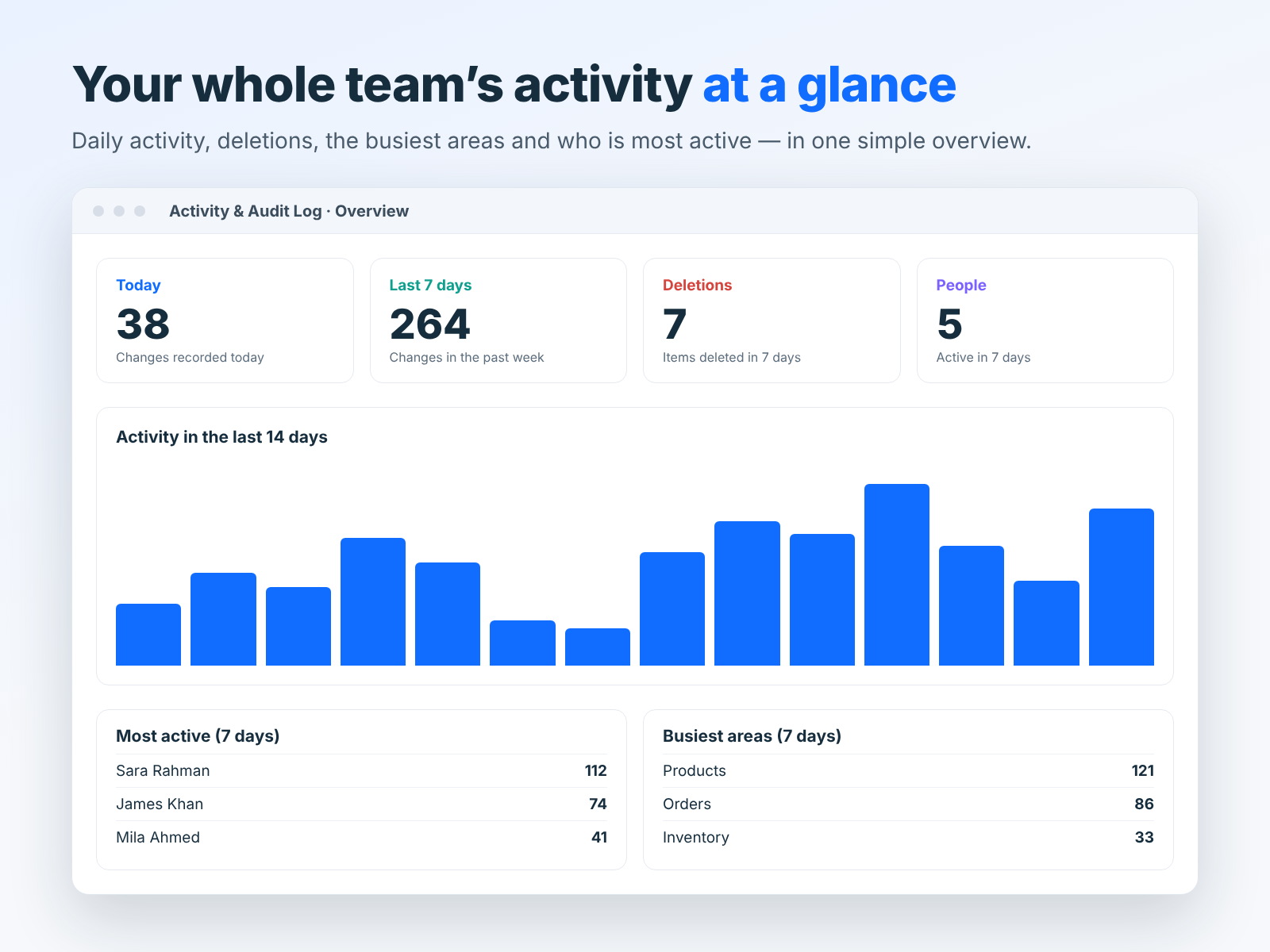
It is a quick way to notice unusual activity, such as a spike in deletions, or to see where your team spends its time.
Filters, search and CSV export
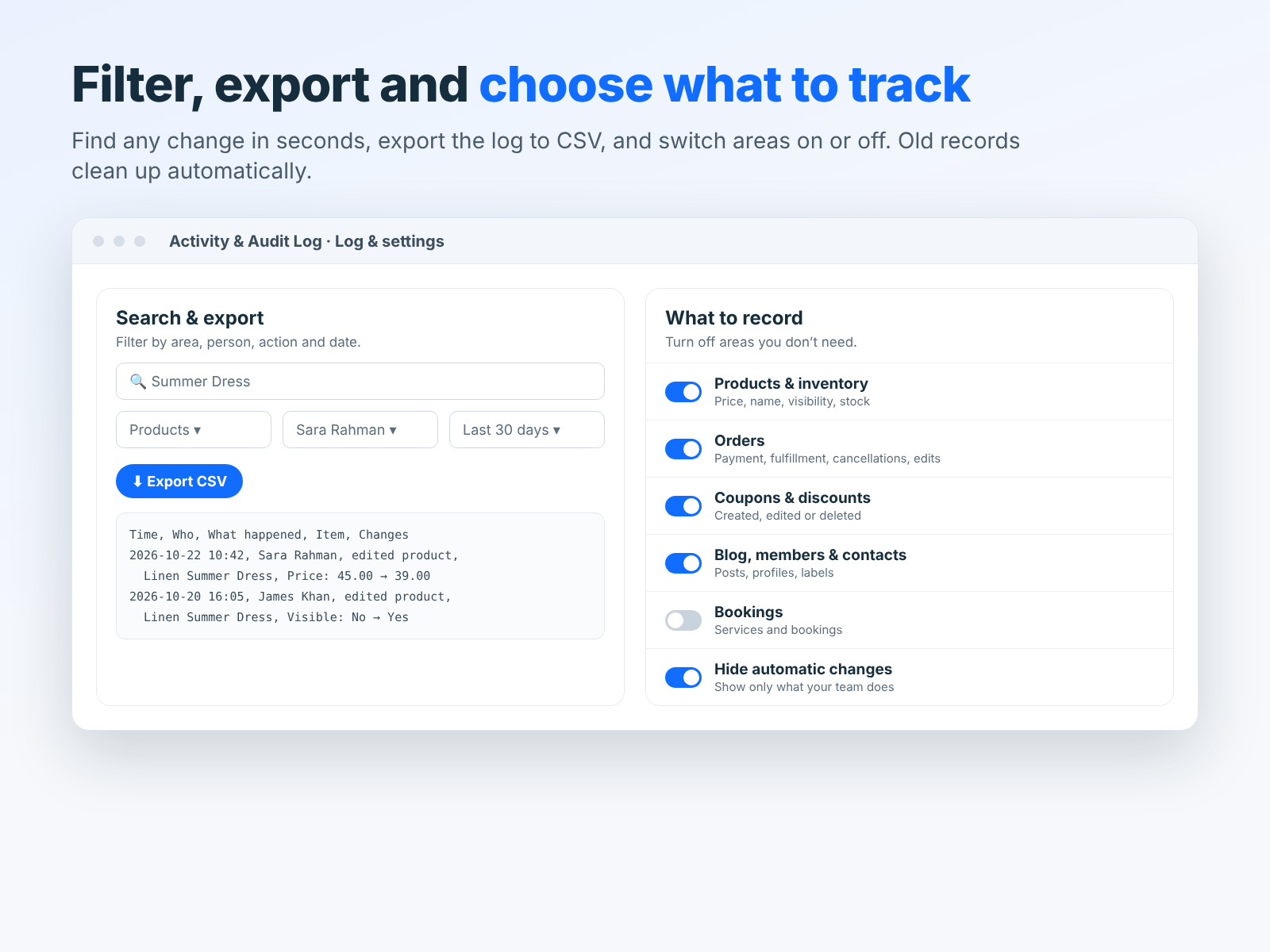
Finding one change among thousands should take seconds. Filter by area (products, orders, coupons and more), by person, by action (created, edited, deleted) and by date range, or simply search for a product name, order number or coupon code. Export the result to CSV when you need to share it with an accountant, a client or a manager.
Choose what to record and for how long
Not every site needs every area tracked. Switch areas on or off, for example record products, orders and coupons but not bookings. Choose how long to keep records, from 30 days to 1 year, and old records are cleaned up automatically. All records are stored in your own Wix site.
How to set it up, step by step
- Install the app from the Wix App Market and start the 5-day free trial.
- Choose what to record. Turn on the areas that matter: usually products, orders, coupons and blog.
- Set the retention period. 90 days suits most stores; choose a year if you need longer history.
- Ask each team member to add their name the first time they open the app, so the log is easy to read.
- Decide what to hide. Hide automatic system changes if you only want to see people.
- Make a test change, such as editing a product price, and check it appears with the old and new values.
Plans and pricing
All plans include before and after values for every change, filters, search, CSV export and tracking of products, orders, blog and more. The difference is team size:
- Starter: track up to 3 team members, $2.99 a month.
- Team: track up to 7 team members, $5.99 a month.
- Unlimited: unlimited team members, best for agencies and larger teams, $9.99 a month.
Every plan starts with a 5-day free trial, so you can test it with your real team before paying.
Everyday ways to use the log
- Price mistakes: search the product, see who changed the price and restore the old value.
- Missing coupons: filter by Deleted and Coupons to see who removed a discount and when.
- Order questions: open the order history to see every payment, fulfillment and edit.
- Content reviews: check what changed in a blog post before it went live.
- Client reporting: agencies can export a CSV of work done during the month.
- New staff training: review a new team member’s first changes and give feedback.
Working with a team or an agency? Read our guide to running a Wix site with a team safely. For broader protection, see our Wix security and backups guide.
Activity log vs backups
An activity log and a backup solve different problems, and most growing sites need both.
- A backup lets you restore a whole site to an earlier point. It is your safety net after a big mistake, but it rolls back everything, including good changes made since.
- An activity log shows each individual change. It lets you fix one wrong price or restore one deleted coupon without touching anything else, and it tells you who made the change.
Wix keeps site history for your design, and your store data lives in Wix’s systems. An audit log adds the missing layer: a readable, searchable record of business changes such as prices, stock, orders and discounts.
Privacy and team trust
Introducing an audit log works best when the team knows about it. Explain that the goal is to fix mistakes quickly and keep the store accurate, not to watch people. In practice, teams like having a log: when something goes wrong, it shows exactly what happened instead of leading to blame. Keep records only as long as you need them, and use the setting to clean up older entries automatically.
Who benefits most
- Online stores with staff who edit products, prices and stock every day.
- Agencies and freelancers who manage client sites and need to show what they changed.
- Business owners who hired help and want peace of mind.
- Booking businesses with several people updating services and appointments.
- Membership sites where member and pricing plan changes need a record.
Install and leave a review
Install Activity & Audit Log from the Wix App Market and try it free for 5 days. If it helps your team, please leave a short review. Need help managing your Wix site? See our Wix maintenance service.
Frequently asked questions
Does Wix have a built-in activity log?
Wix shows some history in specific areas, but it does not give you one searchable log of all changes with old and new values across your store, orders, coupons, blog and members. An audit log app fills that gap.
Can I see changes made before I installed the app?
No. The log starts recording from the moment you install it.
Where are the records stored?
In your own Wix site. You choose how long to keep them, from 30 days to 1 year.
Does it track changes made by other apps?
Yes. Changes by other apps, site members, visitors and automatic updates are labelled, and you can hide them.
Can I export the log?
Yes. Filter the log and export the results to CSV.
Which plan do I need?
Choose by team size: Starter for up to 3 people, Team for up to 7 and Unlimited for agencies and big teams.


